



FOUND! The Feature from Hell! Missing Fonts
I'm certain almost every user has seen the Missing Fonts dialog when opening an AEP -
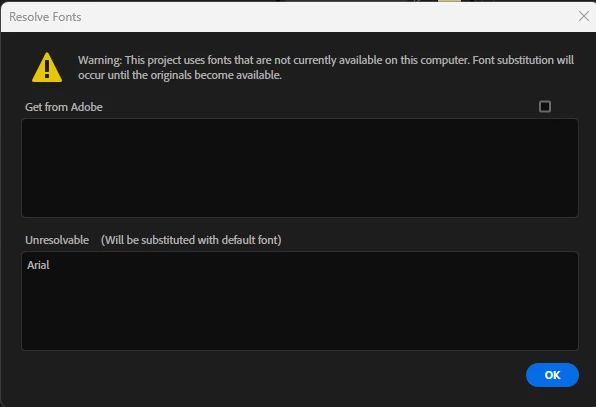
So, today I said, enough of this crap - I'm going to get rid of this dialog. So ...
How to RePro -
1 - in the Project Panel, input "Missing Fonts"
2 - Project Panel displays comps that include one or more Text Layers with this "Missing Font"
3 - Open each Comp and replace each instance of the font's use with a viable font. But you'll notice that each opened timeline displays only affected Text Layer(s).
After completing the same task across all Comps I realize - DANG!!! How do I get back the layers? Shy Layer icon isn't in an enabled state. It seems like something at a lower level is hiding the layers unaffected by the "Missing Fonts".
The only way I know (I think) how to get the other layers back into the timeline is to save-quit-restart. This is WILD!
Hopefully this gets a quick fix - starting from the poorly thought Missing Fonts dialog which SHOULD include a list of the comps affected and an easy way to replace the fonts within the dialog with 2-4 clicks at most plus a way to confirm the replacement/substitution has been completed successfully.
 AdChoices