



Alba27699334tz3u
Known Participant
August 5, 2026

GPU acceleration failing on macOS Tahoe 26.6 - After Effects CRASHES, Effects NOT LOADING, preview FROZEN, broken video files

  • August 5, 2026
  • 3 replies
  • 8 views

Hi team,

I am experiencing severe performance failures and system instability across After Effects on macOS Tahoe (version 26.6). The apps are crashing, effects fail to load, previews freeze during playback, and exported/rendered video files are coming out corrupted or broken.

Equipment Specs:

  • Model: MacBook Pro (M1 Max)

  • Memory: 64 GB RAM

  • OS: macOS Tahoe 26.6

  • Software: After Effects all versions failing

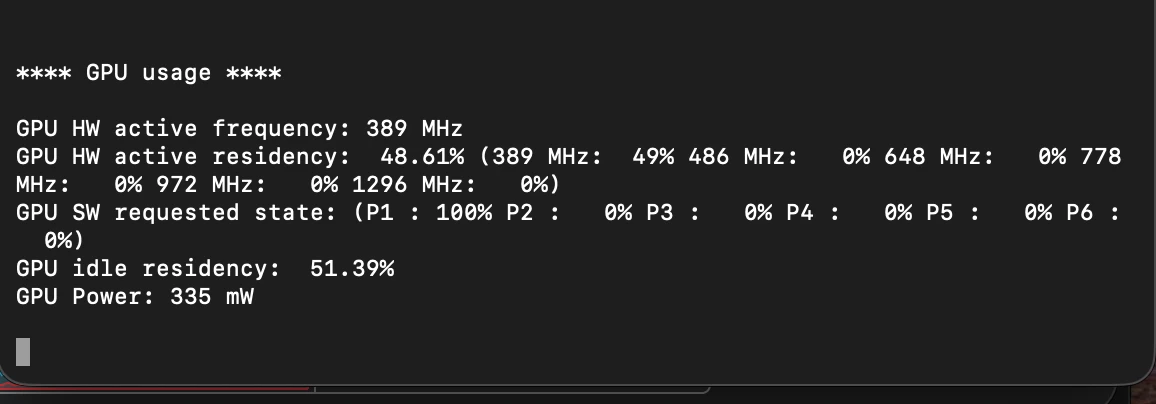
Main Issue: System diagnostics via powermetrics show that during playback and rendering, the Mercury Playback Engine / Metal renderer fails to engage the GPU. The hardware remains completely stuck in an idle state:

  • GPU Active Frequency: Locked at 389 MHz (idle baseline).

  • GPU Power Draw: ~258 mW – 335 mW (minimal power draw).

  • High-Performance States (648 MHz – 1296 MHz): 0% activity.

Because the system is not utilizing GPU acceleration, processing falls entirely on the CPU, causing heavy lag, frozen previews, effect render failures, project crashes, and corrupted media exports.

Is there a known compatibility issue or an upcoming patch for macOS Tahoe 26.6 to restore proper Metal API handshakes on Apple Silicon?


Here is the screenshot of the POWERMETRICS while running a video preview on After Effects:
 

Is someone else experiencing the same issues?

    3 replies

    Nishu Kushwaha
    Community Manager
    Community Manager
    August 5, 2026

    Hi Alba, thanks for writing in and for sharing the details.


    A few things that would help us undestand the issue better:

    1. Your exact AE version (Help > About) and specifically which builds you've tested.

    2. Did GPU acceleration work correctly on your previous macOS version, or has it always been an issue?

    3. Does it happen with a fresh new project (empty comp + single video layer), or only production projects?

    Looking forward to your response.


    Thanks,

    Nishu

    Alba27699334tz3u
    Known Participant
    August 5, 2026

    Hi ​@Nishu Kushwaha 


    thanks for your assistance, here are the answers to your questions, I hope this can help to find a solution for the current bugs:

    1. I’m working with two After Effects Versions but I’m getting problems with bot.  26.3.0  and 25.0 - I’m juggling from 26 to 25 trying to continue working but is getting worse and worse.
    2. I’ve been struggling with the GPU issues I’m almost 100% sure since the MacOS Update to TAHOE. But with Sequoia and the After effects 25 versions I had other issues with imported swf, mp4 and mov files which suddenly from one day to the next fail and are not correctly displayed in my project, are not compatible anymore or sometimes the video gets muted and cannot hear the audio during the preview process.
    3. No difference, I’m getting the same errors with new and old projects. Empty or full
    Nishu Kushwaha
    Community Manager
    Community Manager
    August 5, 2026

    Thanks for getting back. Let’s try to investigate the issues you’re getting instead of focusing on GPU power consumption for now. I am saying this because After Effects does not use the GPU for every task or effect. It mostly uses the GPU for GPU-accelerated effects, for rendering when Hardware Encoding is enabled, and other tasks. Also, AE not engaging the GPU wouldn't cause it to crash on its own, so the powermetrics data is likely a symptom rather than the root cause. Please share the following details as well so that we can diagnose the issue properly:

    • Do you get the mentioned issues every time? Is there a specific action/command that triggers it?
    • Are there any crash reports or any error messages?
    • What type of media and effects do you usually work with?

    Screenshots or screen recordings of the issue in action would also help us understand what's happening. Looking forward to your response.


    Thanks,

    Nishu