


Participant
July 6, 2026

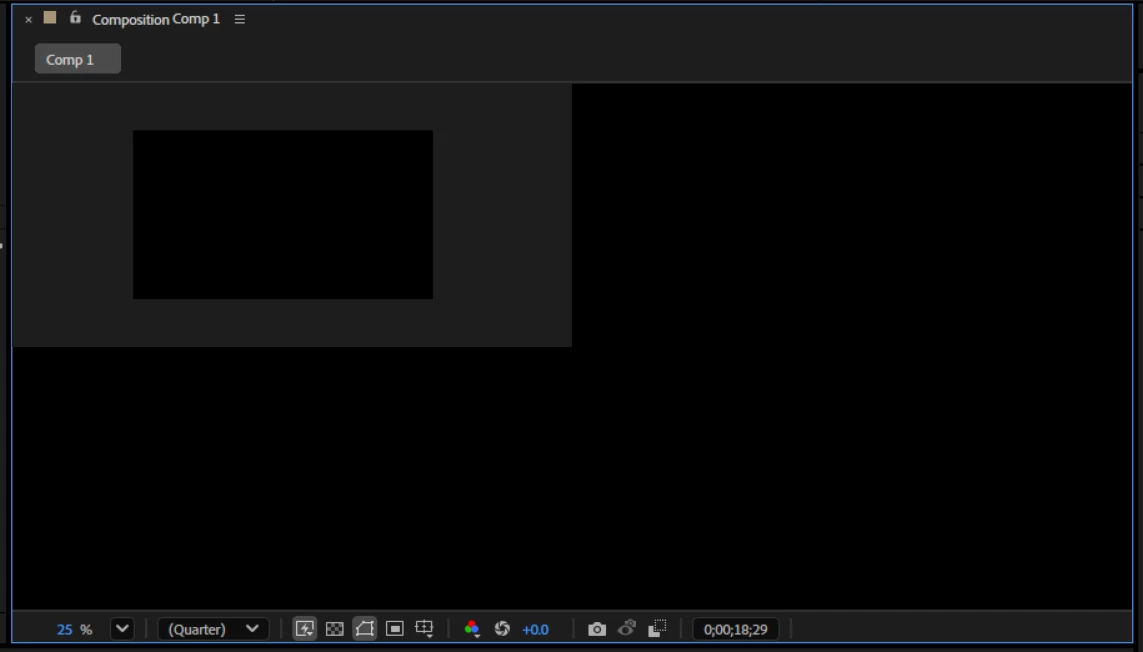
I'm running the latest version of After Effects and my Composition panel is showing a strange layout.
  • July 6, 2026
  • 1 reply
  • 48 views

Hi everyone,

I'm running the latest version of After Effects and my Composition panel is showing a strange layout — my actual video/composition only appears as a small rectangle in the upper-left area of the panel, while the rest of the panel (from top-right to bottom-left) is solid black/dark gray and shows nothing.

Details:

  • Composition panel zoom is set to 25%, Quality is Quarter
  • The small rectangle updates correctly and shows my footage/timeline content
  • The surrounding dark area does not change when I scrub the timeline or switch layers
  • I've attached a screenshot showing the issue

Any help is appreciated

    1 reply

    Nishu Kushwaha
    Community Manager
    Community Manager
    July 6, 2026

    Hi Sheeda, thanks for the screenshot. To help narrow this down, could you share your system specs (CPU, GPU, RAM, OS and version)?

    In the meantime, a couple of things to try:

    1. If you're on Windows, update your GPU driver to the latest version if you haven't already. For NVIDIA cards, the Studio driver is recommended for creative apps.

    2. In After Effects, go to Preferences > Appearance and disable "Hardware Accelerate Composition, Layer, and Footage Panels." Restart After Effects and check if the Composition panel renders correctly.

    Let me know the results and I'll take it from there.


    Thanks,

    Nishu

    SheedaAuthor
    Participant
    July 6, 2026

    I have Rtx 3050ti ryzen 7 5800h 16bg ram,
    i also updated my drivers also uninstall my software and reinstall but nothing works. Also i tried all the prefrences setting reset my prefrences but when i install older version it works smoothly.