
Participant
July 8, 2024

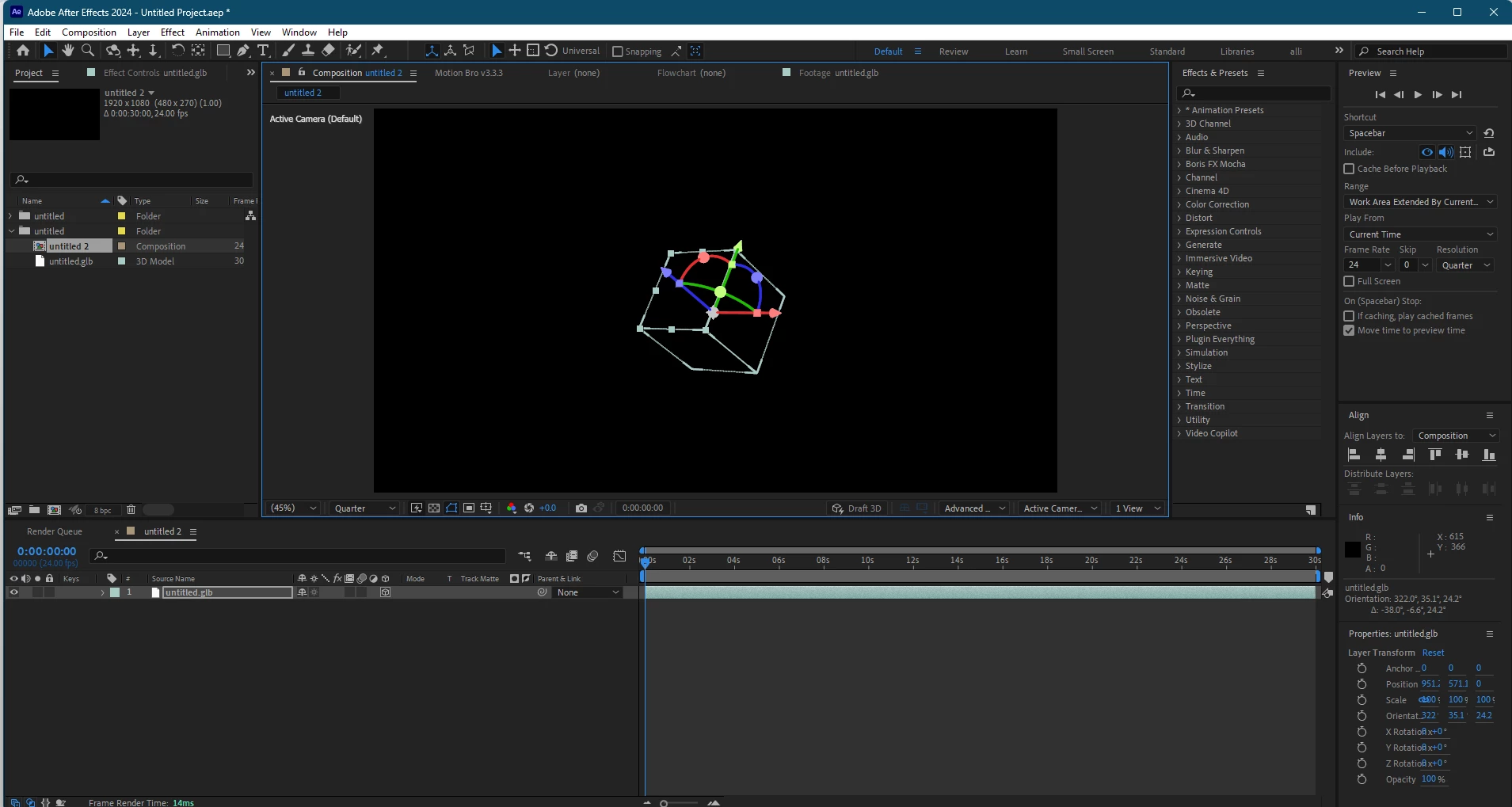
Imported 3D models donot show

  • July 8, 2024
  • 8 replies
  • 1219 views

Hi there everyone .. Does someone know how  can if fix this issue it that the 3d models i created  in blender and then save it as .glb file ,and importing it to aftereffects  only shows controlsand  not the object.Ihave  tried ver 24.1  and  now 24.5 the same  problem  presists .The  advanced 3d renderer is not working for  me .here  is  the screenshot attached.
 

This topic has been closed for replies.

8 replies

DaciaSaenz
Inspiring
July 15, 2024

@Haider_ali


I just confirmed with our devs and it looks like the issue is that your Nvidia card may be too old to support Advanced 3D 😞 

-- "For NVidia GPUs, they must have at least 4 GB of RAM and be of the Maxwell generation or newer.  The line between Kepler and Maxwell is complicated, but all NVidia cards in the GTX 9x0 generation are Maxwell.

They have a Quadro K2200, where the 'K' stands for Kepler.  But in reality NVidia stuck a Maxwell GPU in there! https://www.techpowerup.com/gpu-specs/quadro-k2200.c2601 But the line between Kepler and Maxwell is really blurry." 


I think that may be the root of your issue. Unfortunately, you may need to update to a newer GPU.

- Dacia Saenz, AE & PR Engineering Teams
DaciaSaenz
Inspiring
July 15, 2024

Hi @Haider_ali,


I have approved your access to the link and yes... I mentioned in my earlier post that I got the model to load on both Mac and Windows successfully. 


Can you please let me know about the following?? 

  • What happens if you turn Draft 3D on? Does anything render then? 
  • Have you tried updating your NVidia driver?

  • Do you have an Integrated GPU on your machine? Meaning is there an Intel GPU in addition to your Nvidia card? 

- Dacia Saenz, AE & PR Engineering Teams
Participant
July 13, 2024

kindly allow me in . and secondly have you tried my model on your aftereffects?....and  yeah i have switched on the adaptive resolution as  well.

DaciaSaenz
Inspiring
July 12, 2024

Hi @Haider_ali

Dang! I can get your model to load on both Mac and Windows on my end. 😞 


The model is fairly small and simple as well so the obvious reasons of why this may not be working for you are not relevant in your case. 

You have enough VRAM so that isn't the issue. 

Let's try a few more things... 

  • What happens if you turn Draft 3D on? Does anything render then? 
  • It doesn't look like Adaptive Resolution is turned on in your screenshots but I may be wrong about that. Can you try the clicking on the Lightning Bolt icon next to the Resolution Dropdown and making sure it is turned on. 
  • Have you tried updating your NVidia driver?

  • Do you have an Integrated GPU on your machine? Meaning is there an Intel GPU in addition to your Nvidia card? 

  • Can you try to import and load any of the models in this folder?https://drive.google.com/drive/folders/1RcMEGhirzr2dVsKTPbUOeCnfYg5iMeYr?usp=sharing 


Let's try and get you back on track! 

- Dacia Saenz, AE & PR Engineering Teams
Participant
July 10, 2024
Participant
July 10, 2024

this is my gpu info...

this is the 3d advanced renderer...

here is my render options setting as u suggested ... 

this is my cpu and other things included... it does not works ..using window 11 if required.. i have tried the beta as well ... nothing is working sending you the model gltf file ... and the obj file is not importing in aftereffects it just does not accepts ... if you have any model which works in your system kindly share it so i can try that too . 

DaciaSaenz
Inspiring
July 9, 2024

Hi @Haider_ali


What version of AE are you using? 

What are your system specs including GPU? 

How big is your model? 

Can you try turning on Adaptive Resolution?


Lastly, can you turn open up the Renderer Options and lower the Renderer and Shadow settings down to around 8 and 3? 


If you could send me the model so I can try on my end that would be helpful as well. 


Thank you,


- Dacia Saenz, AE & PR Engineering Teams
OussK
Community Expert
Community Expert
July 8, 2024

Did you try to import as OBJ?