
Participant
May 5, 2023

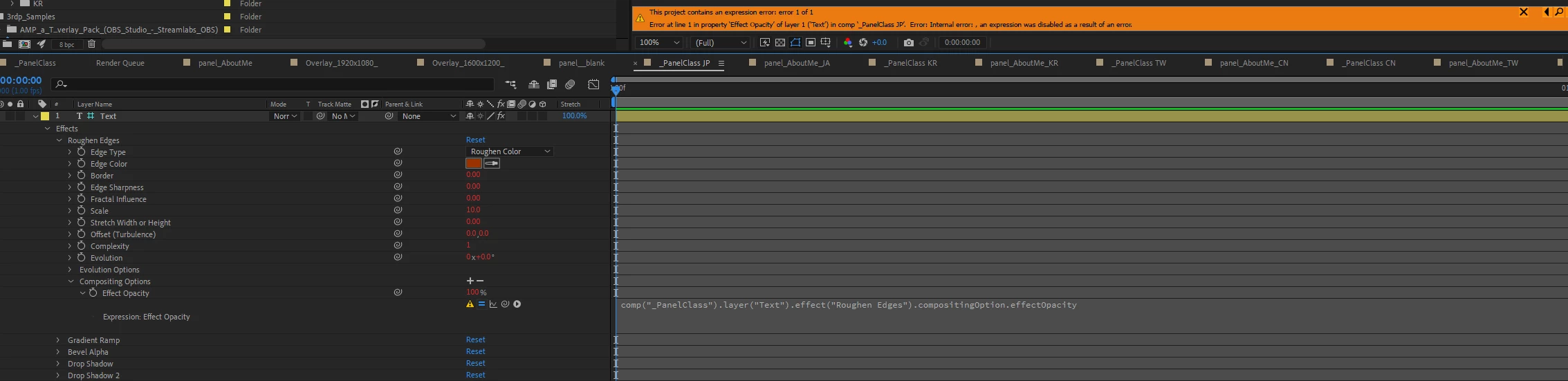
Initial Error when using expression on Effect Opacity

  • May 5, 2023
  • 3 replies
  • 354 views

Hi all,

I'd like to let Effect Opacity to follow another layer's, but I've got Initial Error when using expression on Effect Opacity. The screenshot is attached, the version is the latest update on 5/5/2023.

Thanks in advance!


This topic has been closed for replies.

3 replies

GnefnapAuthor
Participant
May 5, 2023

Hi @JohnColombo17100380 

Thank you very much for your promptly reply!

My OS version:
Microsoft Windows [Version 10.0.19044.2846]

After Effects version:

23.3.0 (Build 53)


However, the same as @ConstantinMaier mentioned, I currently have no idea how I can reproduce the issue. The issue didn't happen at once as if it was okay, it came after a while, very strange. Hope the information helps.

ConstantinMaier
Inspiring
May 5, 2023

Over the years, I've been having various issues when using expressions on Effect Opacity properties too. Sometimes expression errors, sometimes the effect misbehaving (producing weird results). These issues disappear once I remove the expression. Unfortunately, I don't have a current example as I also don't know how to reproduce it as it seems to happen somewhat randomly. Nevertheless, I +1 the bug report.

JohnColombo17100380
Community Manager
Community Manager
May 5, 2023

Hi @Gnefnap,

Thank you for reporting this error. Could you please provide a list of the actions/steps you took to apply the erroring expression? The screenshot shows that Copy with Property Links might have been involved. It would also be helpful to know specific what version of After Effects you are using, as well as your OS version.


Thanks for reporting this issue and for any further information you can provide, 

- John, After Effects Engineering Team