
Issues with render view colours
Hi there,
I've recently been having some strange issues regarding how colours are displayed in render views.
I am working on a 2021 16-inch Macbook Pro with M1 chip using an LG Ultragear 34GL750 monitor.
AE version: 23.0.0 (Build 59)
OS: MacOS Monterey 12.6
When loading a project, what ever render viewers I have open will have over saturated colours. If I create a new render viewer then the colours in this one are correct, and when side by side you can see the difference, as shown below:
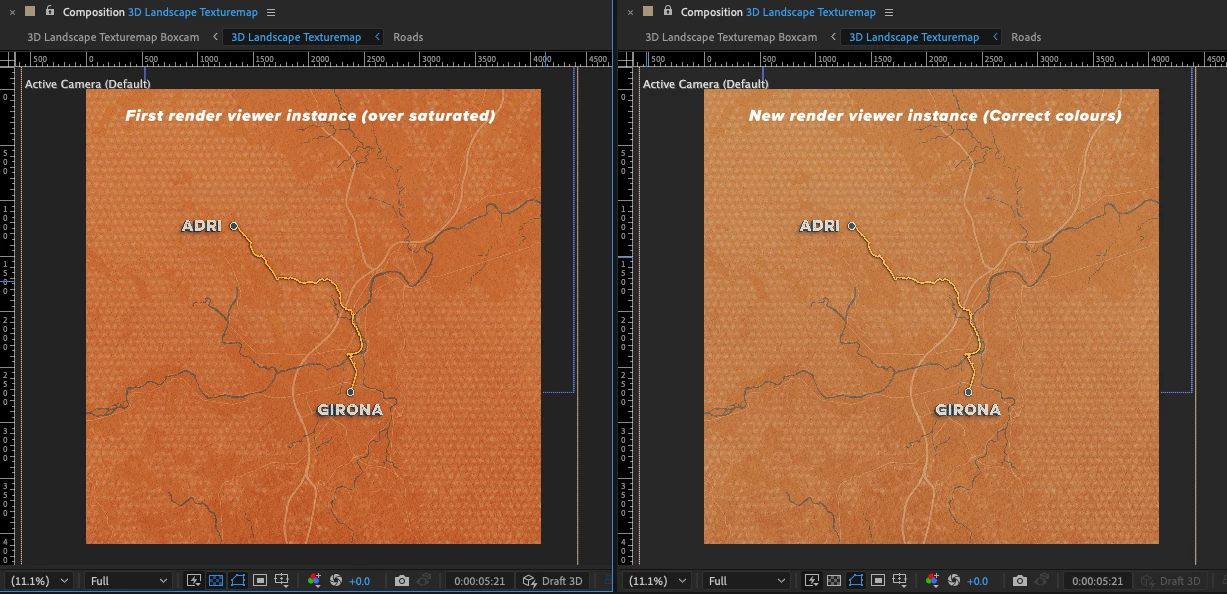
I am working in the sRGB IEC61966-2.1 colourspace in my project settings, but changing this doesnt fix the bug. It happens also if I just open the project on the built in macbook retina display.
I figure it must be some bug to do with colour profiles, it just means I have to replace all my render viewers when I open every project or Im working with incorrect colours which is quite irritating.


 AdChoices