
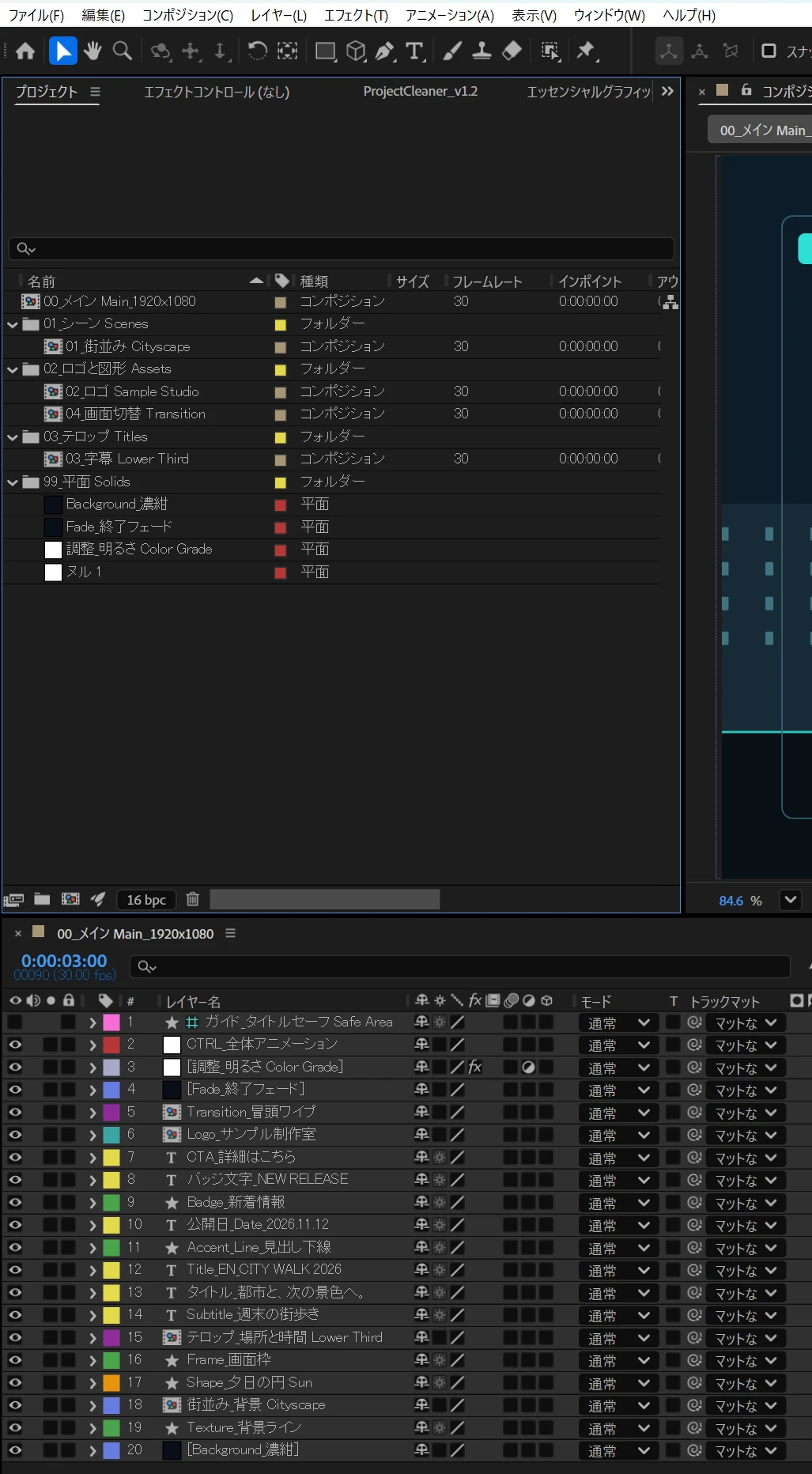
Jagged UI text in Project and Timeline panels when using the Japanese UI on Windows
When using After Effects with the Japanese UI on Windows, project item names and timeline layer names appear unusually thin and jagged, as though font smoothing is missing or ineffective.
Both Japanese characters and Latin letters are affected. Panel headings appear smoother than the item and layer names, making the difference particularly noticeable.
This reduces readability during everyday editing. I am reporting the visible symptom; I have not confirmed whether anti-aliasing is actually disabled.
Steps to inspect the issue
1. Launch After Effects with the UI language set to Japanese.
2. Open the attached AE_UI_Text_Sample.aep project.
3. Open the composition named “00_メイン Main_1920x1080”.
4. Inspect the Japanese and Latin names in the Project panel and Timeline panel.
5. Compare their appearance with the panel headings.
Expected result
Project item names and layer names should have smooth, clearly readable character edges, with consistent text rendering throughout the UI.
Actual result
Item and layer names appear thin, jagged, and less readable than the panel headings.
Environment
- After Effects: 26.5.3, build 9
- UI language: Japanese (ja_JP)
- Operating system: Windows 11 Home, version 25H2, OS build 26200.9974, 64-bit
- CPU: AMD Ryzen 7 9800X3D
- Discrete GPU: NVIDIA GeForce RTX 5080
- NVIDIA driver: 610.88
- Integrated GPU: AMD Radeon Graphics, driver 32.0.21042.62
- Primary display: 3840 × 2160, Windows display scaling 150%
- Additional displays: two 1920 × 1080 monitors, each at 100% scaling
- After Effects is currently displayed on the primary 3840 × 2160 monitor.
- Windows font smoothing / ClearType: Enabled
Attachments
- AE_UI_Text_Sample.aep
- An original-resolution PNG screenshot showing the issue
The sample project provides representative Japanese and Latin item/layer names in a practical editing setup. It includes a 15-second main composition with 20 layers, plus precompositions for a cityscape, logo, lower third, and transition. It has no external media dependencies and requires no third-party plug-ins.
Could the team investigate the UI font rendering in the Project and Timeline panels when the application language is Japanese?
 AdChoices