


Inspiring
September 24, 2024

Justify text not working

  • September 24, 2024
  • 6 replies
  • 502 views

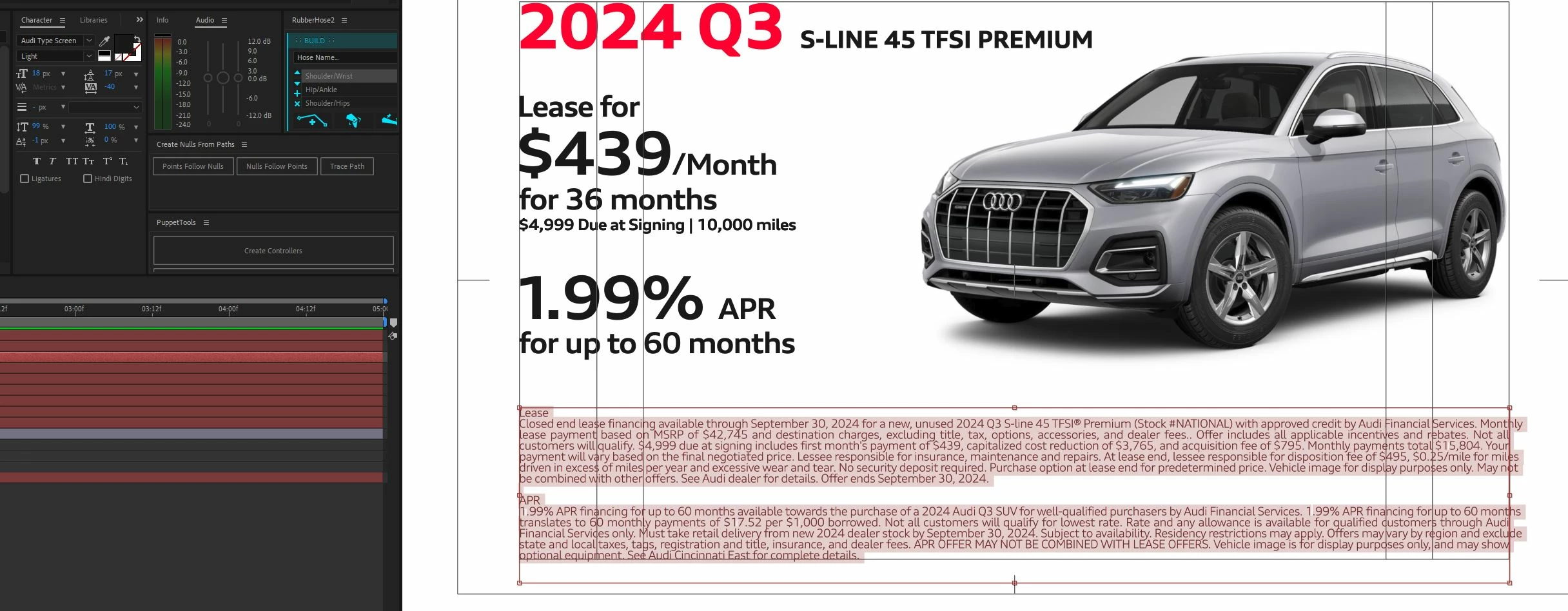
Currently in 24.6.1 on Windows 10 text justification in drawn text boxes is displaying incorrectly. I can kind of finagle with kerning each line. The font nor size seems to matter. Currently I'm laying type in Photoshop and saving out a PNG to get the text I want correctly.
 

6 replies

SwembaAuthor
Inspiring
February 11, 2025

Checking in to see if there has been any movement on this?

SwembaAuthor
Inspiring
November 11, 2024

Unfortunately this yielded no changes...

JohnColombo17100380
Community Manager
Community Manager
October 9, 2024

@Swemba, have you tried switching the Text layer to use the Every-line Composer? Here is that option in the Paragraph section of the Properties panel: 


It is also available in the panel context menu of the Paragraph panel.


Cheers,

- John, After Effects Engineering Team


SwembaAuthor
Inspiring
October 9, 2024

Here is a project file. Creating a PNG of all my type in photoshop is becoming tiring.

https://www.dropbox.com/scl/fi/a2pafisaus1x342ev2bn4/241009_35287_AUDI_OCT_01-folder.zip?rlkey=0ol41n7ve7dm2qaqm8m8ai5ir&dl=0

SwembaAuthor
Inspiring
September 26, 2024

Hey! It is happening on all different files for different projects. Different fonts too. Will send project file soon, in the weeds right now.

nishu_kush
Community Manager
Community Manager
September 24, 2024

Is it happening in a new project as well? Or just this particular project? Could you share a project file to test on our end?

Looking forward to your resposne.


Thanks,
Nishu