


Known Participant
February 7, 2025

Layers UI takes color from marker (AE Beta v25.2)

  • February 7, 2025
  • 4 replies
  • 137 views

Hey Team, 
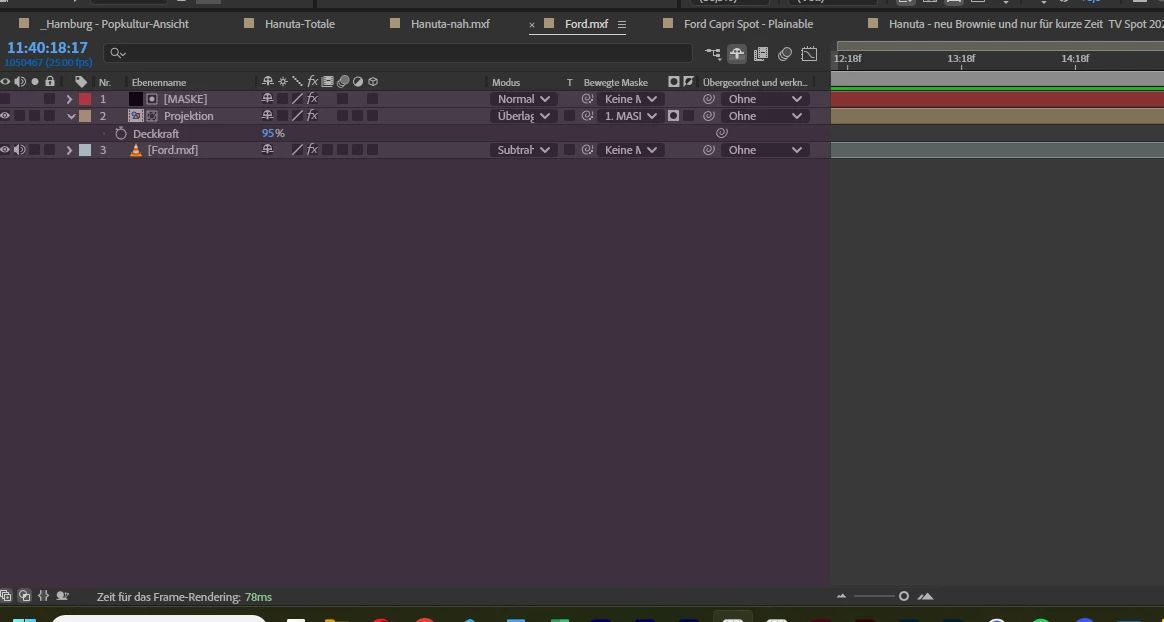
as u can see the UI where the layer is showing has become purple, when I zoom in or out in the timeline it dissappers or comes back. It can take different colors depending on which color the marker has. In my case it was purple but I had this with yellow, too.
Best Greetings
Mischel 

4 replies

Known Participant
March 20, 2025
Community Manager
March 19, 2025

@Graphic_Mischel ,

Would it be possible to reshare the video? Unfortunately was unavailable during the time that it was available. I hope you are doing well.

All the best,

All the best,Jessica McMillan - AE Engineering
Known Participant
February 14, 2025

Yes Windows 11 Pro 24H2.
It started by opening my project and it still is showing the different colors depending on my markes in that same project. When I delet the markers it dissapaers the color overlay over the gray are where the layers appers to be.
I had the project allready colored and opened it from AE in AE Beta and voila there was the UI issue.
https://we.tl/t-qj5FbsiZCE (The link will be delete after 7 days)
In this video u can see what is going on. Just let me know when u download it, so I can delete the link.

Beste greetings
Mischel

Community Manager
February 7, 2025

Hello @Graphic_Mischel ,


Thanks for bringing this to our attention. Do you know how you have gotten itno this state? It looks like you are running on Windows? If you are able to remember specific steps or if it was after loading a project with a colored marker, or you were in a new project, added the marker, and if it happened immediately or after some interaction?

Thanks for reporting once again.

All the best,Jessica McMillan - AE Engineering