
Participant
May 27, 2023

Motion tracking

  • May 27, 2023
  • 1 reply
  • 202 views

Hello,

Im trying to motion track a person in a project that I am doing on after effects but the problem is it doesn't say track type or track target it just says the clip I'm using and tracker 1 on it and stabilise motion etc

Do I have to download something for me to see it
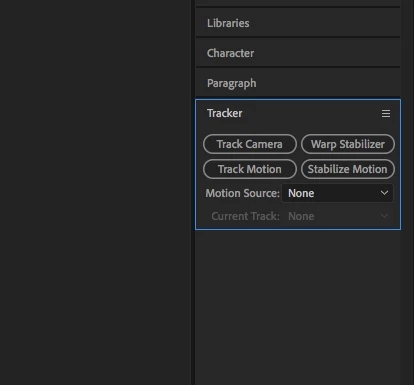
(picture above is better explained)

1 reply

Thaumar
Inspiring
May 27, 2023

I don't really understand what the problem is exactly, but to track a feature you first have to select the footage layer in de composition panel, then select the tracking operation you want (like 'track motion'), this will add a tracker to the layer and open the layer panel for that layer. Here you can place the tracker on the feature you want to track and start by using the tracking controls in the tracker panel. You can apply the tracked results to a layer (by default this will be the top layer in the composition), usually you add a null layer to apply the tracking result to. You can change the target before you apply the results of the track. You might have to extend the tracker panel to see all the controls in the tracker window. 
You can not track a layer that has nothing to track (like a solid or adjustment layer or something), usually you track a video footage layer or a pre-comp with video footage.

Can you share in what part of this process something goes wrong or behaves unexpectedly?