Participant
April 29, 2024

MXF files not being rendered

  • April 29, 2024
  • 9 replies
  • 1878 views

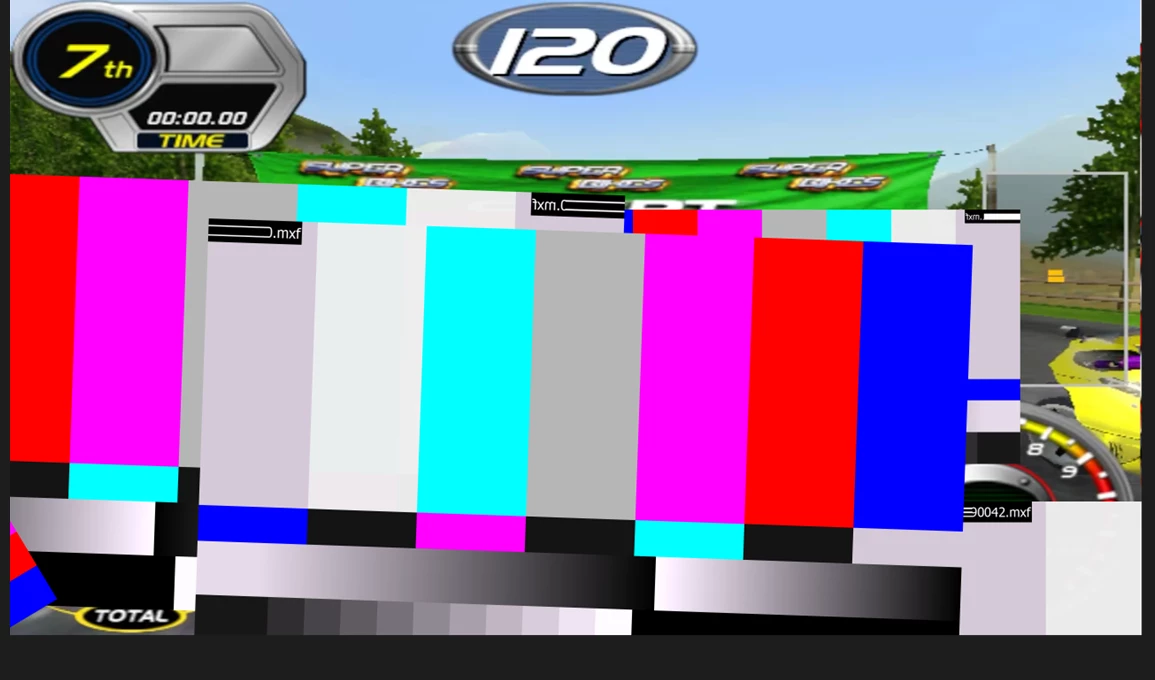
I have numerous green screen footage from .mxf files that are not being rendered. They appear in After Effects but not in the media encoder.  Any ideas?


This topic has been closed for replies.

9 replies

Inspiring
September 18, 2024

In After Effects, rendering a Comp containing a .mxf (OP1a) renders black when I output to ProRes444.

–Output to ProRes444 renders black, with audio.

–Output to .mp4 renders normally.

–Rendering to OP1a .mxf via Media Encoder renders normally.

–Rendering other footage to ProRes444 renders normally


Strange that AE let me work with the .mxf, but can not render it to every codec from the list.


24.6.2 (Build 2), Mac

nishu_kush
Legend
June 11, 2024

Hi all,


This issue has been marked as a bug. Thanks for reporting it.


Best,

Nishu

Known Participant
June 1, 2024

still in the latest Ae Beta 24.6x9

also latest AME Beta (24.6.0.12) (3.July 2024)


(C4D on 2024.4, therfore this is not an issue)

Participant
May 31, 2024

I am the same.
Calibration fails.

Known Participant
May 30, 2024

same here

Win10

Ae 24.4.0

AME 24.0.3

Strange: it worked at noon. Later I startet Pr 2021 and 2024 and updated Cinema4D to 2024.4.1

Then in the evening, as soon I put the same Ae file to AME, it says the mxf is offline and it renders bars.

I don't have the rights to install Beta in my subscription


Media Codec of the used mxf:

XDCAMHD 50 PAL (4:2:2)

Participant
May 7, 2024

I'm working on a project in AE (24.3.0) and Premiere (24.3.0) with MXF files and everything works great, until i export using media encoder.


In media encoder the movie exports but wherever there was an MXF clip it shows that the clip is offline.

In AE and Premiere 23 media encoder does read MXF files properly 

Please help to resolve the issue 

Thank you in Advance 

Adobe Employee
May 5, 2024

@garym46149099 What if the media codec of mxf files being used and when sending to AME in which format you are exporting? Is it H264?

Known Participant
May 6, 2024

@Khyati Gupta I use two types of MXF asset files in AE. Standard video files are XCDAMHD422 and files that require Alpha Channels are ProRes 4444 Alpha. 


From Media Encoder I have tried exporting TO both XDCAMHD 422 (50Mbps) MXFs and h.264 MP4s. In both cases, most of the MXF asset files fail to render. (There have been a couple of weird exceptions, including an MXF source file that partly rendered).


Exporting directly from the AE Render Queue has worked fine in all my tests. All MXF assets render as expected.

Known Participant
May 3, 2024

I am having the same issue. It appears to have started after upgrading to AE 24.3. Everything appears fine during preview in AE but, when sending to Media Encoder, some (but not all) MXF files render with bars. In my case, this doesn't just happen with Alpha channel MXFs, but other types as well.


As an additional note, exporting h.264 through the Render Queue seems to work fine. All elements are rendered normally. I only seems to happen when sending to Media Encoder. I have exported several file types from ME with the same results.

Adobe Employee
May 2, 2024

@Noah5DE4 Thanks for reporting this issue. Can you please try beta builds and let us know if issue is present there or not? And please provide more details like media codec, system information.

Regards,

Khyati Gupta