

John+Solda
Participant
September 14, 2026

object matte tool totally broken, it worked initally then just wouldn't work anymore. Unacceptable software design, seriously considering to switch platform now.

  • September 14, 2026
  • 2 replies
  • 21 views

The Object Matte tool initially worked correctly in this project and I was able to identify and isolate several cars in the footage very accurately. After working for a while, however, it suddenly stopped functioning properly.

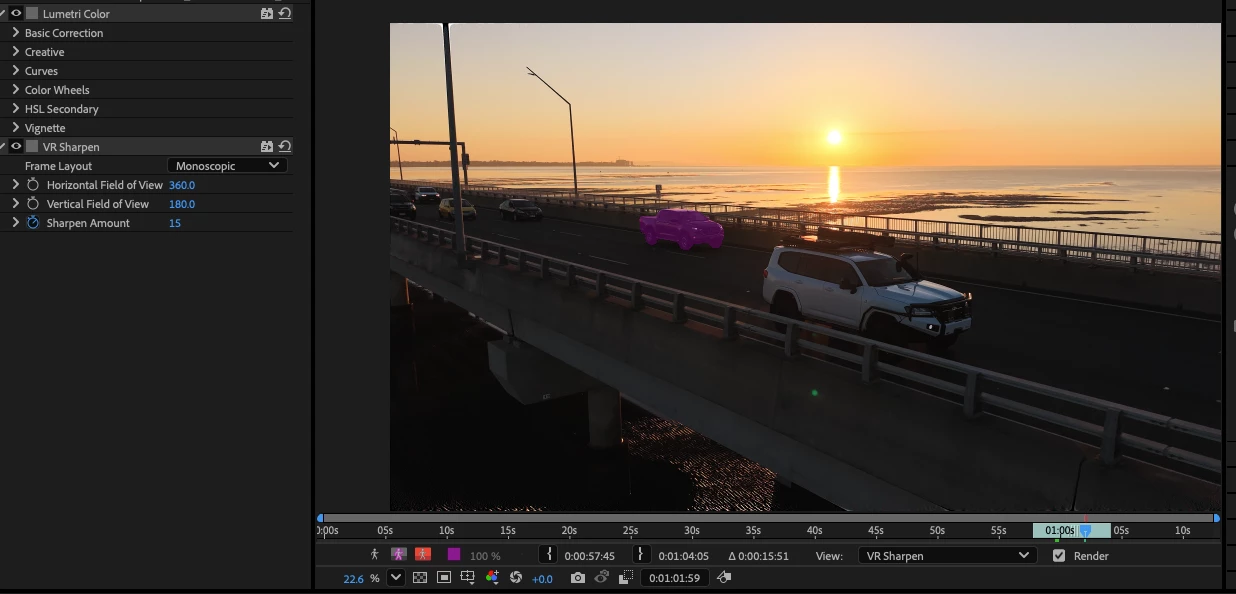
Now, when I hover over a car, After Effects still appears to recognise the object and highlights it correctly. But when I click to confirm the selection, one of two things happens:

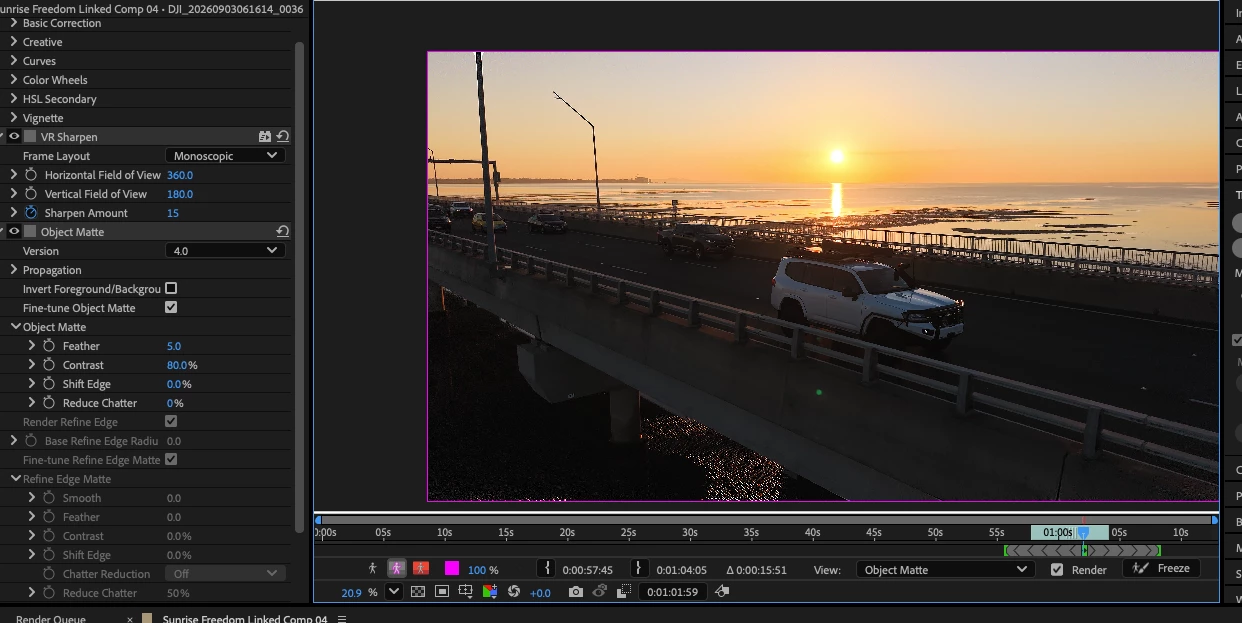
  • The entire frame/layer becomes outlined in purple, as if Object Matte has selected the whole image instead of the car.

  • Nothing happens at all and no object matte is created.

The same problem can also occur when using the brush selection.

I have already tried restarting After Effects, reopening the project, clearing memory and disk cache, reopening the footage in the Layer panel, switching tools, resetting preferences and trying again from frames where the tool had previously worked. None of this has resolved the issue.

This is particularly frustrating because the exact same footage and workflow were working correctly earlier before Object Matte suddenly entered this broken state.

I mainly use After Effects for tasks such as object removal, masking and Content-Aware Fill. In this case I need to remove several cars from moving footage, and manually drawing and tracking masks for every vehicle would take a significant amount of time. Object Matte is specifically supposed to make this workflow faster, so when the feature fails like this it becomes effectively useless.

Considering the amount I pay every month for Creative Cloud, it is extremely frustrating to have a major advertised feature behave this unpredictably during actual production work.

Expected behaviour:
Hovering over a clearly visible object and clicking it should create a matte around that object and allow it to be propagated through the footage.

Actual behaviour:
The object is recognised while hovering, but clicking either selects the entire frame or produces no selection at all.
 

    2 replies

    Nishu Kushwaha
    Community Manager
    Community Manager
    September 14, 2026

    Hi John, I hear you. Your frustration is fair.


    A few details that would help investigate this:

    1. Your system specifications (CPU, GPU, RAM, OS version).

    2. Your exact After Effects version (Help > About). 26.5 was released a few days ago. Did you start noticing the issue after that update?

    3. Are you getting this issue on all projects? Can you try on a new project with the same footage?

    4. Can you share a short screen recording showing the issue? That'll help me report it to the product team.

    Looking forward to your response.


    Thanks,

    Nishu

    John+Solda
    Participant
    September 14, 2026

    Hi Nishu,

    I’m using an Apple MacBook Pro with an M4 Max, running After Effects 26.5.

    I wasn’t aware 26.5 had only just been released. If this issue is related to the new version, then frankly I wish it had been tested properly before release. For software that costs this much every month, major workflow features should be released in a reliable working state.

    I haven’t tested this in other projects because I don’t have time to create extra test projects just to troubleshoot Adobe’s software. I’m working, I have deadlines, and I’ve already spent more than enough time restarting After Effects, clearing caches, resetting preferences, reopening the project and trying different Object Matte methods. I’m not going to keep testing the software on Adobe’s behalf. That should be done before release.

    The screenshots I shared already show the problem clearly. When I hover over the car, Object Matte highlights it correctly, so the detection is obviously seeing the object. As soon as I click, no matte is created and the entire frame becomes outlined in purple instead.

    What makes this more frustrating is that it worked correctly earlier in the same project and then simply stopped working.

    This is not an isolated frustration either. I seem to end up back on these forums reporting bugs far too often. Creative Cloud is one of the most expensive software subscriptions I use, yet Adobe software is also some of the least reliable software I work with. That is extremely disappointing.

    I’ve already provided the hardware, version, screenshots and a clear description of the behaviour. Please pass this to the product team and investigate it from your side rather than asking me to spend more working time testing it further.

    Thanks,
    John