



Open for Voting
OCIO ACES conversion bug in 25.5
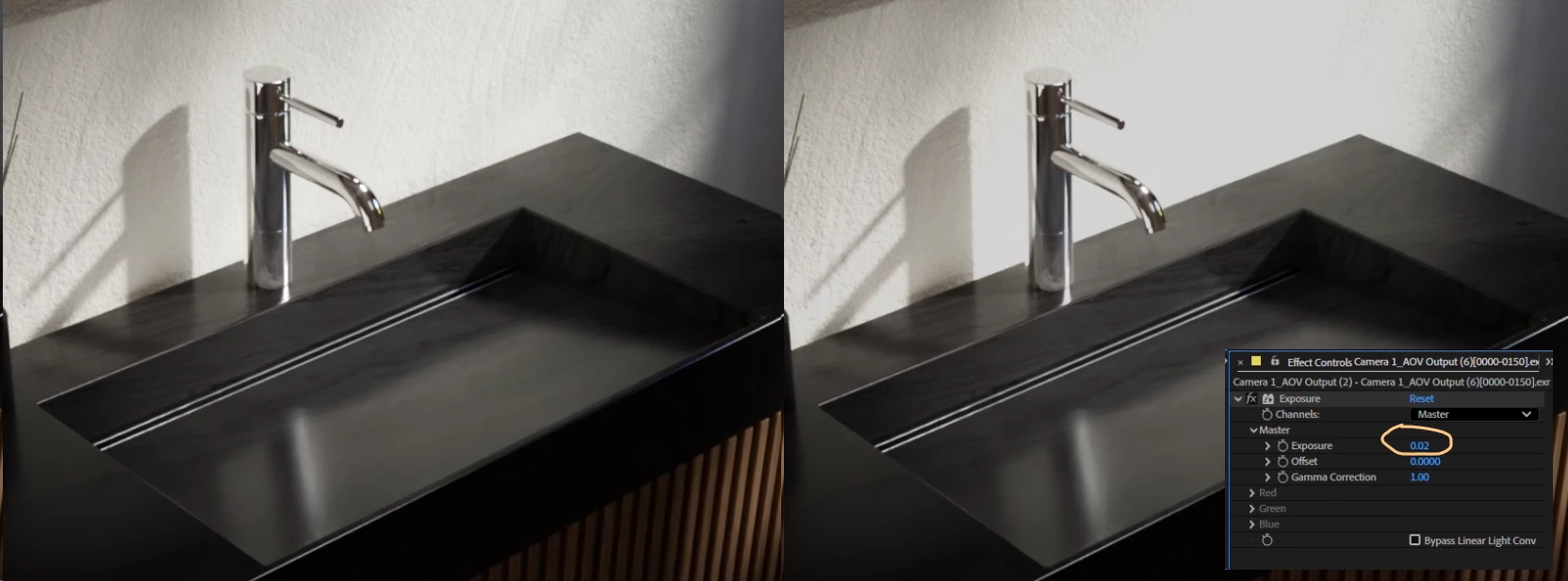
I'm having an issue with AE where it clips my white values when I put any effect (exposure, hue/sat, etc) on my layers. Even negative exposure of -.01 will suddently clip the whites. It's like it turns it into 8bit instead of its native 32.
- Project color settings are OCIO Aces 1.3/32 bit / working linear ACEScg.,
- Sequence is a 32bit ACEScg exr, interpreted as ACEScg,
- viewport display is set to sRGB Display/ACES 1.0 - SDR Video (tried others too). Also tried None and have been using the OCIO display transform on an adjustment layer.
- Raw Sequences look great, but when I put an effect (like exposure) on some sequences directly, I notice whites get capped with barely any adjustment, even negative adjustment of exposure.
- Weird: I can buffer the entire animation with capped (wrong looking) whites, and in the OCIO Display Transform effect, if I hit 'reset' it will 'fix' the entire sequence once. So it looks perfect. If I adjust a single thing, it re-caps all whites. Hitting reset again fixes only the pre-buffered frames. It's like it goes from 32bit to 8 bit every time I make an adjustment to a sequence.
- It's worth noting that I can put an adjustment layer with effects on top and this capping of whites doesn't happen at all. It's only when I put adjustments on a layer itself.
 AdChoices