
Inspiring
August 20, 2024

OCIO not loading in CMD - aerender
  • August 20, 2024
  • 20 replies
  • 3982 views


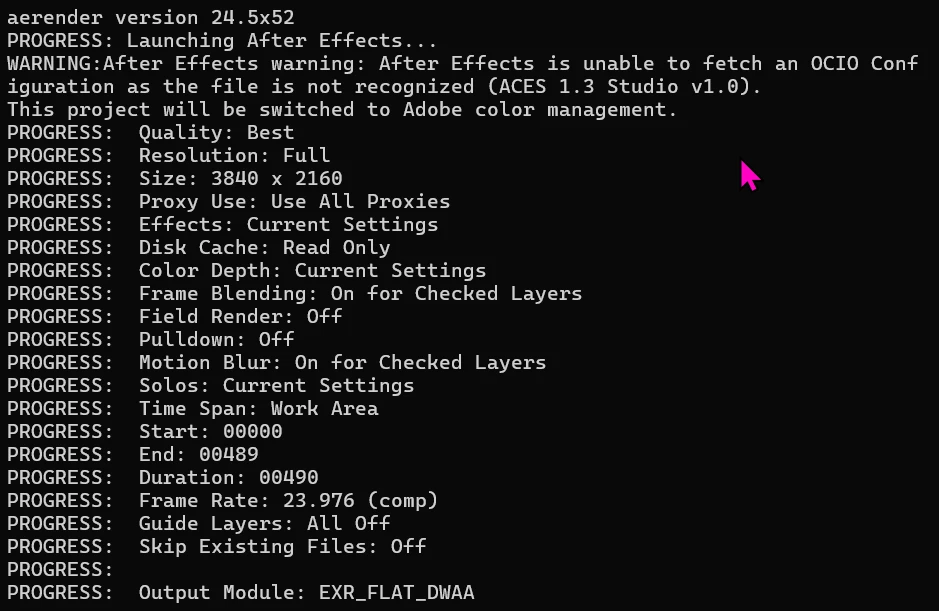
Aerender isn't able to see the default ACES configurations when rendering. I am not sure if this behavior is specific to AE 24.5, but I am fairly positive I have been able to render like this before.

Windows 11, AE 24.5

20 replies

Participant
October 7, 2024

Hi @JohnColombo17100380  


Any update on this?  It's pretty fundamental to render pipelines that this is resolved ASAP.


Latest version is not working still. There have been a few version releases since 24.4, seems like ample opportunity to have merged in a fix?


Kind Regards,

James

Participating Frequently
September 21, 2024

This is a major issue and needs a priority fix ASAP. This affects us greatly as a studio with countless adobe licenses.

Participating Frequently
September 17, 2024

Re: "aerender.exe  WARNING:After Effects warning: After Effects is unable to fetch an OCIO Configuration as the file is not recognized. This project will be switched to Adobe color management."

Summary of testing various recent versions, including latest betas as of 9/17/24:
(Note: OS Name: Microsoft Windows 10 Pro for Workstations, OS Version: 10.0.19045 N/A Build 19045)
aerender version 24.4.1x2 *works* (as @JohnColombo17100380 noted)
aerender version 24.5x52 (fails)
aerender version 24.6.1x2 (fails)
aerender version 24.6.2x2 (fails)
aerender version 25.0x29 beta (fails)
aerender version25.1x9 beta (fails)


Additional details and tests, including pointing to a custom config, just in case that was a workaround (didn't work):

This persists for me in aerender version 24.6.2x2, also. Looking forward to a fix. Will look to roll back on the render farm to 24.4.1x2 meanwhile.

aerender version 24.6.2x2
PROGRESS: Launching After Effects...
WARNING:After Effects warning: After Effects is unable to fetch an OCIO Configuration as the file is not recognized (ACES 1.3 Studio v1.0).
This project will be switched to Adobe color management.

I can also confirm 24.5x52 presents the bug:
aerender version 24.5x52
PROGRESS: Launching After Effects...
WARNING:After Effects warning: After Effects is unable to fetch an OCIO Configuration as the file is not recognized (ACES 1.3 Studio v1.0).
This project will be switched to Adobe color management.

I can also confirm 25.0x29 beta presents the bug:
aerender version 25.0x29
PROGRESS: Launching After Effects...
INFO:After Effects (Beta): this project must be converted from version 24.5 (Windows 64). The original file will be unchanged.
WARNING:After Effects (Beta) warning: After Effects is unable to fetch an OCIO Configuration as the file is not recognized (ACES 1.3 Studio v1.0).
This project will be switched to Adobe color management.

As @JohnColombo17100380 suggested, I can also confirm 24.4.1x2 works and does not have the OCIO config load bug:
aerender version 24.4.1x2
PROGRESS: Launching After Effects...
(No OCIO Error)

As a test, in case it was just an issue with the built in configs, I manually overrode the OCIO config path in Custom directly to:
C:\Program Files\Adobe\Adobe After Effects 2024\Support Files\OpenColorIO-Configs\ACES 1.3 Studio v1.0\\studio-config-v1.0.0_aces-v1.3_ocio-v2.1.ocio
But still receive the same error:
aerender version 24.6.2x2
WARNING:After Effects warning: After Effects is unable to fetch an OCIO Configuration as the file is not recognized (C:\Program Files\Adobe\Adobe After Effects 2024\Support Files\OpenColorIO-Configs\ACES 1.3 Studio v1.0\studio-config-v1.0.0_aces-v1.3_ocio-v2.1.ocio).
This project will be switched to Adobe color management.

Also, to rule out a .config file issue I pointed AFX to Nuke's config for ACES 1.3:
C:\Program Files\Nuke15.0v5\plugins\OCIOConfigs\configs\fn-nuke_studio-config-v1.0.0_aces-v1.3_ocio-v2.1.ocio
No change.
aerender version 24.6.2x2
WARNING:After Effects warning: After Effects is unable to fetch an OCIO Configuration as the file is not recognized (C:\Program Files\Nuke15.0v5\plugins\OCIOConfigs\configs\fn-nuke_studio-config-v1.0.0_aces-v1.3_ocio-v2.1.ocio).
This project will be switched to Adobe color management.

Also, in case it was a OCIO v1 vs v2 issue, I tried pointing it to ACES 1.2, same result:
aerender version 24.6.2x2
WARNING:After Effects warning: After Effects is unable to fetch an OCIO Configuration as the file is not recognized (ACES 1.2).
This project will be switched to Adobe color management.

Inspiring
September 10, 2024

If you figure out a hacky fix, like adding something to the commandline prompt or using a previous version of AE Render, that would helpful, because not being to background render on this job is a problem. Thanks!

Inspiring
September 10, 2024

Windows here. Thanks for looking into it.

JohnColombo17100380
Community Manager
Community Manager
September 10, 2024

Hi all,

Thank you for reporting this issue. We are also able to reproduce this failure when rendering through arender using the ACES 1.3 Studio v1.0 OCIO config. A ticket has been opened for our team to investigate a fix.


For now, rendering via 24.4 should be unaffected by this issue.


We are only seeing the failure occur on Windows—are all of you using Windows as well when you encounter this issue?


Thank you again for reporting this issue. We will update this post as soon as a fix becomes available for testing in the public Beta builds.

- John, After Effects Engineering Team 

Participant
September 6, 2024

We are using After Effects. For large-scale rendering, we use Deadline as the render manager. A problem has arisen where, if we use the ACES 1.3 Studio color space, renders submitted to Deadline will only be rendered correctly on machines running After Effects version 24.4 (or lower). On machines with a higher version of After Effects, even the latest version (24.6.1), we receive the following message: (After Effects warning: After Effects is unable to fetch an OCIO Configuration as the file is not recognized (ACES 1.3 Studio v1.0). This project will be switched to Adobe color management.) Despite this, the render is completed, but incorrectly. We also tried using ACES 1.2 color space and Custom ACES config, but the same error occurs every time. The aerender is unable to recognize the color space, which is odd because if I open the project on these higher-version machines, it renders ACES 1.3 without any issues.


I'm not alone with this problem. I've seen many posts here on the forum dealing with the same issue. It would be great to resolve this as soon as possible, as we obviously want to use the latest version of After Effects in our daily work, and not randomly test different versions to see which one works already.

Inspiring
September 10, 2024

Same. Annoyed.

Participant
September 6, 2024

I was just about to report a similar bug, but I see it has already been reported. We are experiencing exactly the same issue. I would like to add that it works with version 24.4.1 as well, but not beyond that. Where can this be reported at a higher level? 🙂

Inspiring
September 5, 2024

AERender.exe says

WARNING:After Effects warning: After Effects is unable to fetch an OCIO Configuration as the file is not recognized (ACES 1.3 Studio v1.0). This project will be switched to Adobe color management.

😞

Participant
September 6, 2024

I was just about to report a similar bug, but I see it has already been reported. We are experiencing exactly the same issue. I would like to add that it works with version 24.4.1 as well, but not beyond that.

Participant
September 2, 2024

This is still broken (even in v24.6.1)


24.3 apparently still works:
https://www.reddit.com/r/AfterEffects/comments/1efwh0p/afx_245_render_ocio_error/