


Participating Frequently
February 5, 2025

Regression?:Where are the HDR parameters for the Lumetri Color effect?

  • February 5, 2025
  • 5 replies
  • 517 views

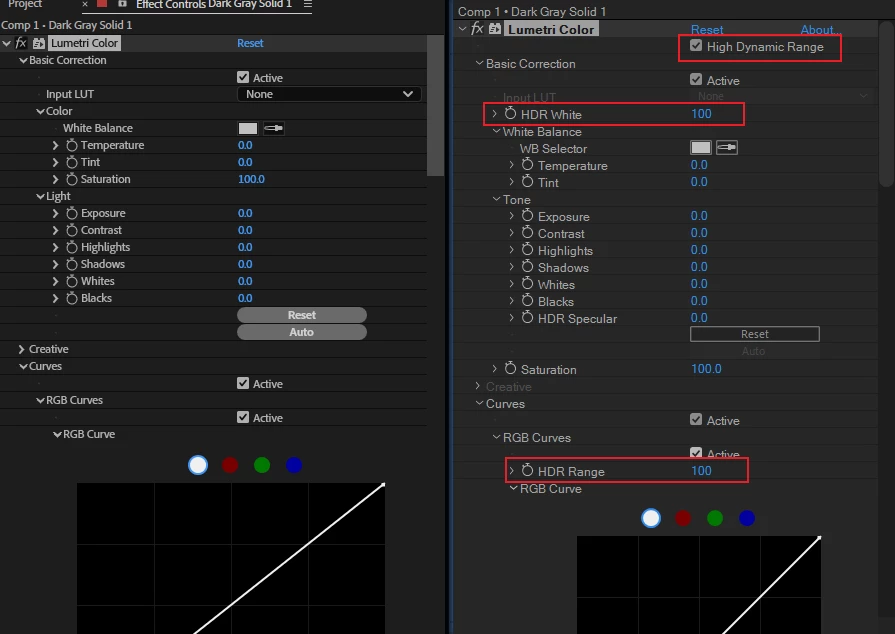
This is a screenshot of CC2019 and the latest (Beta).
Obviously the HDR parameters are missing.
Have there been any major changes to the HDR solution in any of the versions along the way?
Oddly enough the latest Lumetri Color plugin info shows v1.1.
CC2019 showed v3.
 

5 replies

Participating Frequently
February 7, 2025

OK, I am used to After Effects being left behind in time.
I hope the development team will release a modern color grading effect for HDR-OCIO as soon as possible.

Sébastien Périer17107209
Community Manager
After Effects Sr. Quality Engineer
February 6, 2025

Hi @Michael Orwell,

I'm Sebastien from the After Effects Team. This option was removed from Lumetri Color about 3 years ago as it was not working as intended in Premiere's Pro new HLG sequence color management when it was introduced. Lumetri Color being a shared effect between Premiere and After Effects, this option has not been available since in AE.

After Effects is currently revamping it's HDR color workflow, and current Public Beta version supports Import and Preview of HDR format when an HDR Working Color Space.

I understand that the current work in progress nature of AE's HDR workflow might not be a totally viable replacement for you right now. 

While HDR White is still being worked on, in the new HDR Profiles in current Public Beta version, you have multiple options for HDR white values (circled in red in the screenshot) for the most common values and the most common profiles.


Sorry this issue is impacting your workflow, and hoping that the new HDR work will provide a better HDR experience in the long run.

Sébastien
After Effects Quality Engineer

Participating Frequently
February 6, 2025

I checked the links but could not find anything about why HDR parameters was lost from Lumetri Color and a better alternative.
Do I have to rely on the HDR Compander to do operations like HDR color grading and Look Modification Transforms in After Effects? This is an old method, and obviously regression.

Kevin J. Monahan Jr.
Community Manager
Community Manager
February 6, 2025

Hi @Michael Orwell,

Pardon my ignorance on the topic. Since the UI has changed, I'll see if I can get a product team member more familiar with the topic to respond. I'll let them know. Sorry for the hassle.


Thanks,
Kevin


Kevin Monahan - Sr. Community and Engagement Strategist – Adobe Pro Video and Audio
Kevin J. Monahan Jr.
Community Manager
Community Manager
February 5, 2025

Hi @Michael Orwell ,

This article has been recently updated. Does it contain the information about HDR handling here? https://helpx.adobe.com/after-effects/using/color-basics.html. Please let the team know. I hope someone will assist you shortly.


Thanks,
Kevin


Kevin Monahan - Sr. Community and Engagement Strategist – Adobe Pro Video and Audio
jefubbudu
Inspiring
February 5, 2025

It seems to be going much the same way as mocha, and what they tried to do to mp4, and rotobrush might be next with its instability. I would suggest rolling back if possible, as far back as you can preferably. I haven't seen a single feature I would use more than once a year since 2014, and many things have had regressions. CS6 is still snappy, loads in well under 30 seconds, and works on less than 4GB of RAM