
Participant
April 28, 2023

Rendering video as green, keeping effects, music, etc.

  • April 28, 2023
  • 3 replies
  • 296 views

Ok. I have NEVER seen anyone with the same problem as me. Every single damn time I go to render a video in either AE, or Media Encoder using AE. The video comes out green. The video still has the sound effects, video effects, etc. No, it's not when I import a video. It's when I RENDER. The video looks fine in AE. And when it comes out green. I mean GREEN. Entire video is green. When I try to watch it on my PC, it's just a green video. NOTHING has fixed it. I don't know the issue. My specs are a RTX 3060 ti, AMD Ryzen 5 1600 Six-Core., 16 GB Memory, Windows 10 Pro I think. Please. Please someone help. I've spent so much time on edits and NONE of them come out correctly.
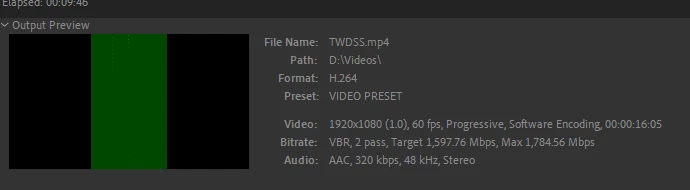
 

3 replies

Ando0o0
Inspiring
April 28, 2023

Is the source video an Mp4? In other words - is the video or material you are using in AE mp4? If so, I would recommend using a better codec when inside AE. Something like a MOV that's pro res.

Participant
April 28, 2023

I would also suggest to render to another format. maybe Prores 422. and the reencode. Adobe Media Encoder is very very buggy. for example I once had a project where I hade my animation on exactly the same red background in 10 different resolutions. but when i rendered it in AME one particular video of the 10 had slightly different red tone in the Background. Choosing handbrake for final encoding solved the problem

Thaumar
Inspiring
April 28, 2023

Well, this looks like an encoding problem. Not sure what triggers it, it might be the combination of size, frame rate, bitrate, I don't know.
I don't have a solution to fix the problem, but I would suggest to render to a high quality intermediate (using a high quality codec), and then encode that file to h264 with the prefered encoding settings.
That route will hopefully circumvent the problem and at least get the job done.