
Replace Footage Layer in Split Layers not functioning as intended in Ae v23.1.0
I am writing to report a bug I have encountered in the latest version of After Effects (v23.1.0). In previous versions of the software, it was possible to split a new layer into multiple cuts and then easily replace those layers with footage. However, in the latest version, when I attempt to replace the footage using the steps below, the result is not as expected.
Steps to Reproduce:
- Create a new layer (Adjustment Layer, etc.)
- Split Layer at Current Time (Ctrl+Shift+D)
- Replace Selected Layer with Selected Footage Layer (Ctrl+Alt+/)
Expected Result: The split layers should be replaced with the selected footage layer.
Actual Result: The selected footage layer is only applied to the start of the composition/layer, not the split layers. I have tried using the new layer as a placeholder but the result remains the same.
I have attached an image to demonstrate the issue. The red represents the bad result, the yellow represents the split layers, and the green represents the desired outcome.
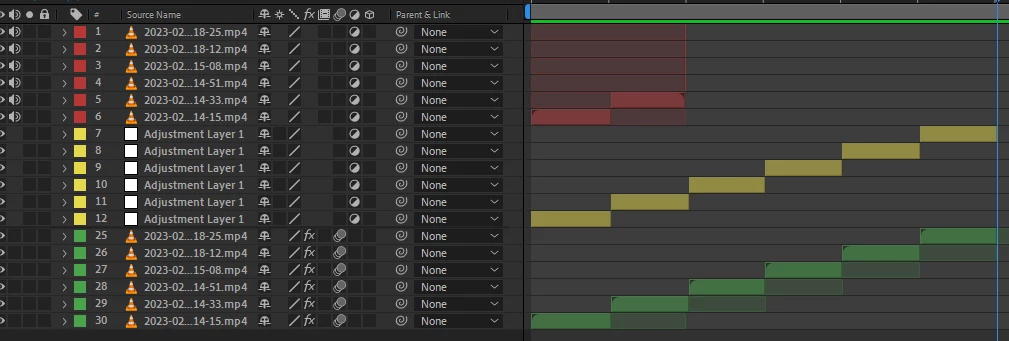
I would greatly appreciate it if this issue could be addressed as soon as possible. I have attached the required information and I am available to provide additional details if needed.
Thank you for your attention to this matter.


 AdChoices