

Participant
November 25, 2024

Rotoscoping too slow

  • November 25, 2024
  • 2 replies
  • 326 views

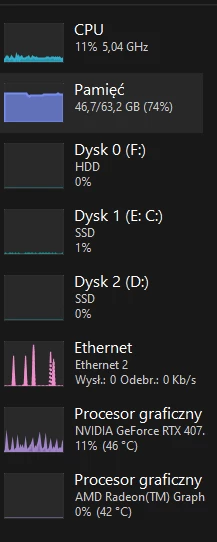
Maybe I'm a fool for asking this question; nothing is at 100% in the Task Manager, and After Effects can't rotoscope and freeze-frame faster.

 

This topic has been closed for replies.

2 replies

James Landy
Inspiring
November 27, 2024

Depending on what version of After Effects and Roto Brush you are using, the expectation is that performance is much better when using Roto Brush 3, and starting with Ae 24.2, we also improved Freeze render times so Roto Brush can take advantage of pre-existing propagated frames when performing the Freeze process.


Our internal testing indicates Freeze is now 1.6x to 5.8x faster to complete. Performance results can vary depending on platform, OS version, and GPU. Older GPUs will see the biggest performance gains. Performance gains are reduced when using the Refine Edge Tool (1.2x to 1.6x faster).

I can't explain the CPU usage or performance slow down you’re experiencing, but please let us know if you’re encountering the problem when using Roto Brush 3, and Ae 24.2 or higher

Thanks

DaciaSaenz
Inspiring
November 25, 2024

Hi @Michał346649282wux


Sorry that you're experiencing that. 

Can you please share

  • your computer specs
  • GPU information
  • version of AE that you're using
  • does this happen if you disable third-party apps? 
  • can you please share a screen recording of what you're seeing in the app? 


It would also be super helpful for devs to have a log of your app session. You can do that by doing the following: 


  1. Start AE
  2. Help Menu => Enable Logging
  3. Restart AE
  4. Click through any errors.
  5. Help Menu => Reveal Logging Files...
  6. Find the "After Effects Log.txt" file and copy/paste the content back to this forum thread.


Thanks so much. Hope we can get you back in business ASAP, 


- Dacia Saenz, AE & PR Engineering Teams