


Known Participant
December 11, 2023

Scrolling Issue: Property Value Adjustments in the Opposite Direction

  • December 11, 2023
  • 8 replies
  • 882 views

When using the scroll wheel or the two-finger swipe up/down gesture on the trackpad to adjust a property value, it is being adjusted not correctly (backwards).

Clicking on a value and scrolling/swiping up decreases the value, while scrolling/swiping down increases it.


Scroll/swipe UP ↑

DECREASES the value ↓

Scroll/swipe DOWN ↓ 

INCREASES the value ↑


This behavior is counterintuitive. It should work the other way around. Please fix it.
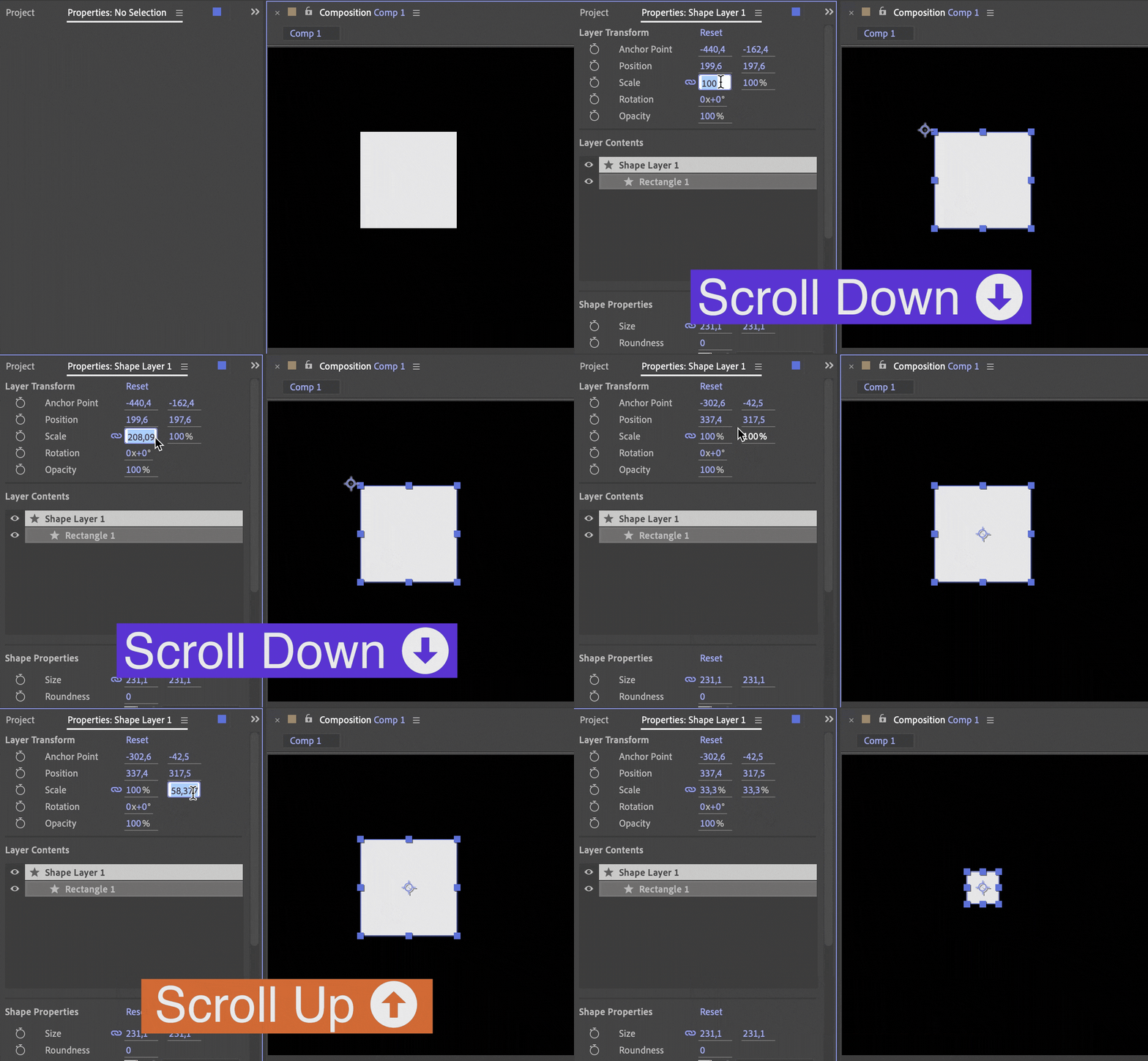


macOS 12.7.1

After Effects v24.1


PS. This issue also exists in Illustrator:

https://illustrator.uservoice.com/forums/601447-illustrator-desktop-bugs/suggestions/47546990-making-adjustments-to-a-value-within-a-panel-s-fie

This topic has been closed for replies.

8 replies

Known Participant
December 20, 2023

@jenkmeister17177426  

I wrote a lengthy reply to you, but due to this forum being buggy, it hasn't been posted for some reason. 😤 Since I started using Adobe's products, I haven't encountered a single Adobe-related product that hasn't had bugs. Even this forum is buggy.

Jenkmeister
December 15, 2023

You may find ONLY the properties panel supports the scroll wheel. It is the most recently implemented UI panel. Everything else is bordering on being so old scroll wheels didn't exist. Part of the 2024 roadmap for AE is a new UI architecture so as that work is completed, more things like the scroll wheel will begin working. For now, my best advice is to use click-down and scrub. That is implemented consistenly across the UI. 

Known Participant
December 15, 2023

@jenkmeister17177426 

New bug discovered:

In the "Effect Controls" panel this feature doesn't work at all. Scrolling up and down doesn't adjust the value at all in this panel.

Please adress this issue as well.


Known Participant
December 12, 2023

@jenkmeister17177426 

I tested After Effects and Illustrator on a Lenovo laptop running Windows OS, and I encountered the same issue when using the touchpad. Adjusting the values with a mouse works fine, though.


Lenovo laptop with Windows OS:

Scroll mouse wheel up ↑

increases the value ↑

Scroll mouse wheel down ↓

decreases the value ↓

Two-finger swipe up ↑

decreases the value ↓

Two-finger swipe down ↓

increase the value ↑


This feature works well only with the oldfashioned Windows scrolling direction when using mice only. 

It seems that this feature was developed a long time ago and hasn't been updated for the modern usecases. Nowadays Adobe's apps (After Effects and Illustrator) have troubles working with modern touchpad gestures and modern scrolling direction. 

Known Participant
December 11, 2023
quote

we could consider a preference to allow you to flip that on an individual basis. 


By @jenkmeister17177426


I would greatly appreciate this.

Jenkmeister
December 11, 2023

I don't know that we would override the preference of the user with a hardcoded setting but we could consider a preference to allow you to flip that on an individual basis. 

Known Participant
December 11, 2023

@jenkmeister17177426 

quote

Are you on a Mac with Natural Scrolling switched on? That will reverse the inputs to AE causing what you are seeing. 


By @jenkmeister17177426 


Yes, it's enabled, but it's the default scrolling for the entire macOS.

It seems that AE doesn't work properly with the default scrolling direction on macOS.

Will you fix it?


PS. This issue also exists in Illustrator.

https://illustrator.uservoice.com/forums/601447-illustrator-desktop-bugs/suggestions/47546990-making-adjustments-to-a-value-within-a-panel-s-fie


PPS. IMHO, this method of adjusting values using the scroll wheel or two-finger swipe up/down gesture should be independent and hardcoded. Scrolling/swiping UP should always INCREASE the value, and scrolling/swiping DOWN should always DECREASE it regardless of the scrolling direction setting.

Jenkmeister
December 11, 2023

Are you on a Mac with Natural Scrolling switched on? That will reverse the inputs to AE causing what you are seeing.