
arewenotmen
Known Participant
July 6, 2023

Shape layer attributes created with Add menu are not shown in the Properties panel

  • July 6, 2023
  • 4 replies
  • 656 views

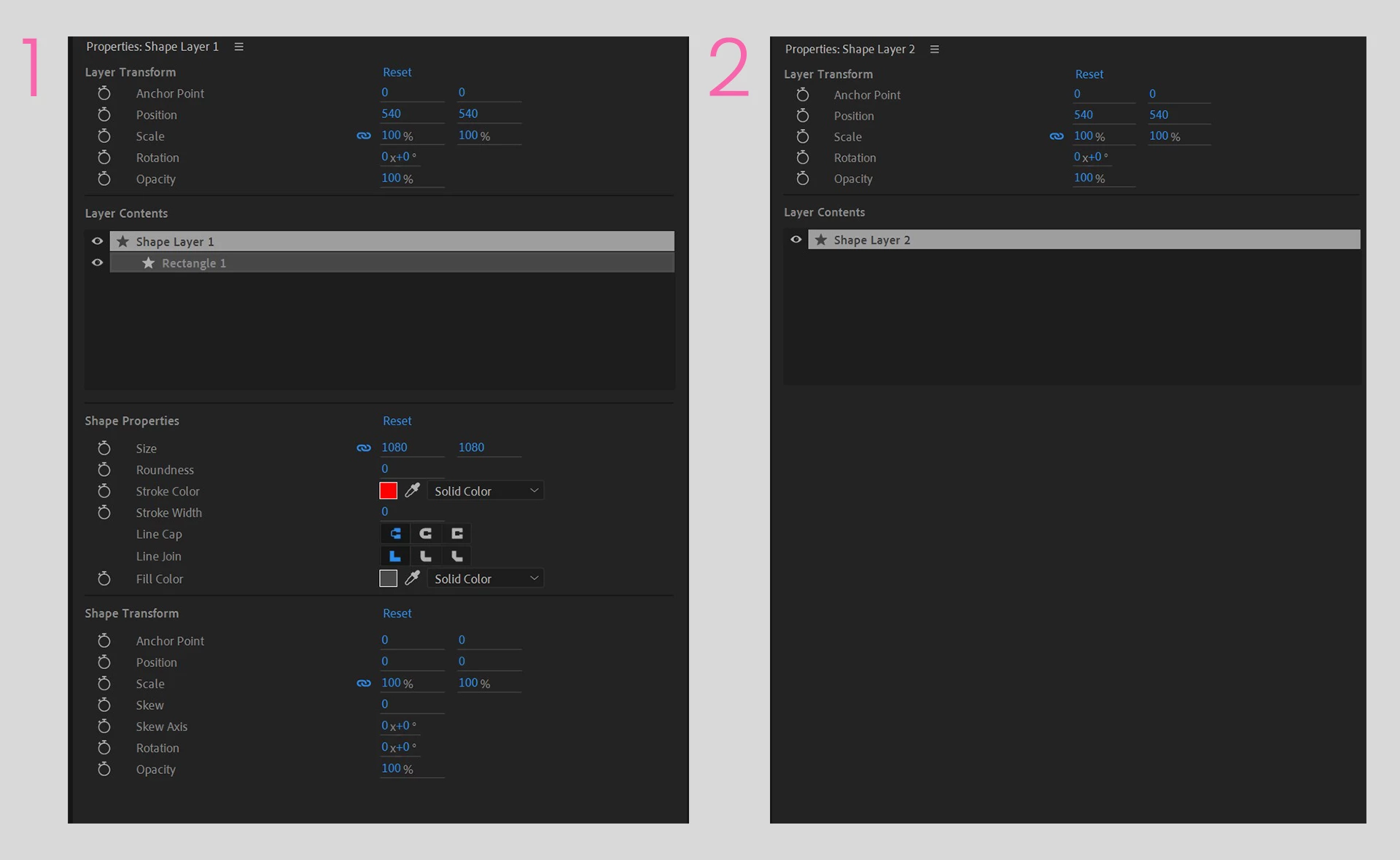
When I create a shape layer by double-clicking the toolbar icon, I can access the expected controls in the Properties panel (pic 1)


But when I create one using the menu, I only get access to the main transform controls in the Properties panel, not things like fill or stroke etc (pic 2)


I asked someone to test it on their machine and everything worked as expected, so it's something in my system that's causing the problem. Does anyone else have this issue?

Win 11 PC - AMD 5950x - RTX 3080 - 128 GB RAM


This topic has been closed for replies.

4 replies

arewenotmen
Known Participant
July 11, 2023

Hi John,


Thanks for taking the time to explain. I'll give it a go tomorrow but I'm sure what you're suggesting about the empty group will work. 


For some reason I've always gone through the menu for creating shape layers rather than the toolbar - not sure why, but I've been doing it for so long now I find it hard to switch!


Thanks again for your help with this. 

JohnColombo17100380
Community Manager
Community Manager
July 11, 2023

Hi @arewenotmen,

Thanks very much for reporting this issue. We've had some other similar reports and confusion around this issue.


The Properties panel currently requires any Shape elements (Paths, Fill, Strokes) to be contained within at least one Group before it will show their properties. If you add "Group (empty)" before adding the Rectangle and Fill, the Rectangle and Fill will be inside the Group and you should see them show up in the Properties panel. Please let us know if that doesn't work for you.


Since this behavior gives the impression of a bug, we'll be looking into an improvement/modification for a future version of After Effects.


Thanks again for reporting this issue,

- John, After Effects Engineering Team 

arewenotmen
Known Participant
July 11, 2023

Been chatting with Adobe on Twitter about this and they asked for a screen record so sharing it here too.


This is a new project, created in Safe Mode, with all third-party plugins disabled.


arewenotmen
Known Participant
July 6, 2023

I should point out that when I create a shape layer via the menu, it is after I then add, for example, a rectangle and fill, there is still nothing in the Properties panel.