
Participant
December 4, 2023

Some menus lose translucence in macOS Sonoma

  • December 4, 2023
  • 3 replies
  • 260 views

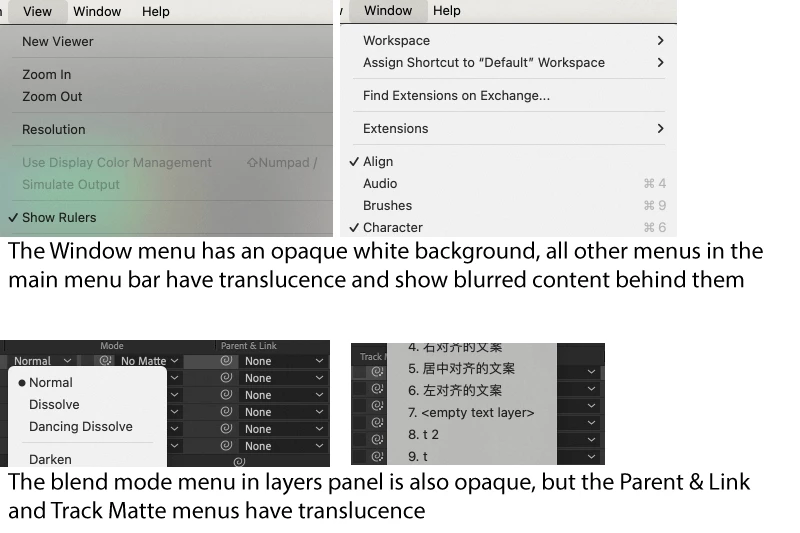
After upgrading to macOS sonoma, I found that the Window menu and blend mode menu are not transparent. The following screenshots are taken on Sonoma 14.1.1 (23B81) and After Effects 24.0.3 (Build 2).

It's only After Effects on my machine having this issue, other apps like Photoshop and Illustrator are good.

Does anyone else encounter this issue? I know it doesn't affect daily workflow, but it's just noticeable.
 

This topic has been closed for replies.

3 replies

Participant
December 22, 2023

Yes. The window menu and blend mode menu can't fit my laptop screen and have arrows. All the translucent menus appear completely on the screen.

Jenkmeister
December 21, 2023

@Simon329743443c30 Can you check if the non-translucent menus are larger than what can appear on the screen and have an up or down arrow to scroll the menu? Whereas the translucent menus appear completely on the screen? 

Jenkmeister
December 4, 2023

Yes, that's something we are investigating internally. We don't quite understand what Sonoma is doing to our menus. It seems like it has to do with if the menu scrolls offscreen or has up/down arrows, then it's solid. But otherwise it's not.