



Some third-party plug-ins show garbled non-English UI text in After Effects 26.2
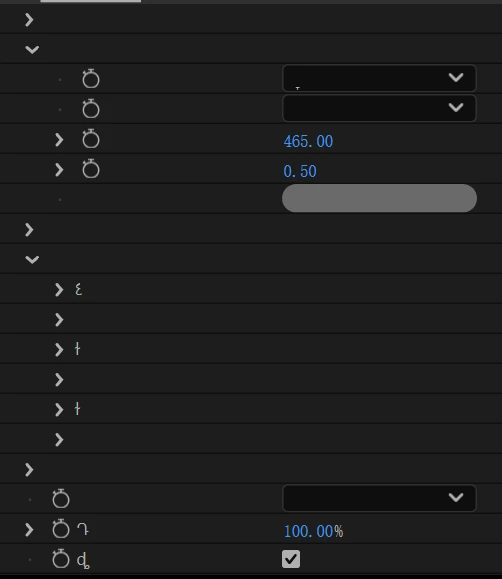
After updating to After Effects 26.2, I noticed that some third-party plug-ins are showing garbled text in their UI controls.
In my case, I can clearly reproduce this with plug-ins that include Chinese text, and I suspect it may also affect other non-English or non-Latin languages as well.
What made me pay attention to this is the 26.2 release note saying:
“Effect names are now correctly encoded for Unicode characters when accessed by third-party plug-ins.”
So I’m wondering if this may be related.
One detail that seems important: if I open project files that already use these third-party effects in Safe Mode (without loading third-party plug-ins), the Chinese parameter names display correctly. But in normal mode, some of those same labels appear garbled.
I’m not the plug-in developer, just an end user reporting what I observed in testing, so I can’t tell whether this is an AE issue, a plug-in compatibility issue, or an interaction between both. But the behavior seems to have changed after updating to 26.2.
If needed, I can provide screenshots or a screen recording.
 AdChoices