

Matorototo
Participating Frequently
June 23, 2023

Strange cropped/repeated edge when exported in media encoder

  • June 23, 2023
  • 42 replies
  • 26292 views

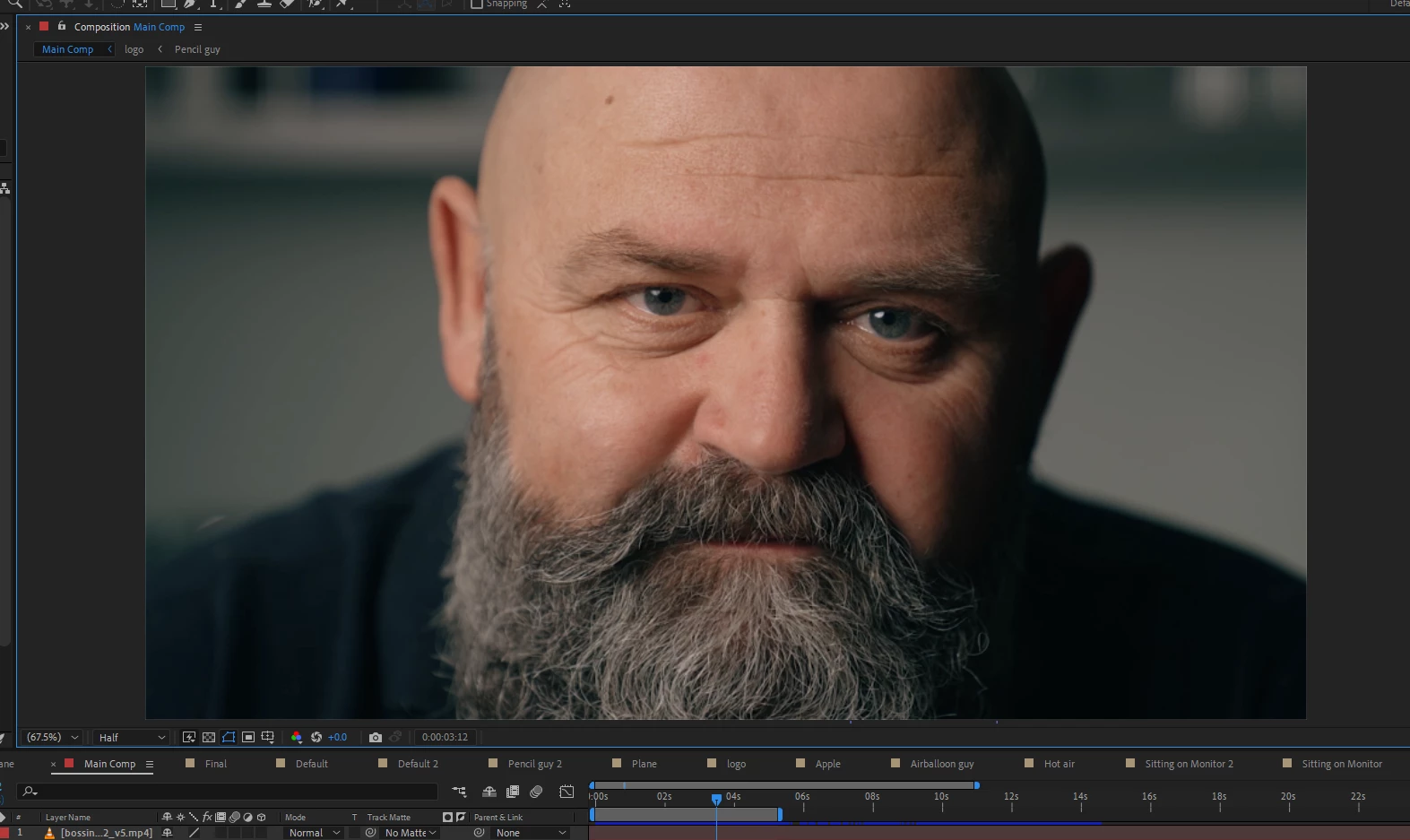
For some reason media encoder changes the position and repeats a section of my composition when exporting.

After effects Preview
Media encoder output
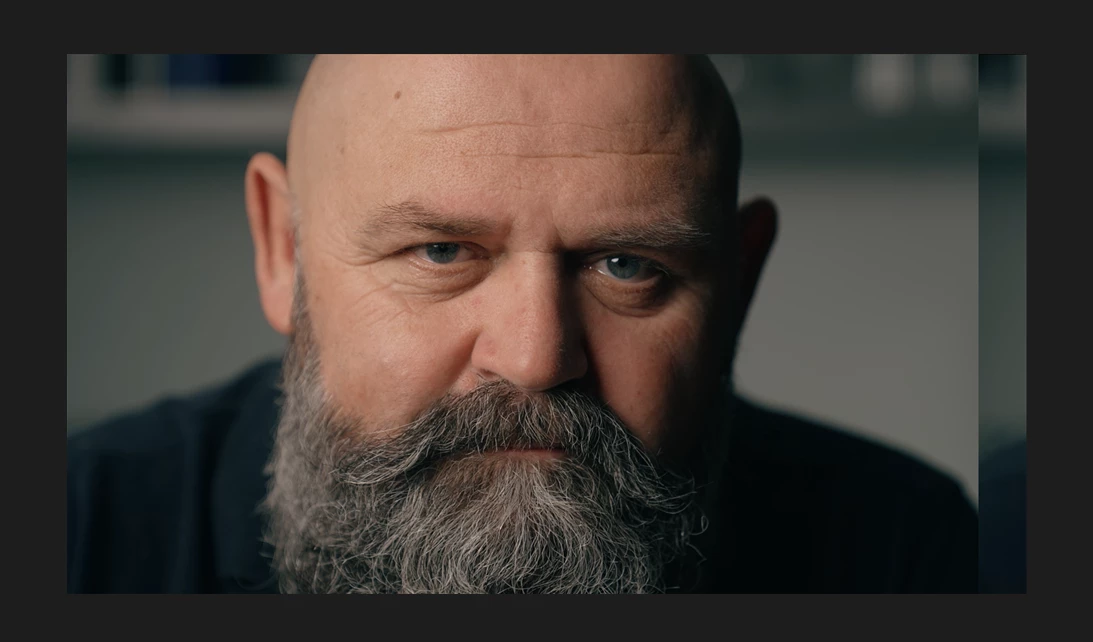


This issue occured when I tired to render the composition in Quicktime Format. It affects the output of the video, and when I try to switch back to H.264, the updated position+repeated edge persist.

I managed to replicate this exact issue with a totally different composition using the same steps which makes me think its a media encoder issue.

42 replies

Participant
July 19, 2023

Mein zu bearbeitendes Footage wird mir perfekt zentriert und den Screen auffüllend angezeigt. (Siehe Screenshot 1)

Der finale Render jedoch ist verschoben und das Bild wiederholt sicht. (Siehe Screenshot 2)


Hat jemand eine Idee woran es liegt / wie man dieses Problem beheben kann?


Vielen Dank im Voraus!

Mylenium
Legend
July 19, 2023

Bekanntes Problem. Hardwarebeschleunigung ausschalten und/ oder auf 23.4 downgraden.


Mylenium

Participating Frequently
July 19, 2023

Hi everybody,

I created an After Effects composition template in 1080x1080. I use it for some weeks and I never had a rendering issue, but now when I export with Media Encoder, my creation is shifted to the left and a stripe appears on the right side. 

I USED A PICTURE FROM PEXELS JUST TO SHOW YOU AN EXAMPLE OF MY ISSUE.

How it appears in AE : 

How it appears in Media Encoder export preview and after exporting (in mp4 and GIF)


I do this in the same way since a lot of tine and never had this issue before. Any idea of how to resolve it please? Many thanks!

CoSA_DaveS
Adobe Employee
Adobe Employee
July 13, 2023

To install an older version using the Creative Cloud desktop app, click on the dot-dot-dot menu next to the app name and choose Other versions:


Participating Frequently
July 11, 2023

how to do that ?

Community Manager
July 10, 2023

Yes, we investigated internally and the problem is that a change was made to the size of a structure used for communicating between applications with Dynamic Link on Windows in the 23.5 release without also bumping the protocol version. So any app with a 23.5 version sending frames to an earlier 23.x build will hit this issue.

I'm actually on the Character Animator team, so the first report I saw was between the latest Character Animator build (we haven't needed an update since 23.1) and the latest AME (23.5). The answer there is to downgrade AME to 23.4, but if you don't need Character Animator, you can also synchronize the apps you need (AME and Ae, for example) to 23.5, the problem is when you are using apps spanning that 23.4 <-> 23.5 boundary across processes. (you can also see it using Dynamic Link between Ae and Ch and the same applies to other cross process usage)


Dan Tull

Adobe Character Animator Team

Participant
July 8, 2023

Out of all the suggestion I tried; installing a earlier verson of media encoder was the one that worked for me

Participating Frequently
July 7, 2023

Having same issues after updating just today. Tried the GPU Accelerated Rendering suggestion and still getting the error.

JosefinaMandarina
Participant
July 6, 2023

Hola a toda la comunidad de Adobe! Necesito ayuda con un problema de renderizado de videos que no puedo solucionar. Después de renderizar los videos, aparecen con fallas, como si estuvieran desplazados completamente hacia la derecha, y esa porción recortada aparece en el borde opuesto del video. He intentado exportar proyectos que antes funcionaban correctamente, y también he probado renderizar tanto desde After Effects como desde Adobe Media Encoder. ¿Alguien puede ayudarme a entender y resolver este problema de manera más clara? Gracias de antemano!

Mylenium
Legend
July 6, 2023

This is a known bug. Downgrade to 23.4 and/ or turn off hardware acceleration.


Mylenium

JosefinaMandarina
Participant
July 7, 2023

Thanks!!!


Participant
July 4, 2023

The exact same issue here.

Participant
July 4, 2023

Hi everyone! 


Weird error i am experiencing, everytime i'd like to render this composition i have. The preview and render shows everything but 20px to the left or right. Can't find why this is happening. 

I've attached a screenshot of the error + settings


Thanks for the help.

Mylenium
Legend
July 4, 2023

It's a known issue. Turn off hardware acceleration or downgrade to 23.4.


Mylenium