
Participant
October 6, 2024

Stroke disappears when paths overlap

  • October 6, 2024
  • 1 reply
  • 151 views

When adding a stroke to a shape, it'll dissapeaer if the shapes paths overlap.
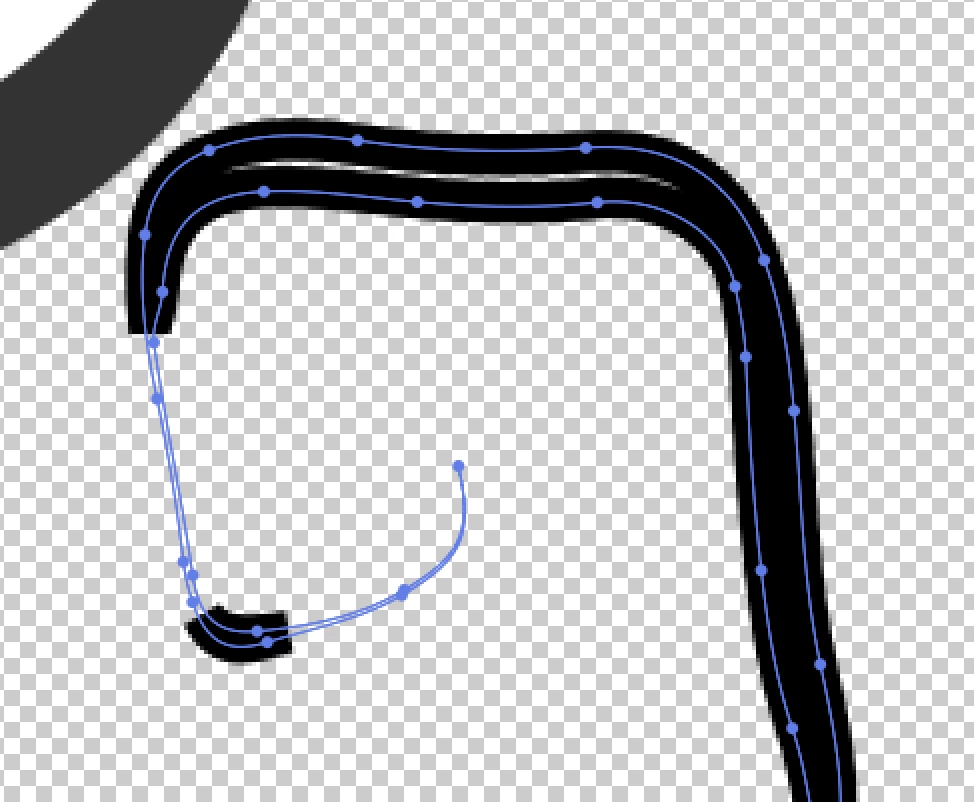
I tried offsetting the stroke, but I still cannot get it to function the way I want it to. 
Expected behaviour would be to have the trokes overlap one another, not vanish. 

If anyone knows any work arounds, I could really use the help. This is very frustrating. 

1 reply

nishu_kush
Legend
October 7, 2024

Hi there!


I’m sorry to hear you’re experiencing this issue. Could you provide more details about your project? Specifically, are there any particular settings or effects applied to the paths? Sometimes, overlapping paths can cause rendering issues depending on the stroke settings and layer modes.

If possible, could you share the sample project file that repeats the issue? This would help in diagnosing the problem more accurately. Feel free to send it via DM if you prefer not to share it publicly.

Looking forward to helping you resolve this!


Thanks,
Nishu