


Participant
May 11, 2023

Struggling to relink files on PC from a profile file made on Mac

  • May 11, 2023
  • 5 replies
  • 796 views

Hey,

I've spent most of my afternoon trying to fix a bug. Long story short, I've recieved a file from a mac which requires me to relink some assets. (I already had the assets from another project file I was working on) when I try to relink them I get the error "After Effects warning: Invalid ascent count '0'". This is happening on MP4s MOVs and PNGs, probably other file formats too... I have 500 files to relink...

The strange thing is, in my other project file I can relink things fine. Also, I can directly import the files without getting the error and they work fine. So the files themselves don't seem corrupt. 

Is this a new bug? Or a long issue between mac and PC.
(For context, these are a few of the files I'm trying to relink, I've tried coverting them to mp4, changing the name, everything... and always get this error)
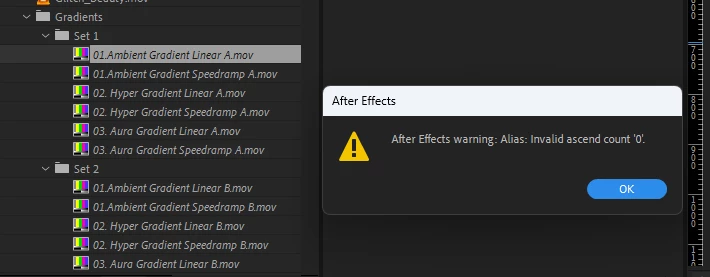


Any help would be amazing,

Danny


5 replies

Participant
February 1, 2025

I'm having the same problem linking .mp4s from Mac to PC it's 2025 now. Ugh

Real Sock Monkey Legends
Participating Frequently
July 9, 2024

We have a new NAS, and relinking large After Effects projects using raw Canon stills is a major problem.  Our previous system used a SAN (SmallTree) and the projects we have from the past were created using assets on that SAN.  Now, when we try to reconnect to our assets that have been moved to the NAS (a Qnap device) After Effects crashes when I try to relink an assets.  Is there a work around for this, or some other way to get our data to link up?  We use the same system with Premiere Pro, and our projects are relinking to media just fine in Premiere, but After Effects is definately a problem.  Any help would be nice.

May 11, 2023

I actually don't fully understand how common this is. We have a repro in a test project but it's not an error that we see reported often. If you do see it happening with other projects, it'd be good to know. I'll also see if we can find a simpler fix to at least remove the unneccessary error sooner than later.

Participant
May 11, 2023

Ah... Yes I do. I found that I can relink everything on my external harddrive via my mac... then open on my PC without having the issue. 

How common is this issue? I've recently switched over to PC and I'm wondering if I will encounter this often. Could be an issue for me.

May 11, 2023

It's a long standing issue. If you still have access to the Mac, you can try to do a Collect Files to create a new folder of the content and take that to the Windows machine. The error you're seeing is AE trying to follow the path to the file but it's been saved with a Mac specific file path and AE fails on that. The bug is in the queue to get fixed but it's a deeper architectural change we haven't yet sorted through.