



The . key on the numeric keypad no longer plays audio properly. It should play from the correct place of the audio matching what the place in the UI and what matches the space bar preview, but it's off by a second or so.
I’ve used the . key (on the numeric keypad) to preview audio when adding markers since 2007.
In AE 26.0 (build 67) this function now no longer works. When I hit the audio preview key, the start time of out by approximately 1 second (which makes it unusable). The . audio preview was good because after you play, the CTI would still be where you left it.
When I preview with the spacebar, the CTI moves and stops when you hit stop.
My primary reason four this is when i am marking up audio - music or a voiceover.
I’m on Windows OS - 11 - 25H2 - Windows Feature Experience Pack 1000.26100.291.0
AMD Ryzen 7 9700X 8-Core Processor
Nvidia Studio Driver - 591.74 - Mon Jan 5, 2026
misc extra detail:
NVIDIA system information report created on: 02/10/2026 14:51:27
NVIDIA App version: 11.0.6.383
Operating system: Microsoft Windows 11 Home, Version 10.0.26200
DirectX runtime version: DirectX 12
Driver: Studio Driver - 591.74 - Mon Jan 5, 2026
CPU: AMD Ryzen 7 9700X 8-Core Processor
RAM: 96.0 GB
Storage (5): SSD - 1.8 TB,SSD - 3.6 TB,+3 more
Graphics card
GPU: NVIDIA GeForce RTX 5070 Ti
Direct3D feature level: 12_1
CUDA cores: 8960
Graphics clock: 2572 MHz
Resizable BAR: Yes
Memory data rate: 28.00 Gbps
Memory interface: 256-bit
Memory bandwidth: 896.064 GB/s
Total available graphics memory: 64233 MB
System video memory: N/A
Shared system memory: 47930 MB
Dedicated video memory: 16303 MB GDDR7
Video BIOS version: 98.03.58.00.c8
Device ID: 10DE 2C05 144C196E
Part number: G147 0060
IRQ: Not used
Bus: PCI Express x16
Display (1): DELL U2725QE
Resolution: 3840 x 2160 (recommended)
Refresh rate: 120 Hz
Desktop colour depth: Highest (32-bit)
Display technology: G-SYNC Compatible
HDCP: Supported
Display (2): DELL U2718Q
Resolution: 3840 x 2160 (native)
Refresh rate: 60 Hz
Desktop colour depth: Highest (32-bit)
HDCP: Supported
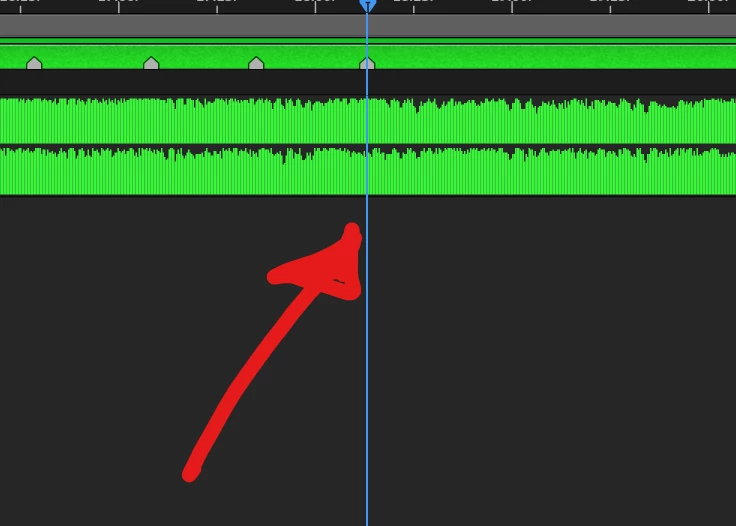
The . won’t play from where the CTI, it plays about 1s later
 AdChoices