

Known Participant
September 9, 2026

Timeline have residuum of scruber line sometimes in AE26.5

  • September 9, 2026
  • 2 replies
  • 7 views

I have some mess after timeline scrubber move sometimes after update to 26.5
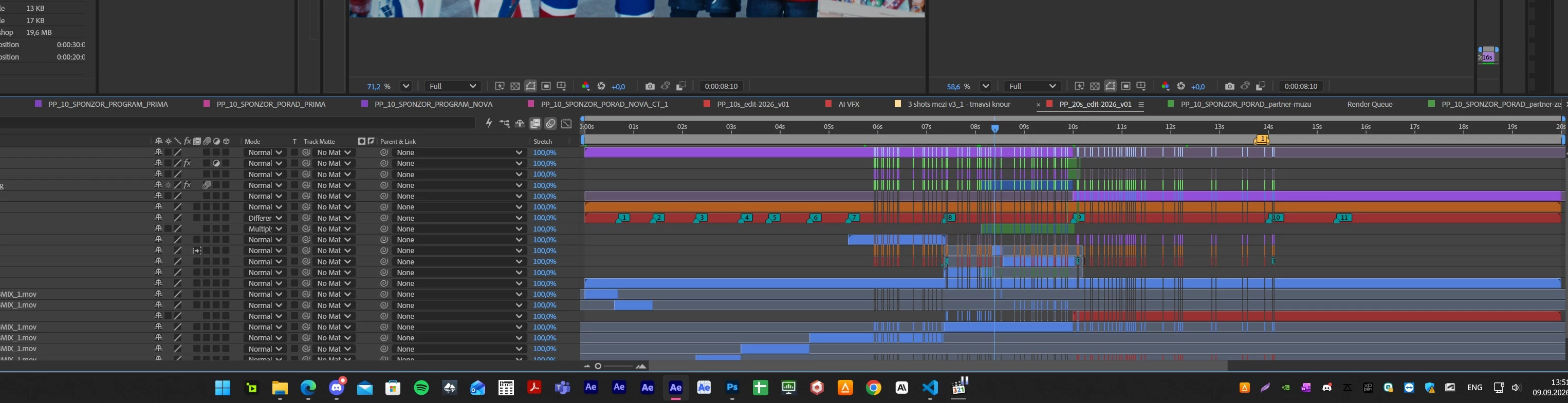


    2 replies

    Nishu Kushwaha
    Community Manager
    Community Manager
    September 9, 2026

    Hi, thanks for the report and screenshot. Scrubber trails/ghost lines are usually a UI redraw issue.

    A few things worth trying:

    1. Toggle hardware acceleration off. Preferences > Appearance > uncheck "Hardware Accelerate Composition, Layer, and Footage Panels" > restart AE. If the trails stop, the issue is in the GPU-accelerated UI path.

    2. Update your GPU driver from the manufacturer's site.

    3. Try running AE in Safe Mode with third-party plug-ins disabled: https://adobe.ly/4ypsAPO

    A few details that would help:

    - Your system specs.

    - Your GPU model and driver version.

    - Does this happen consistently, or only after a period of use?

    Let me know what you find.


    Thanks,

    Nishu

    Known Participant
    September 9, 2026

    GPU nVidia 4070. Latest drivers. there was no plugins used and I did not try it because I was forced to downgrade to 26.3 as we needed to finish our jobs quickly. That glitch pop up sometimes. Restart helps, then it happen again after a while.. Usualy I do not  instal new versions in studio and test them at least few days at home, but now somehow accidentaly AE updates automatically - I think the autoupdate switched on after some CC ap update--
