

Participant
November 13, 2025

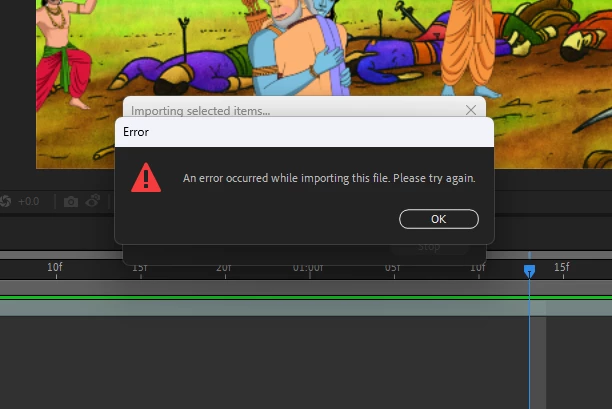
Unable to import FLA files into After effect, Importing error in AE

  • November 13, 2025
  • 2 replies
  • 52 views

"An error occurred while importing this file. Please try again"

Animate cc23.0.1 and AE version 23.0, Operating system win 11,
 

2 replies

Warren Heaton
Community Expert
Community Expert
November 13, 2025

@Sanjay Pol 

To expand on @nishu_kush's reply, you can install After Effects 24.x or 25.x without removing the version that you're currently working in (23.0).  Just make sure that "Remove old versions" is disabled in Creative Cloud Desktop.


If importing the FLA into a 24.x or 25.x works as expected, you can then use File > Save As > Save a Copy as 23.x.  The resulting After Effects project file will open in the older version of After Effects that you are working in.

If it turns out the FLA does not import as expected in a newer version of After Effects, then you'll want to patiently export SWFs from your FLA that can then be imported into After Effects directly.  This is manually doing what the FLA Importer plug-in does when it's working as expected.


- Warren

nishu_kush
Community Manager
Community Manager
November 13, 2025

Hi Sanjay,


Thanks for reaching out. Can you test this on the latest version? This issue was fixed a few versions back.

Let me know how it goes.


Thanks,
Nishu
