
Inspiring
May 22, 2025

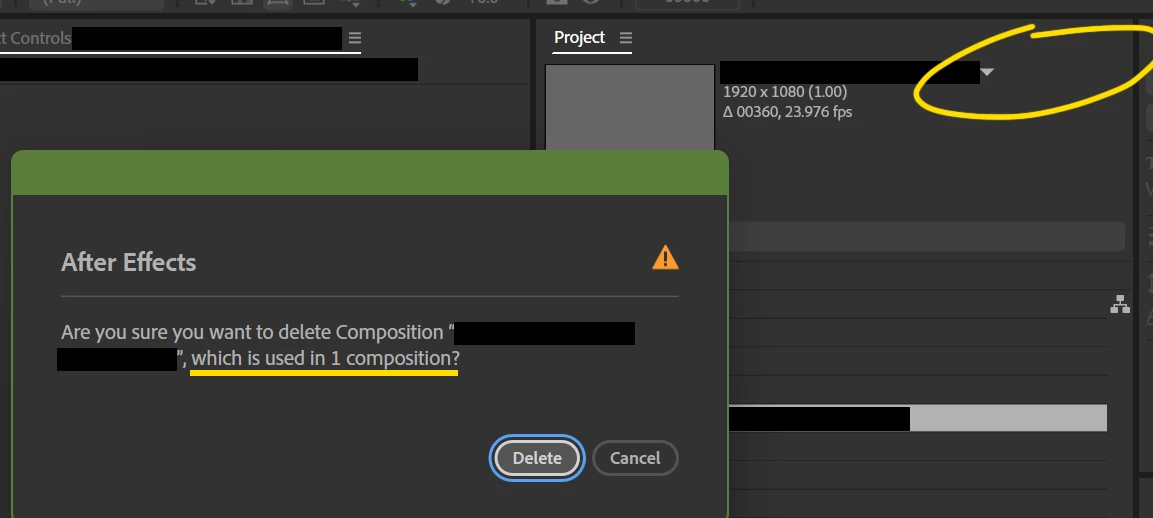
When deleting Unused comps, After Effects says comp is used when it is not

  • May 22, 2025
  • 10 replies
  • 820 views

More than once, in different projects that have nothing to do with each other (no merges or project imports), I have had After Effects alert me when deleting unused comps that they're in use. I know they're not in use because I'm familiar with the projects and After Effects itself shows that these comps are not in use by not displaying a "used X times" message next to the comp name in the project panel.


Steps - search bar, type in Unused, select a comp listed, hit delete, get the alert. Finish by smacking After Effects for now having a problem with a process that didn't use to have a problem.


v 25.2.0 Build 131

Windows 11
 

10 replies

David.Arbor
Community Manager
Community Manager
July 28, 2025

Hey, not a problem at all! I appreciate your responses and williness to investigate it further. No big deal that it's not a real bug (actually, hooray for it not being a real bug!).


Take care,

 David, After Effects Engineering Team

sskaz
Inspiring
July 28, 2025

Ok, I think I see what’s happening. I think I was too focused on Essential Graphics. The prompts I was describing relates to if a comp is empty or not—not because it previously had some EGPs.


Here’s another screen recording: https://imgur.com/a/ae-prompts-when-deleting-comps-lg3KXxD

0:04: Delete an empty comp: No prompt.

0:14: Delete a comp with an EGP: prompt.

0:20: Delete a comp with a layer: prompt.

0:25: Delete an empty comp, that used to have an EPG: no prompt.


This all seems by design and solid reasoning. Sorry I went down the wrong rabbit hole!


David.Arbor
Community Manager
Community Manager
July 28, 2025

@sskaz , you said the error comes up when deleting a comp that "previously had Essential Properties." Can you confirm that the comp has no EPs before deleting? I can reproduce the scenario you're talking about when deleting a comp that contains EPs (even if the comps isn't used anywhere else), but I believe this might be as-designed because Comps don't have to be pre-comped in order otherwise make them MOGRTs.


Thanks,
- David, After Effects Engineering Team

sskaz
Inspiring
July 25, 2025

I spoke too soon. I tested this again and I get a different alert (“Are you sure you want to delete Composition "compname"?) when deleting a comp that previously had Essential Graphics properties and is not used in any other comps. At least still doesn’t erroneously say it’s being used…


This doesn’t match normal behavior when deleting other unused comps, where it just deletes without an alert prompt.

sskaz
Inspiring
July 25, 2025

Thanks for following up, @David.Arbor. I haven’t noticed it come up while working. I just replicated my steps from my earlier post and can confirm it looks to be fixed. Thanks!

Inspiring
July 25, 2025

@David.Arbor thanks for the followup acknowledging the bug. I have not experienced it in 25.3.2.


But like whack a mole, Follow Cursor under Preview -> Magnification is now broken (it doesn’t Follow regardless Legacy or Smooth), but I reckon I’ll submit a new ticket for that.

David.Arbor
Community Manager
Community Manager
July 23, 2025

Hey @Marc Trzepla,

Thanks for reporting the issue. I know it's been a bit since you posted, but I see that you filed the bug against AE 25.2. This issue was fixed in 25.3, have you or @sskaz  updated since then?


Thanks,
- David, After Effects Engineering Team

Inspiring
May 30, 2025

For the Adobe peeps who might be fixing this, none of my projects that exhibited this issue had Essential Graphics. One pjct literally had two comps made from drag-and-drop sequences, neither used in the other, I deleted one just because and immediately got the popup.

sskaz
Inspiring
May 30, 2025

I got this problem recently as well. It happens if the comp you’re deleting ever had any Essential Graphics properties.


Here’s a screen recording showing how to reproduce it: https://imgur.com/a/ae-warning-when-deleting-unused-comps-that-previously-had-essential-graphics-properties-XJpzPA6

(Today I learned you can only add attachments in the 1st post, not a reply. Sad. imgur won’t show the video at full size but should be easy enough to follow along.)


In my recording, I show trying to delete a precomp when it’s still in use and get the proper in use warning. If I remove it from the parent, then try to delete it, no warning as expected. Then I add an Essential Graphics property to the precomp and try to delete it, then as expected, I get the warning that is has EG properties.


Then I remove all the Essential Graphics properties, confirm it is not used in any parent comps, and then try to delete it and I get the comp is in use warning even though it’s not.


Edit: I can confirm the warning still appears after quiting AE and re-opening the project, and after importing the project into a new blank project.

Community Expert
May 23, 2025

Try opening up the flow chart to see where the comp is being used. I have never experienced a situation where that error message did not actually point to another composition.