

With all the same settings for import, project and render, the colors look different for me and a coworker.
Hi. I work in post. We usually import an image sequence of cr2 / raw footage into After Effects, it shows a preview on the Camera Raw window, where we leave everything as it is by default, with Adobe Color profile.
The producer let us know that my renders were looking a bit more desaturated and kind of dark, while my coworker's was just as expected, bright and vivid colors.
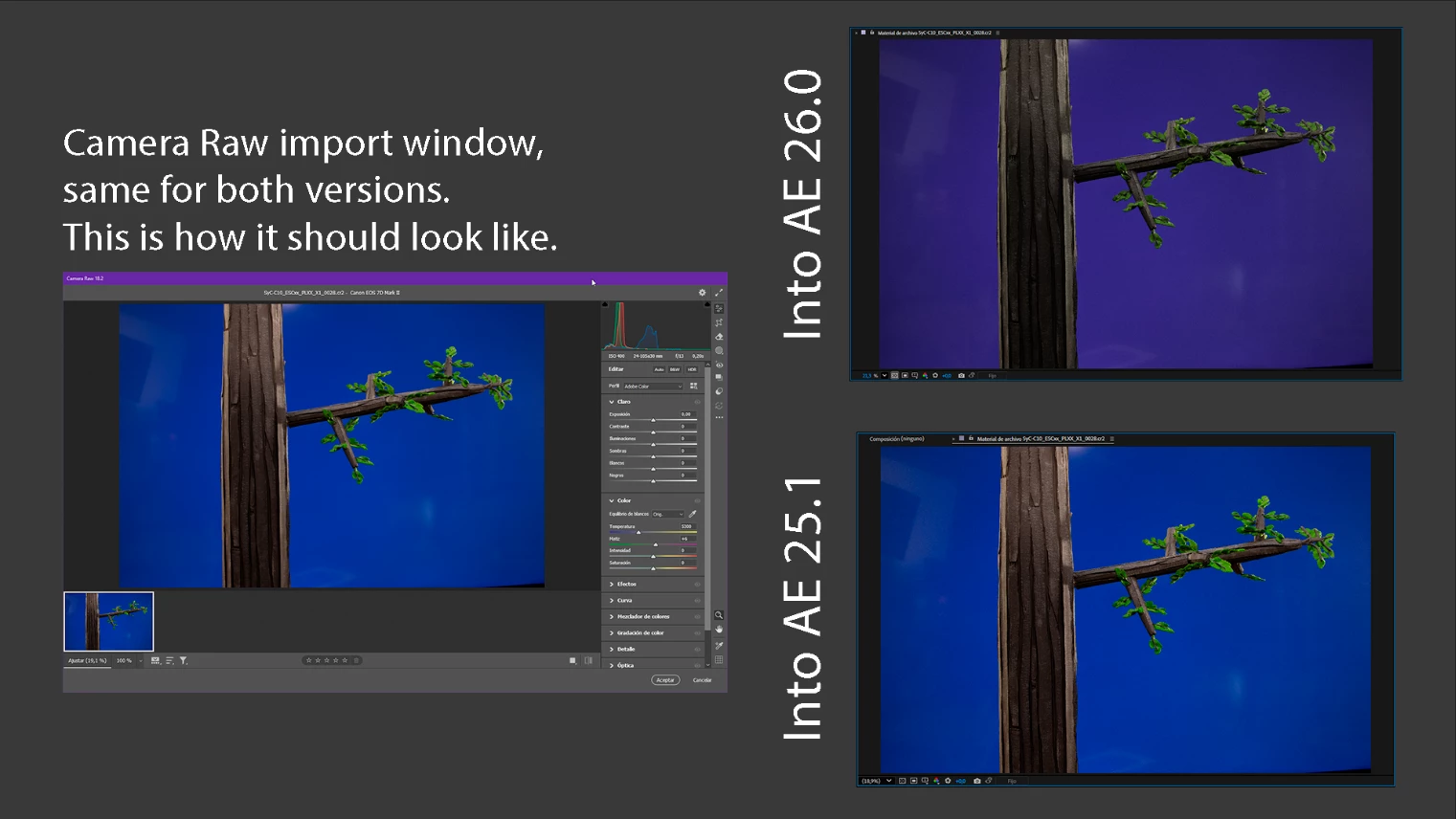
We rendered in Quicktime, with Apple ProRes 4444, we double checked all of our settings, everything was the same. The only different thing was the AE version. He was working with 2025 (25.1) and I was working with 2026 (26.0). I downloaded a previous AE version, imported the footage and it looked just fine.
Overall, this seems to be a specific 2026 version problem. Please fix this asap. Luckily, we found a way for importing all my work into a past version of AE and it was an instant fix, otherwise it would have been a problem for the person working the color after me.
Thanks.
 AdChoices