
Participant
November 10, 2022

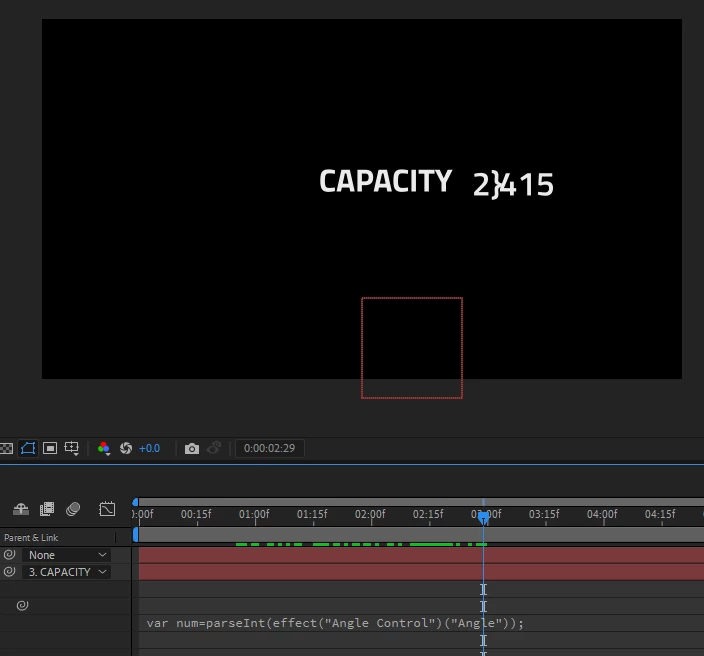
With the new upgrade Expressions doesn't work and spit out } curly brace instead of comma.

  • November 10, 2022
  • 4 replies
  • 305 views

I don't know if this happens to you. 

var num=parseInt(effect("Angle Control")("Angle"));
num.toLocaleString("en-GB");

I tried these expressions in an old version AE 2020 it worked fine. But when I tried it in AE 2023 it is spitting out } this curly brace instead of comma. 
This topic has been closed for replies.

4 replies

JohnColombo17100380
Community Manager
Community Manager
November 30, 2022

Hi @Janel270731500tlp,

Thank you for reporting this issue. I'm also not able to see the curly brace instead of the comma. Would you be able to share your project file?


Also, what language is your OS running in? Is After Effects installed using that same language?


Thanks for reporting this issue and for any further information you can provide,

- John, After Effects Engineering Team 

Mylenium
Legend
November 13, 2022

What language are you actually on? What is your default delimiter set in the system preferences? Anything else you can tell us?


Mylenium

Participant
November 13, 2022

It doesn''t work for me, I tried using different fonts but still does the same. I tried it in different computers, one with intel based laptop and the other with Ryzen processor.

Dan Ebberts
Community Expert
Community Expert
November 11, 2022

It works for me in AE 2023--I get a comma, as expected. Does it make a difference which font you use?