

_Maik
Known Participant
February 1, 2025

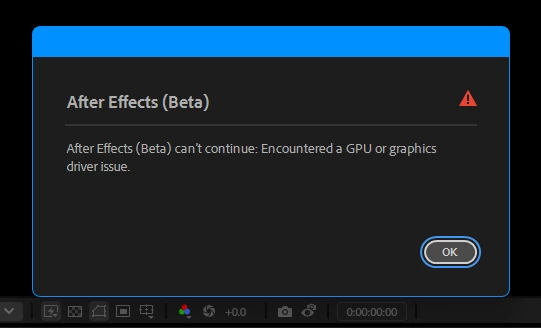
After Effects can't continue : Encountered a GPU Or Graphics Driver issue
  • February 1, 2025
  • 16 replies
  • 4569 views

I tried to increase the volume of my system (volume icon, "taskbar") my screen froze and went black and then that error came out! my GPU is a Gtx 1660 (driver studio last update "yesterday") this problem already It even comes from 2023 but before it did not give this message... it only turned the screen black and in the worst case the video was not given again but rather I restarted the pc

16 replies

Participating Frequently
October 17, 2025

One more thing: In the display settings, disable Hardware Accelerate Composition, Layer, and Footage Panels, and in Import, disable Hardware Accelerated Decoding.

Participating Frequently
October 17, 2025

After Effects can't continue: Encountered a GPU or graphics driver issue (I FIXED IT)

UPD: Basically, all you need to do is: 1. Remove the drivers using DDU. 2. Roll back the Studio driver to version 537.58 (Windows 11 in the link, download it for your Windows version). 3. Uninstall AE. I uninstalled it using Revo Uninstaller without scanning. 4. Remove everything related to AE and Creative Cloud using the Everything program. In the search bar, type: After Effects / Creative Cloud > Ctrl + A > Del. 5. Be careful here. Remove GPUCache, but only the one related to Adobe, AE, and everything else related to AE. 6. Download any version you need. I downloaded 2025, preferably to an SSD. THAT'S IT, YOU'LL NEVER CRASH AGAIN, NO MATTER HOW MUCH YOU ALT-TAB.


gtx 1650

ryzen 7 5700x

16 gb

Participating Frequently
October 14, 2025

Okay. I was very surprised when it actually worked, even though it didn't completely solve the problem. Changing the compatibility mode in the properties of the After Effects exe file on Windows 8 really works. The problem remains, but crashes have become much less frequent. Before, I used to crash literally every time I pressed Alt+Tab, but now it doesn't happen as often, although the problem still remains.


P.S. Keep in mind that I reinstalled After Effects before doing this.

Participant
September 17, 2025

I'm facing same problem with same gpu

Participant
August 15, 2025

Same problem, also gtx 1650

Participant
July 23, 2025

im facing the same problem, my gpu is a GTX 1650 but AE crashes even if i create a new empty project

Participating Frequently
July 18, 2025

same problem......how to fix it ?

Participant
July 14, 2025

Treid all valid Options as well as Reinstalling the SOFTWARE Drivers, Yet the error statyssame on GTX 1660 TI. 
There is no error on my other systems which have 1660 SUPER. Let me know if anyone found a better solution for it? 
Or Degradding the versions to something old might work? 


Participant
June 27, 2025

Guys, I've been dealing with this problem since the beginning of the year, and I finally solved it! I saw the post where @WellsMcKenzie suggested running AE in Windows 8 compatibility mode, and it worked! This video here shows how to do that, hope it helps solve your problems too.

Inspiring
June 27, 2025

Same here. Bug shows when I do something in AE and try for example to open a folder on my computer or minimize AE. It is 1 month or longer when I can't work. Adobe should pay us for problems with customers we have in oiur buisness. This is sick!