
Participating Frequently
July 18, 2025

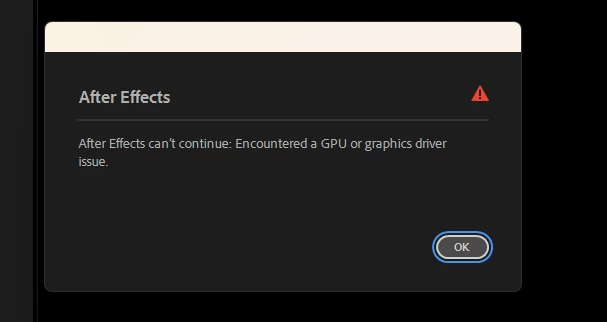
After Effects can't continue : Encountered a GPU Or Graphics Driver issue

  • July 18, 2025
  • 22 replies
  • 1434 views


While working, the screen suddenly goes black and then this error appears... I'm using a 2060 Super. I updated the driver, but the problem still happens. How can I fix this problem?
    22 replies

    Participating Frequently
    August 13, 2025

    Hi David,

    Thanks for getting back to me, and no worries about the delay.

    Yes, I did try your suggestion of closing all background apps and checking the taskbar to ensure nothing else was running. Unfortunately, the issue still occurs.

    I also tried creating a new user account, but the problem still persists.

    To answer your questions:

    • The problem happens on every project, not just certain ones.

    • I am currently using the [insert your composition renderer here — e.g., Mercury GPU Acceleration (CUDA)].

    • It happens with both 2D and 3D assets.

    • The error usually appears when I minimize After Effects to open another application or Google Chrome — the screen briefly goes black and then the error shows.

    • From what I’ve seen, this issue is not only happening to me; it’s more common among NVIDIA 16-series and 20-series GPUs..............

    David.Arbor
    Community Manager
    Community Manager
    August 12, 2025

    Hi @Anik_Sarkar9020 , sorry for the delayed reply; I've been out of town.


    I'm sorry you're still encountering issues, but I'm afraid I need more detail if we're to continue troubleshooting this. Your last reply simply said that it's not working and you "tried everything." Does that mean you tried my suggestion of closing all background apps and looking at ones that were running in your task bar? 


    Another suggestion is to temporarily create a new user account. This can help let you know if there's a conflict in your current account or a larger problem with your machine. 


    • Can you also tell me if this is happening on every project or just certain ones?
    • Which Composition Renderer are you using? 
    • Is it happening with 2D or 3D assets or both?
    • Can you make a screen recording of yourself working when this error comes up?


    I do want to help figure out this issue, but without anymore information, I can only make guesses.


    Thanks,
    - David, After Effects Engineering Team

    Participating Frequently
    August 3, 2025

    I've tried everything but it's not working... I'm unable to do this task because of this error.

    Participating Frequently
    August 3, 2025

    not work

    David.Arbor
    Community Manager
    Community Manager
    July 28, 2025

    Ok, the part about the error only appearing when you minimize AE is a key piece of information. My guess is that something else is aggressively taking hold of the GPU when you minimize After Effects and then it's not handing it back to AE when you refocus the app.
    If this were my machine, I would look at all background applications, starting with what's in my Task Bar at the bottom-right (by the clock) and see what might be using a lot of GPU resources. The easiest test to see if my hunch is correct or not is to quit everything that shows up in the taskbar, minimze AE, then bring it back. If the error doesn't occur, then you need to identify which of those apps is causing the conflict. Restarting your machine would bring all those apps back, then presumably the problem would return to AE.


    Thanks,
    - David, After Effects Engineering Team

    Participant
    July 28, 2025

    I’m using the latest Studio driver and the latest version of After Effects, but whenever I minimize After Effects, the screen suddenly goes black and this error appears. Please help solve this.

    David.Arbor
    Community Manager
    Community Manager
    July 28, 2025

    Thanks for trying the latest update. The next thing I would try is running the option in the Studio driver installer to perform a clean install.

    Can you also go to Preferences > Memory & Performance and click the GPU Information button? Does that show your 2060 or perhaps your integrated GPU?


    Thanks,
    - David, After Effects Engineering Team

    Participant
    July 26, 2025

    I'm using the latest version(25.3.2), but the same issue is still happening.............Is there any solution for this?

    David.Arbor
    Community Manager
    Community Manager
    July 21, 2025

    The latest version of After Effects is 25.3.2. Your version is from more than a year ago. Can you please update from the Creative Cloud Desktop app?


    Thanks,
    - David, After Effects Engineering Team