



howiemnet
Inspiring
May 24, 2022

M1/ARM version doesn't gamma encode output of linearised project if color spaces match ?!?!

  • May 24, 2022
  • 3 replies
  • 370 views

This is a bit nuts so if anyone has a second to either confirm it's a bug or point out my idiocy it'd be much appreciated; there's a minimal project file attached.


I tend to work with a linearised sRGB working space, and when rendering to an sRGB output file, AE correctly applies gamma correction to de-linearise the image. Except it's not doing it on my M1 machine; it outputs a linear space file. The same project opened on Intel vs ARM64 machines show the problem:


To reproduce:

  • open the attached project. It contains an empty comp and a single render item.
  • look at the File > Project Settings... > Color dialog. It should show the project is using a linearised sRGB working space:
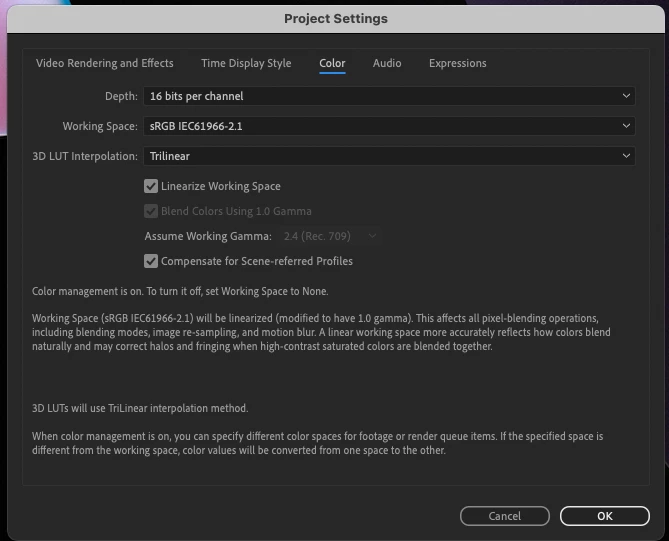
 

  • go to the Render Queue, click on the Output Module (ProRes), and go to the Color Management tab.


On my Intel Mac Pro, I see this:
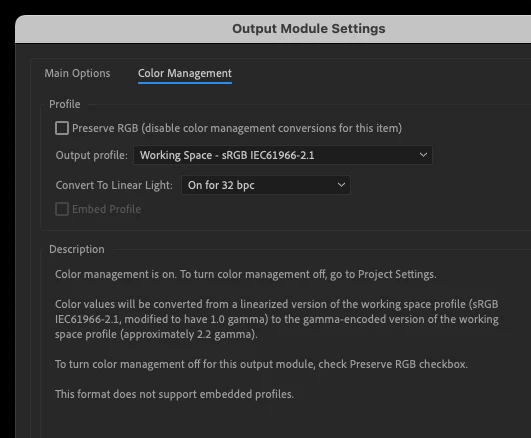
Note the middle paragraph - though I'm outputting to the same colour space as the project, AE knows it has to apply gamma.


On my M1 MacBook Pro, I see this:
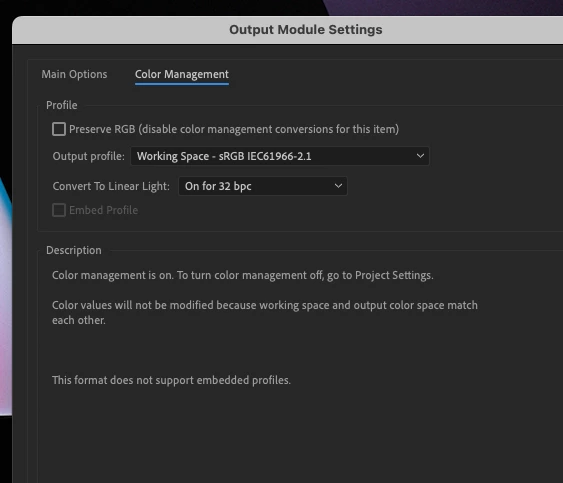
... which is patently wrong. Even if I manually select sRGB in the Output profile list, AE still doesn't recognise that the Working Space is linearised while the output space shouldn't be. The only way I can get a correctly gamma-encoded output is to choose something other than sRGB as an output profile (say, Rec.709) - which seems to nudge AE into recognising it has to gamma encode the output.


Same project, same version of AE Beta, on both machines. Vanilla installs on both, plus the same set of plugins.


Is this something I've done? I'm at a loss; never come across this before, and it's driving me crazy.

    3 replies

    howiemnet
    howiemnetAuthor
    Inspiring
    May 24, 2022

    Thanks John, clearing the prefs + a fresh install has cured it.


    Frustratingly (in a different way) I can't now reproduce the problem. It's not the output module (this was affecting PNG and EXR sequence renders as well as ProRes, so I'd kinda ruled that out), but what's weird is that restoring the old prefs folder doesn't bring the problem back. So I can render again (yay!) but I can't track down what/why it was happening (boo). Which is always annoying 🙂


    Still, I've got another bug going on that a fresh install hasn't cured, but now I know it's not prefs-related I'm a bit more confident about logging it 😉

    JohnColombo17100380
    Community Manager
    Community Manager
    May 24, 2022

    Hi @howiemnet,

    Thank you for reporting this issue, that is definitely frustrating. In opening your project, I wasn't able to see the same message on an M1 Mac without changing the "Convert to Linear Light" dropdown menu to "On", rather than "On for 32bpc". I saw the same "Color values will not be modified..." message when I created a new project with the same settings, which leads me to believe that either the Output Module "ProRes" is corrupted or you may have bad values in the application preferences.


    Try moving the preferences folder for After Effects (Beta), located at /Users/<yourUsername>/Library/Preferences/Adobe/After Effects (Beta)/22.5, to your Desktop while After Effects (Beta) is closed, then launch After Effects (Beta) to create a fresh set of preferences. Please let us know if the issue continues with the fresh set of preferences. Also, try creating a new "ProRes" Output Module and see if it shows the same issue.


    Thanks again for reporting this issue,

    - John, After Effects Engineering Team 

    howiemnet
    howiemnetAuthor
    Inspiring
    May 24, 2022

    Note: the first screenshot above shows the project set at 16bpc - I normally work at 32bit float, was messing with the colour depths to see if that made any difference (it doesn't as far as I can tell). Just note that this issue doesn't seem to be affected by color-depth; I've also turned off Hardware Encoding (ProRes), which doesn't seem to make any difference either.