

Setting the Track Matte of a Matte doesn't work
This is easier to explain with an example:

I have a text layer. I want this layer to be matted by TWO layers; Circle Matte AND Rectangle Matte. So I set the Text layer's track matte to the Circle Matte and I set the Circle Matte's track matte to Rectangle Matte:
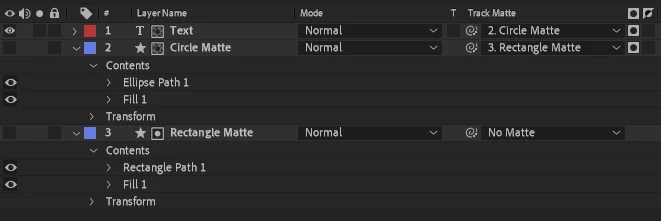
If we look at Circle Matte on its own, we see that it's been successfully matted by the rectangle:

...so you'd think that if I then set the Text layer's matte to this, we'd only see the area within that semicircle, but no, we get this:

The text is only matted by the circle and the fact that the circle has been matted by the rectangle is ignored. I've tried using both luma and alpha mattes, but it makes no difference. I'm fairly sure that when the Track Matte pickwhip system was introduced, Adobe said we could have "mattes of mattes" or something....this clearly isn't the case. Any chance of this bug being fixed?
I'm on AE Beta 24.3.0x23, but it's been like this for ages.


 AdChoices