
Participant
May 9, 2022

Transform Effect (Scale) breaks when you try to link one to another with an expression

  • May 9, 2022
  • 2 replies
  • 374 views

Creating an expression to link one transform effect scale to the other breaks.


Steps to recreate:

New project, new Comp. Add a solid and apply a Transform effect on the layer. Duplicate layer. Create expression link from the Transform effect (scale) to the other layer's Transform effect (scale). Error occurs.
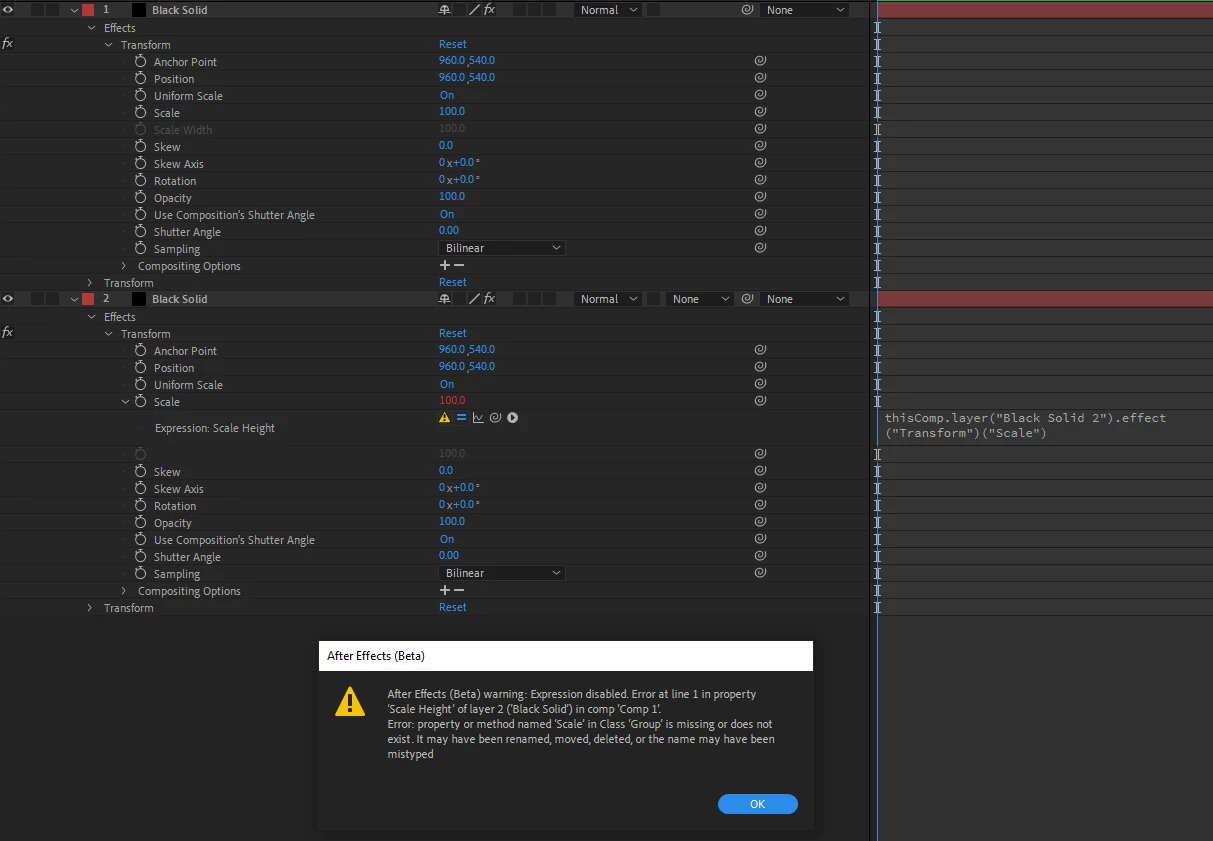


It looks like it's not taking into account the Uniform Scale checkbox option above it and is trying to maintain split dimensions and not finding that other dimension as it's currently hidden/not applicable.


2 replies

Participant
December 19, 2024

Greetings from late 2024!


The bug hasn't been fixed yet, I racked my brains until I came across this thread.


Dragging from alt really did solve the problem, but damn, Adobe, start working already 😄


Some bugs are many years old (for example, the Edit panel size for VR compositions does not resize if there are many of them and they are cut off) etc.

JohnColombo17100380
Community Manager
Community Manager
May 10, 2022

Hi @Herbie444,

Thanks for reporting this bug. We are aware of this issue; it is indeed related to the Scale property's ability to have its name changed between "Scale" and "Scale Height" based on the Uniform Scale checkbox.


While a fix is being investigated, there are a couple of different workarounds, with varying levels of robustness:

  1. Holding down Alt/Option while creating the expression link will create a link using the index of the property instead of the name, like this:
    thisComp.layer("Layer Name").effect("Transform")(4)​
    This will avoid the error and remain linked even if the Uniform Scale checkbox is toggled, making this the most robust option.
  2. Toggling the Uniform Scale checkbox after creating the expression link will clear the error, but it may return if the Uniform Scale checkbox is changed since this also changes the Scale property's name.


Thanks again for reporting this issue,

- John, After Effects Engineering Team