

Unable to change text things (eg. kerning in AE, sequence names in PPro)
Hello,
Earlier this week (Mon & Tues 19 & 20 Jan 2026) I was working on a project in PPro. Then I took a couple of days off. I'm not sure what version PPro that was, but today Ioaded up that project in PPro 26.1.1 Beta build 32. PPro immediately crashed, and I found the only way to load the project was to launch PPro, THEN open the project from the "recent projects" panel. Oh well, annoying but no big deal.
The first thing I wanted to do was duplicate them main sequence and rewname the new one with a newer version number. Weirdly, the only way I could get PPro to accept the new sequence name (I'd changed a 4 to a 5) was to tab out; pressing Enter or Return just moved the text focus down to the next item in the Project Panel and the sequence name reverted back to the "4" version. Again, annoying.
I then loaded up the corresponding AE project, and created a comp, added some text, and found a weird thing: If I try to edit the tracking of the text, the text layer (as in its Transform > Position) is MOVED up by about 200 pixels. I now can't replicate that, because no matter what I do with the Tracking, nothing happens at all. And also weirdly, the Tracking number is never blue and scrubbable; I have not clicked in the Tracking number box; this is just how it is in its default state:
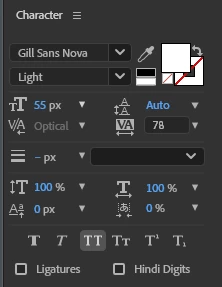
I have a suspicion what might be causing this, even though I haven't activated that feature.


 AdChoices