Participant
June 2, 2023

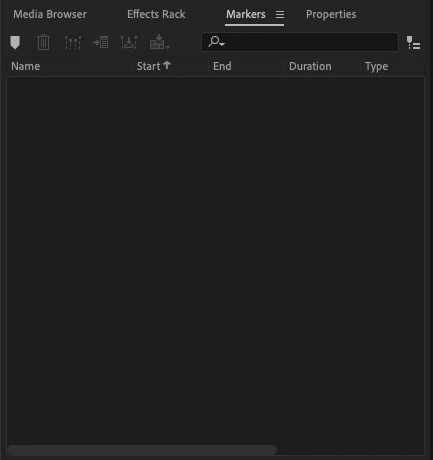
Audition does not show markers in Markers Panel

  • June 2, 2023
  • 14 replies
  • 3117 views

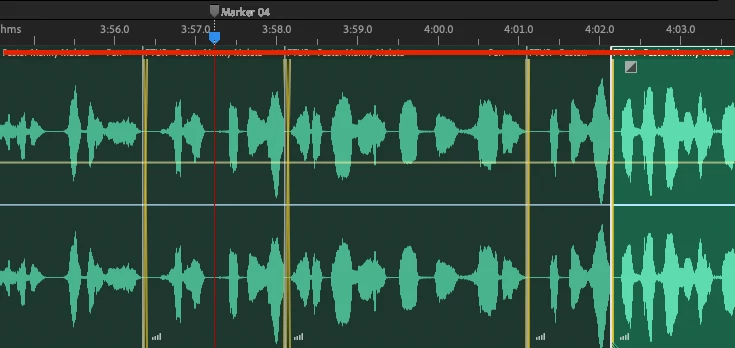
Issue: Audition does not show any markers in the Markers Panel when adding markers to a multitrack session.

  • Audition Version: 23.3.0.55
  • OS Version: macOS Monterey 12.1


Steps to Reproduce:

  1.  Create a new multitrack session and add audio file to a track
  2.  Add markers to any point in the timeline and Press M to add a marker.


Expected Result: Audition should list the marker in the Markers Panel where you can edit its position (and end, if ranged marker) and change its type.


Actual Result: Audition creates a marker but not list it in the Markers Panel, even after restarting the application.

14 replies

LittleGreenDog
Participating Frequently
September 1, 2024

Ah! Thank you so much for that excellent explanation!


I hadn't noticed this before today, and that's probably because I'm editing an unusually long clip (for me) with many edits, and it was driving me nuts how markers would appear and disappear. After reading your post, I checked the individual clips, and sure enough, some of my 'Session' markers were hidden among them.


I agree with Pariah Burke that there should be a mode that we can toggle on so Audition  makes only Session clips. Sure, I can see uses for Clip markers, but most of the time I want to make only Session markers.

D.R. Greenlaw - Artist/Partner, Little Green Dog | (Formerly Lead Digital Animator, DreamWorks Animation)
Pariah Burke
Community Expert
Community Expert
May 3, 2024

I agree, Steve: clip markers are highly useful and what the average Adobe Audition user most often wants. That said, a toggle switch or Preferences setting, coupled with better and more complete documentation of changes from Adobe would alleviate many users' frustrations and confusion.

Known Participant
November 28, 2023

thanks for this!!

SteveG_AudioMasters_
Community Expert
Community Expert
October 25, 2023

 Jim-Off-Grid I think you're somewhat behind the curve on this. People have been requesting clip markers - that, importantly, move with the clips - for a long time. It's taken the developers quite a while to figure out a system that lets both types of marker exist, and they have. They've figured out that most people actually want clip markers, and that's what the default settings are. If a clip is highlighted, then M puts a marker on that clip. If a clip isn't highlighted then it goes on the timeline, and can be exposed in the Marker list using the Show Markers of All Files button.


This is logical and sensible. There's nothing to fix as far as I can see. Your POV may be different, and that's fine, but I think you'll find that you are in the minority.

Participant
October 25, 2023

Problem sorted for me, thank you.

Participating Frequently
October 5, 2023

Okay, I've found the bug - We really should be getting paid to do you jobs, since we solve things that no Adobe employee bothers to figure out.
If any audio clip is highlited in a track then often it greys out the options for renaming the marker, or going to the marker position. Un-highlight the audio clip and the menu is accesible. 


Another point.
The two marker position thing is confusing and time wasting in my view, I can't understand why you would need to mark the clip as well as the track but if you did need this feature why make the marker automatically go to the clip any time a clip is highlited? When isn't a clip highlited? You should at least be able to choose if you want the default the marker to the clip or the track. It's frsutrating and slows production.


I'll be very curious to see if this ever gets fixed, I highly doubt it, but at least it's here for the others that are frustrated by silly little bugs in Adobe Audition.

Adobe Employee
August 17, 2023

Thank you @Jim-talk for providing the details. Can you please give one more info?
What happens if you make sure if no clip is selected in multitrack - for example if you click any empty space or in some empty track. Additionally, when "Show markes of all files" is enabled, you should be able to see all the markers(Clip and Session), but will be able to edit a clip markers if corresponding clip is selected or able to edit session markers if no-clips are selected.

Participating Frequently
August 15, 2023

In additon top this, the error is random. I just went through using several markers and not being able to change the names, deleted them all and started again and now it allows one to be changed.

Participating Frequently
August 15, 2023

Working on a session, if I add a Marker and then try to rename it, it highlites the Marker panel, as it shuold but doesn't show the marker. If I click "Show Markers of all files" it displays the session folder and the Marker but I am unable to change the name. 

Adobe Employee
August 2, 2023

@Jim-talk Can you please share(may be again) the issues in details you are running into
In case you are referring to empty marker panel when a clip is selected, refer my previous post.
Please let us know the autmation and plugin issue you are running into.