


Participant
October 11, 2024

RX 11 elements not showing full plugin (and audition keeps crashing)
  • October 11, 2024
  • 16 replies
  • 2329 views


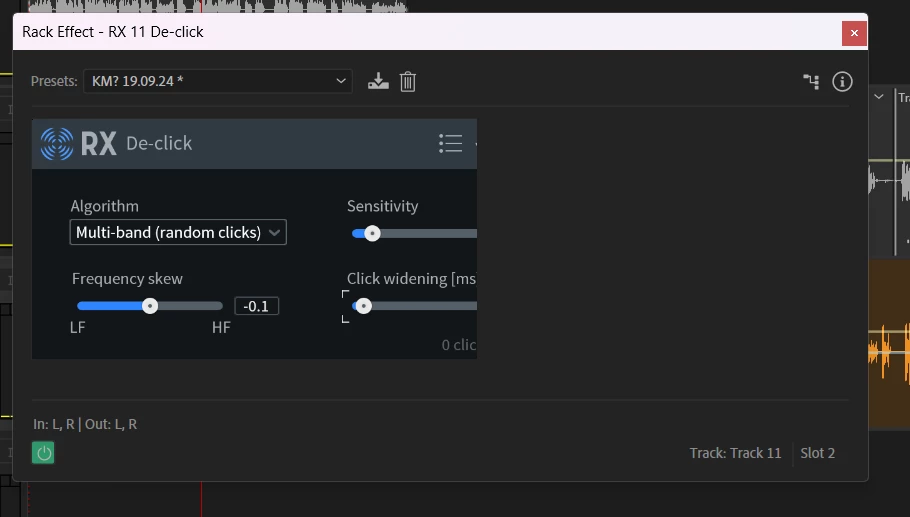
No matter what I do, a few of my RX plugins appear like this, where a lot of the important bits are cut off. I'm in conversation with the team at Izotope, but just wanted to check in here in case it's an Audition thing. 


Also Audition keeps crashing, which is suuuuper unfun. There's also been a lot of (I BELIEVE) latency or sampling issues that, no matter how I try to fix in the hardware section by matching the sample rate, make my audio sound like slow and crackly garbage but then exports fine. I've uninstalled and reinstalled all software involved, and still no luck. 


Help would be much appreciated.

16 replies

Matthew David King
Inspiring
February 24, 2025

My solution; close all instances of Audition, right click on desktop and change your screen resolution to 1920x1080. Relaunch Audition and load Neutron and it should allow you to click away from the share popup.


3 MONTHS LATER and this is the only solution instead of Adobe or Izotope fixing it, but it seems to have worked. Shame I still have to wait 2 minutes every time I pick a new plugin though.

A business that makes nothing but money is a poor business. - Henry Ford
juhaj81113247
Participant
December 6, 2024

It's a bug in Audition that when you enlarge windows, some of the data is lost.

Rag and Bone
Community Expert
Community Expert
November 26, 2024

What does iZotope say about these issues? Perhaps the issues aren't Adobe's.

ChrisKane
Participant
November 26, 2024

I had a similar issue with Neutron 5, cropping the plugin so I couldn't even start using it. It was cropping the "share your info" window when you first launch the plugin.


My solution; close all instances of Audition, right click on desktop and change your screen resolution to 1920x1080. Relaunch Audition and load Neutron and it should allow you to click away from the share popup.


Then close Audition again and revert to your original resolution.Will allow you to see the entire plugin now.


But my current issue is, that no matter what I do. Neutron 5 does not even work. It doesn't detect any audio signals. All my other plugins work properly, but Neutron doesn't even respond to audio. I've reinstalled 3 times and nothing.


I'm at a loss. It feels like Adobe doesn't really care that much about Audition any more and I'm just left trying to keep this DAW alive. Barely.


jackattack0_o
Participating Frequently
November 26, 2024

I'm unable to upload a screenshot for some reason but I did find a workaround. Not a solution, but a workaround. If you're in Premiere:


  • Use the Audio Track Mixer and in the fx panel, add VST3 to the rack.
  • From there, you can use the panel just above your "Mix" dropdown to adjust all of the settings. You're kind of flying blind without the visualizer, but you can still make all of the adjustments that are not visible in the cropped window.

This is an annoying error/issue, but I will say that izotope is like 200x better than the noise removal tool in Adobe. I had no idea it was this good.

wildbill3867835
Participating Frequently
November 26, 2024

Me too - same issue and unusable in Premiere Pro (Windows 11).

jackattack0_o
Participating Frequently
November 26, 2024

I am also having this issue. I just downloaded the plugin and it's currently unusable.

Participant
November 25, 2024

Great! Please keep us updated on any response you get from the ticket!

Participant
November 25, 2024

I am having the exact same issue. I just opened up a support Ticket with Izotope as I assume this is a 'them' issue. The window resizes but the RX editing window does not. I went into the program properties and made adjustments but it didn't help anything. I wish they would give us back the stand alone app to work in while they figure this out, but I doubt it.

Participant
November 3, 2024

@kirsty_1404 , have you found a solution to the cropping of the Repair Assistance plug-in box? Much of it is not accessible to me -- even when I stretch the window.