michaljanata
Inspiring
Nov 18, 2026 11:20 AM UTC
Open for Voting

Wrong file type association

Adobe Bridge 2027 on Win11 cannot associate file types properly after updates.

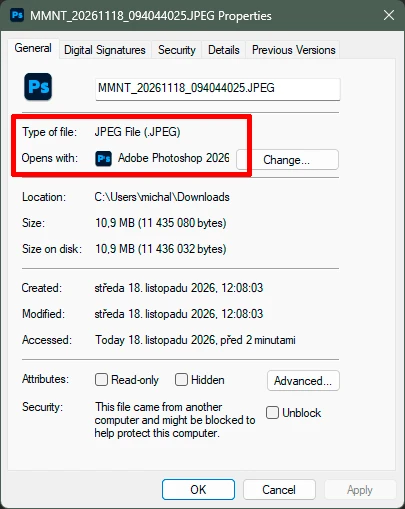
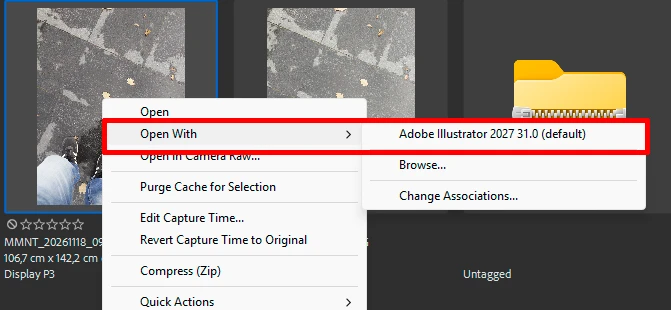
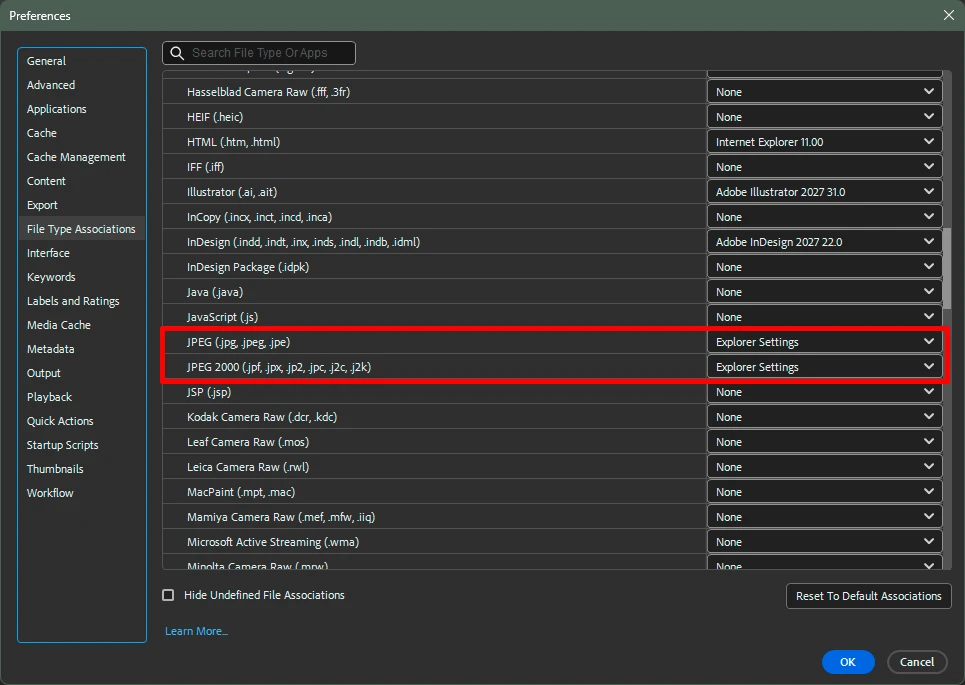
It opens JPEG (and some other image types) in Adobe Illustrator,  while preferences says Explorer Settings, while Explorer Settings is open JPEG in Adobe Photoshop.

Double click in Windows Explorer opens JPEG properly in PS, double click in Bridge opens JPEG wrong in AI.


    1 reply

    Erik Bloodaxe
    Legend
    Nov 18, 2026 2:32 PM UTC

    Seen this happen a lot after updating to a new Photoshop version. You need to remove “Explorer Settings”.

    Use the dropdown menu and choose Browse. This will take you to your Program Files folder. Navigate to Adobe>Adobe Photoshop 2027>Photoshop.exe and click “Open”.

    That should fix it for you. There seems to be no quick way of achieving this for all required file types so you have to do this individually.

    Translate