Known Participant
March 24, 2024

P: Denoise - large artifacts with AMD Graphics Card

  • March 24, 2024
  • 41 replies
  • 7541 views

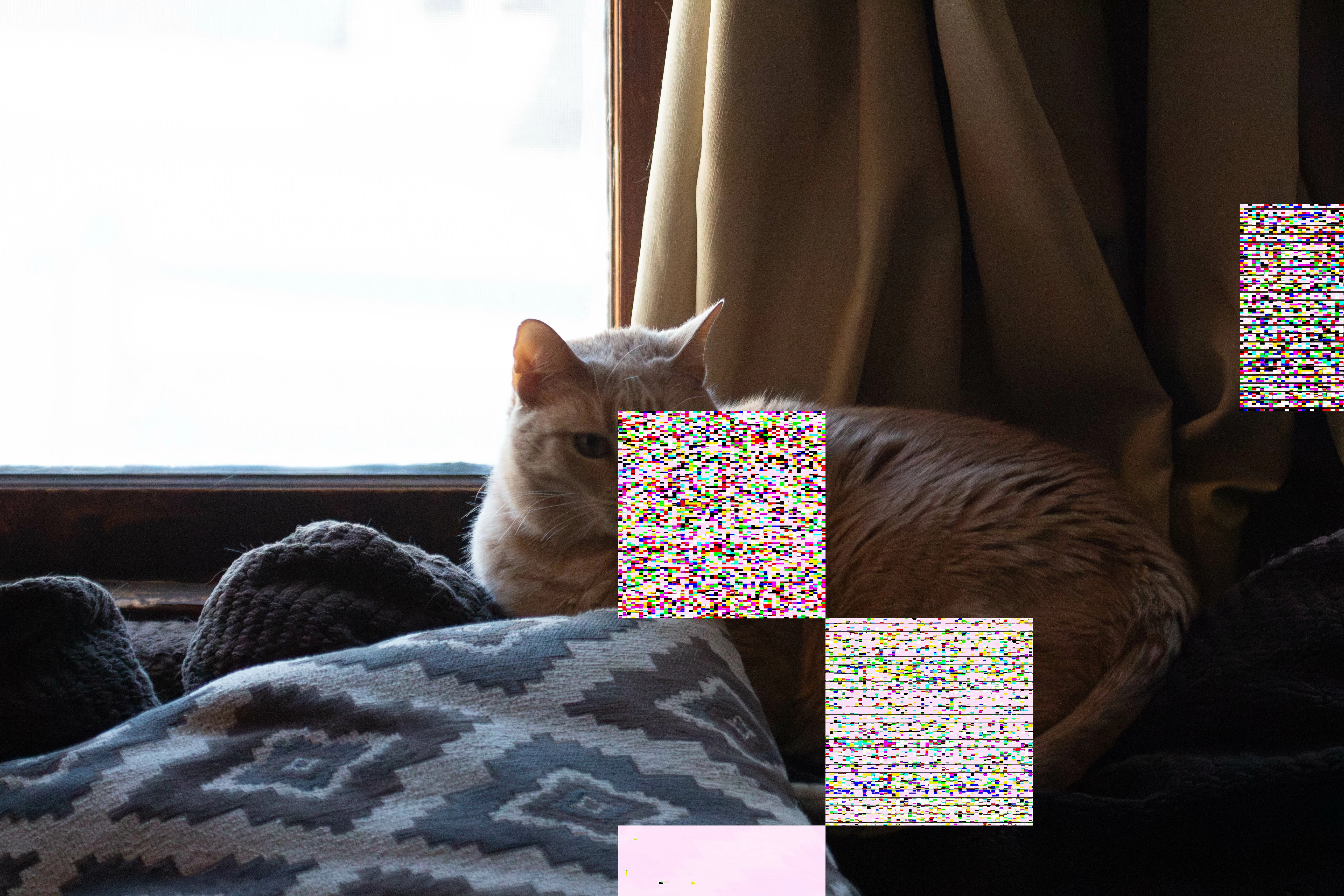
When I use Denoise on RAW images, the images are putting strange squares on the DNG once it is created.  this was after the latest update on both mac and adobe lightroom.  I've spent HOURS on adobe customer service, don't know how to fix this.  I love that feature.
This topic has been closed for replies.

41 replies

johnrellis
Legend
April 18, 2024

There have been many reports that the AMD version 24 drivers aren't working well with LR 13.


It may be that the version 24 AMD Adrenaline utility has started automatically applying a "gaming" profile to LR Classic. Some have reported that disabling the profile and "optimizations", restoring the default settings, lets the version 24 drivers work correctly with LR:

https://www.reddit.com/r/radeon/comments/1ad69lg/lightroom_classic_crashing_on_the_latest_driver/ https://community.adobe.com/t5/lightroom-classic-discussions/long-time-listener-first-time-caller-am... 

Participant
April 17, 2024

I also have an AMD Gpu (6800 XT) and am facing these similar issues. annoying.

rexr70639307
Participant
April 13, 2024

A recent driver update with my daughters gaming PC (not Mac) with an AMD card altered the maximum thermal limit by around 10 degrees.  Yes, it is a touch faster now however the sound of the fans on the graphics card are like a Jet Engine now, a very poor trade off. 

Known Participant
April 12, 2024

Everything you have mentioned i did with Adobe.  The interesting fact is that there where zero problems with LR before the last MAC OS update/ADOBE LR update.

rexr70639307
Participant
April 12, 2024

I have built and repaired computers for many years and in general when I see an issue like this with graphics card it is often a VRAM issue, either faulty, overheating, timings pushed too far by the driver.  The Enhance feature in LR is really pushing your GPU and it's VRAM quite hard and at the same time graphics manufacturers are always trying to leverage every

ounce of performance from products in driver updates.


You can't do much about the driver but you could try one of the following.  And yes a driver or system update can cause the power requirements to just tip the scale against you. 


Try LR settings/performance and select limit video cache, incrementally reducing it to determine if the issue disappears.  Even if your video card says you have XXGB of video memory it doesn't mean you/programs have full access or can fully utilise it.  A certain amount will be reserved, cached and all manner of things. 


If possible try running with the computer case open and see if that helps.  I know when I throw 20 images at enhance all my fans ramp up with the extra work it has to do and it's a great way to heat the room.  Many Mac's traditionally have very conservative thermal fan speed curves to preserve a quieter operational environement.

Rikk Flohr_Photography
Community Manager
Community Manager
April 5, 2024

I've opened a ticket for the Camera Raw team to investigate. 

Rikk Flohr: Adobe Photography Org
johnrellis
Legend
April 4, 2024

Another person reported similar artifacts with an AMD Radeon Pro 5300 with LR 13.2  / Mac OS 14.4.1 after updating both LR and Mac OS.  The sample file didn't exhibit the artifacts when processed on my own LR 13.2 / Macbook M2 Max / 14.4.1.


This is looking like a a bug in AMD's graphics drivers. AMD's recent Windows drivers have had bugs tripping up LR, and it may be that recent changes in LR's use of the GPU is tripping over them. 


Since Adobe is constantly changing the LR code that uses the GPU, you might try rolling back to an earlier version of LR (e.g. LR 13.0), to see if the issue still occurs.


Unfortunately, on Mac the only way to update the graphics driver is to wait for AMD to provide a new one to Apple and for Apple to release a new version of Mac OS (a downside of Apple's walled garden). 

Legend
April 4, 2024

I've gotten a few instances of intermittent garbage in the ACR display on Sonoma/Intel with the 4GB Radeon 5300M, and one instance of Enhance/Super Res creating plain white DNG files from small TIFFs. Rebooting the computer has fixed this each time its happened. I suspect memory issues.

I'll do a bug report if it happens again.

Participant
April 4, 2024

I have the exact same problem, yesterday I was working with an Adobe consultant 3 hours online, he tried everything, but the problem was not solved. He said we must wait for another updates on Lrc and Camera Raw from Adobe. The denoise feature in Lrc and Camera RAW was working excellent until 2 weeks ago, before the latest Adobe updates.

Known Participant
April 4, 2024

I basically hd the exact same experience they called me back and said wed have to wait until the next update.  I also am having issues with other adobe programs involving enhance.   So they need to see what they did and fix it.  

Participating Frequently
March 31, 2024

I recently updated to the latest version of LR classic. Today two photos I've used denoise on have ended up with a square in the photo. Attaching images for clearer idea of the issue. Nothing has changed in my workflow other than the recent update. Using iMac macOS

johnrellis
Legend
April 1, 2024

Please copy/paste here the entire contents of the LR menu command Help > System Info -- that will let us see exactly which versions of hardware and software LR thinks you're running.

Participating Frequently
April 2, 2024

Here you go!


Lightroom Classic version: 13.2 [ 202402141005-bf1aeb84 ]
License: Creative Cloud
Language setting: en-US
Operating system: Mac OS 14
Version: 14.4.1 [23E224]
Application architecture: x64
Logical processor count: 12
Processor speed: 3.1GHz
SqLite Version: 3.36.0
Built-in memory: 16,384.0 MB
Dedicated GPU memory used by Lightroom: 3,691.2MB / 4,080.0MB (90%)
Real memory available to Lightroom: 16,384.0 MB
Real memory used by Lightroom: 1,700.4 MB (10.3%)
Virtual memory used by Lightroom: 48,036.7 MB
Memory cache size: 9.7MB
Internal Camera Raw version: 16.2 [ 1763 ]
Maximum thread count used by Camera Raw: 5
Camera Raw SIMD optimization: SSE2,AVX,AVX2
Camera Raw virtual memory: 546MB / 8191MB (6%)
Camera Raw real memory: 650MB / 16384MB (3%)

Cache1:
Final1- RAM:43.0MB, VRAM:0.0MB, 291A509D-343C-41CD-A36A-87A57D75D357.dng
NT- RAM:43.0MB, VRAM:0.0MB, Combined:43.0MB

Cache2:
final1- RAM:425.0MB, VRAM:1,448.0MB, DSC_6463.NEF
T- RAM:425.0MB, VRAM:1,448.0MB, Combined:1,873.0MB

Cache3:
m:9.7MB, n:57.0MB

U-main: 88.0MB

Standard Preview Size: 5120 pixels
Displays: 1) 5120x2880

Graphics Processor Info:
Metal: AMD Radeon Pro 5300
Init State: GPU for Image Processing supported by default
User Preference: Auto

Application folder: /Applications/Adobe Lightroom Classic
Library Path: /Volumes/LaCie/Lightroom Catalog-v13.lrcat
Settings Folder: /Users/stephaniepepper/Library/Application Support/Adobe/Lightroom

Installed Plugins:
1) AdobeStock
2) Aperture/iPhoto Importer Plug-in
3) Flickr
4) Nikon Tether Plugin
5) ON1 Effects 2023
6) ON1 NoNoise AI 2023
7) ON1 Photo RAW 2023

Config.lua flags: None


Legend
March 25, 2024

Please post a system report for us, we have no technical info to go by here. Help->System Info

Known Participant
March 25, 2024

None of this artifacting happend before the last update to mac os and lightroom 


Legend
March 25, 2024

I just had a weird issue where Camera RAW was showing me a distorted preview but rebooting fixed it and Denoise is working fine now. 2019 Intel MacBook Pro w/Radeon card.