johnrellis
Legend
February 25, 2024

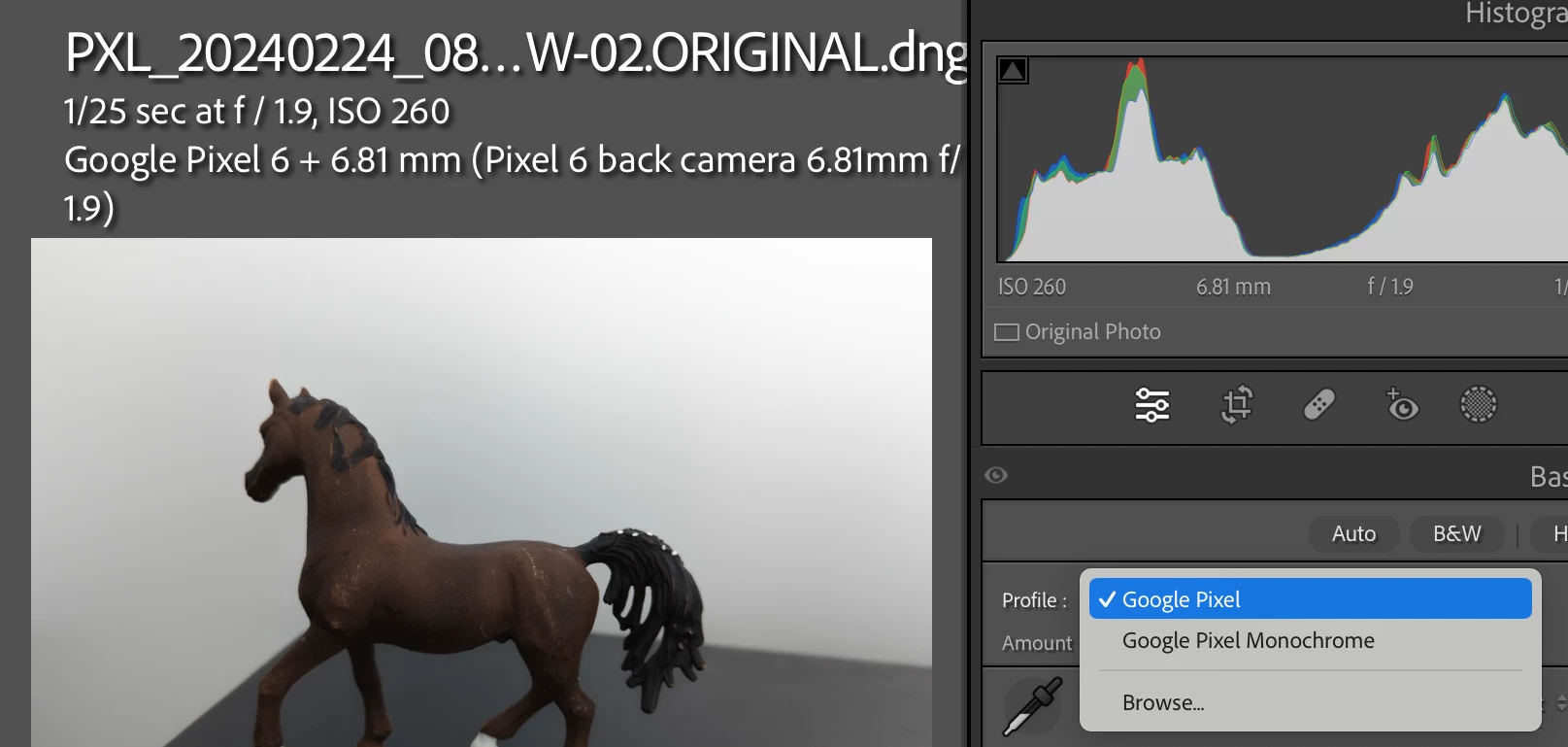
P: Google Pixel 6, 6a, 6 Pro, 7a, and 7 Pro DNGs don't show Adobe camera profiles

  • February 25, 2024
  • 35 replies
  • 5184 views

35 replies

Participant
July 21, 2025

Hi,

I'm using LR classic 6.0 (with I believe camera raw 9.0). I've taken pics with my Pixel 7A and its created dng files. When I important them to my LR they are pretty much B&W. Anyway, if I go to Develop and then the camera Calibration, the only option I have for profile is Google embedded camera profile. Not sure I really know what I'm doing, but I put the folder you've suggested in the path you suggested and restarted LR. I still see exactly the same thing and no additional profile options in the camera calibration section for one of the dng images. 


I'm really not that familiar with LR, I just do the basics; normally the images I use are from my canon. First time I'm trying to use my Pixel 7A.


Any help greatly appreciated.


johnrellis
Legend
July 31, 2024

@-38909374rb30, this bug report was for the Google Pixel 6 and 7 models, and it has been marked Fixed. I recommend that you post a new bug report for the 8 Pro, following these guidelines:

https://community.adobe.com/t5/lightroom-classic-bugs/how-do-i-write-a-bug-report/idi-p/12386373


Upload a sample DNG showing the problem to Dropbox, Google Drive, or similar and include the public sharing link -- otherwise Adobe isn't likely to pay attention.

Participant
July 31, 2024

I have the same problem with my Pixel 8 pro. When I open RAW file with LR I only get "Google Pixel" profile and it makes every picture blurry and looks like it adds some distortion too. If I set profile bar to 0 value, it becomes less blurry but it ruins the colors completely. At 100 value the colors are very close to the default jpeg made by camera app, but the whole picture looks like "details" is set to minimum.

Participant
June 18, 2024

I have the same issue on my old one Google Pixel 4a 5g. No Adobe profiles are available on the latest Lightroom mobile. And the same troubles with wrong colours converted in dng files. In previous photos that i've took before december 2023 everything is ok

I have attached sample dng files here https://drive.google.com/drive/folders/14UH4PMSFhapjGAuD9ebohmZlDWeG9AGv

johnrellis
Legend
June 11, 2024

@Rikk Flohr: Photography: "I've forwarded the link to the Camera Raw team for review."


Rikk and @Rick Spaulding - , this bug is still marked as Fixed, even though there are confirmed reports of DNGs from the 6a and 7a not working above. Has the team completed its review?  New reports have come in about the 7a -- should we open a new bug report or use this one?

Participating Frequently
June 7, 2024

I don´t know what´s the problem, but i´m using a modded gcam for a xiaomi phone and all versions above gcam 8.6 have this problem only showing google pixel color profile. If i install an older modded gcam, like 8.4 i can see adobe color profile. Please can you take a look on that?

augustov72937847
Participant
May 25, 2024

Yes, I have just noticed that you are right. On the Pixel 7a the Adobe profiles are displayed only for the wide angle shots but not for the ultra wide angle shots

johnrellis
Legend
May 24, 2024

I've tried 6 sample photos from the Pixel 7a.  Five were from the Wide Camera (Pixel 7a back camera 5.43mm f/1.9) and one (yours) from the Ultrawide Camera (Pixel 7a back camera 1.84mm f/2.2).  The Adobe camera profiles are displayed for the Wide Camera samples but not the Ultrawide Camera sample.


You might check some of your other Pixel7a photos to see if that pattern holds up.


Rikk Flohr_Photography
Community Manager
Community Manager
May 24, 2024

Thank you. I've forwarded the link to the Camera Raw team for review. 

Rikk Flohr: Adobe Photography Org
augustov72937847
Participant
May 24, 2024