



Max_Ramuschi
Known Participant
December 27, 2013

P: ICC Table Profiles clipped shadows under OSX

  • December 27, 2013
  • 166 replies
  • 3958 views

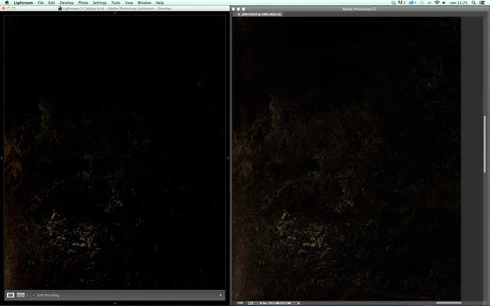
Hi, I've just found a really bad issue occurring in Lr 5 (but also in all other Lightroom versions) under Mac OSX 10.9 with a calibrated monitor: dark shadows (from a value of 20 to 0) are all clipped (pure black with no detail and no textures) while the histogram remains ok, indicating NO clipped shadows at all. This issue afflics also ACR.

Photoshop for now is the only software under MAC that reproduces dark shadows correctly: Library Module shows a bit darker and shifted shadows than Ps but acceptable, Develop Module is really bad showing brutally clipped shadows (but you work in the Develop Module right?!).

The same problem occurred also in OSX 10.8 but it was related only to LUT profiles, creating a Matrix based profile problems were solved.

Now the issue occurs with both Matrix and LUT profiles, v2 and v4. There's no apparent way to make Lr working right.

Under Windows no problems at all: Bridge, Photoshop, ACR, Lr (Library Module and Develop Module) show the same correct NOT clipped shadows.

I tested 8 different Mac running 10.9 with different GPU, different monitors, different profiling Softwares (Color Eyes Display Pro, Eizo Color Navigator, BasICC Color, i1 Profiler). Same results.
I tried to change the gamma value (2.2, sRGB, L*) problems remain. I tried to change ICC version (v2, v4) problems reamain. I tried to change profile type (LUT, MATRIX) problems remain.

How can a photographer work professionally on RAW images if shadows are bad reproduced?

Why Photoshop can reproduce shadows correctly while Lr isn't able to do that?

Why this happens only on a Mac enviroment?

Is Lr based on ColorSync (that can't handle profiles correctly) while Ps isn't (because it can handle and it has no problem)?

Please Adobe, FIX IT for all professional photographers, we can’t use Lr for serious works under Mac.

Max Ramuschi
Adobe Certified Expert

p.s.: Added a 100% Crop screenshots that shows the problem, some photos are even worse...
This topic has been closed for replies.

166 replies

Participating Frequently
November 7, 2014
Kelly, Eric, any update on this?

More than 10 days from last update, can you please share the status?

Thank you very much for your effort

Andrea
Participating Frequently
November 7, 2014
I to have this issue. I don ́t occur when viewing TIFFs or JPS ́s only dark CR2 and DNG ́s.

It ́s very annoying.
Inspiring
November 3, 2014
Great! I'm having this issue with a series of black on black images. Need a fix soon!
Max_Ramuschi
Known Participant
October 26, 2014
Ok understood, I call that profile table based or LUT based because Eizo Color Navigator calls it this way. The options you can choose in that software are 'LUT Based' or 'Gamma Curve', to be honest I've never looked into the profile itself. So the problem is actually about the gamma encoding right? It's a gamma issue with perfect matching colors indeed...
MadManChan2000
Adobe Employee
Adobe Employee
October 26, 2014
FYI, Massimiliano, you may be confusing two different concepts: the color transform and the gamma encoding (1D functions). The color transform may be matrix-based, or table-based. The gamma encoding can be polynomial-based, or table-based.

Both ICC profiles that you sent me actually use matrices for the color transform, so these are both considered matrix-based profiles.

However, one of the profiles uses a polynomial gamma encoding, whereas the other profile uses a table for the gamma encoding.

So, the underlying issue here actually is not matrix-based vs table-based for the color transform itself, but rather polynomial-based vs table-based for the gamma encoding.
Max_Ramuschi
Known Participant
October 26, 2014
The really important thing (for me at least) is that Lightroom will become able to handle table-based profiles in every module. I personally don't use matrix based profiles at all, as they are not too precise.
Community Expert
October 26, 2014
Fantastic. Can't wait!
Participating Frequently
October 23, 2014
Very good news 🙂 awaiting for a fix. Thank you very much !!!
Max_Ramuschi
Known Participant
October 22, 2014
Good news. Keep us informed!
Inspiring
October 22, 2014
Yay! The best news of the day! The future is smiling to me again - with LR! 🙂