


Max_Ramuschi
Known Participant
December 27, 2013

P: ICC Table Profiles clipped shadows under OSX

  • December 27, 2013
  • 166 replies
  • 3958 views

Hi, I've just found a really bad issue occurring in Lr 5 (but also in all other Lightroom versions) under Mac OSX 10.9 with a calibrated monitor: dark shadows (from a value of 20 to 0) are all clipped (pure black with no detail and no textures) while the histogram remains ok, indicating NO clipped shadows at all. This issue afflics also ACR.

Photoshop for now is the only software under MAC that reproduces dark shadows correctly: Library Module shows a bit darker and shifted shadows than Ps but acceptable, Develop Module is really bad showing brutally clipped shadows (but you work in the Develop Module right?!).

The same problem occurred also in OSX 10.8 but it was related only to LUT profiles, creating a Matrix based profile problems were solved.

Now the issue occurs with both Matrix and LUT profiles, v2 and v4. There's no apparent way to make Lr working right.

Under Windows no problems at all: Bridge, Photoshop, ACR, Lr (Library Module and Develop Module) show the same correct NOT clipped shadows.

I tested 8 different Mac running 10.9 with different GPU, different monitors, different profiling Softwares (Color Eyes Display Pro, Eizo Color Navigator, BasICC Color, i1 Profiler). Same results.
I tried to change the gamma value (2.2, sRGB, L*) problems remain. I tried to change ICC version (v2, v4) problems reamain. I tried to change profile type (LUT, MATRIX) problems remain.

How can a photographer work professionally on RAW images if shadows are bad reproduced?

Why Photoshop can reproduce shadows correctly while Lr isn't able to do that?

Why this happens only on a Mac enviroment?

Is Lr based on ColorSync (that can't handle profiles correctly) while Ps isn't (because it can handle and it has no problem)?

Please Adobe, FIX IT for all professional photographers, we can’t use Lr for serious works under Mac.

Max Ramuschi
Adobe Certified Expert

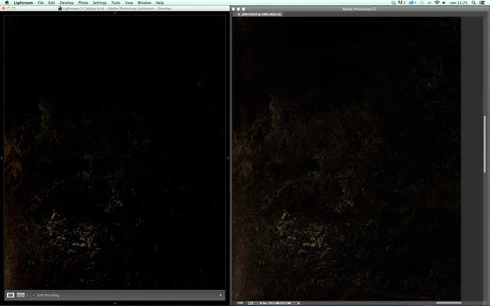
p.s.: Added a 100% Crop screenshots that shows the problem, some photos are even worse...
This topic has been closed for replies.

166 replies

Kelly Castro
Adobe Employee
Adobe Employee
October 22, 2014
An update: Eric has identified the source of the clipping issue and we are currently testing a solution. More info as it becomes available. Thanks for your patience.
Max_Ramuschi
Known Participant
October 21, 2014
I noticed some magenta shift and bad transitions between contiguous tones... But it depends on the GPU and drivers. you can observe the issue on both mac and win. For me it's not a major issue because it's easily fixable.
Community Expert
October 21, 2014
Massimiliano. I did the LUT based profile and indeed the dark patches in Photoshop are slightly darker in "Advanced" mode vs "Basic". Not much but still.
Max_Ramuschi
Known Participant
October 20, 2014
Eric, you're right: the issue you identified is affecting ACR on Windows also, when using a table-based profile. I'm not a good observer...
Max_Ramuschi
Known Participant
October 20, 2014
Jao, please try to create a LUT based or Table based Profile for your display and check if the library module is darker than PS.
Community Expert
October 20, 2014
Let me know if I can help more with that. Glad that you are investigating these issues. Very much appreciated as it has bothered me for a long time now.
MadManChan2000
Adobe Employee
Adobe Employee
October 20, 2014
Interesting.  (Doesn't match my experience re: GPU.  I'll have to follow up on that later, and separately.  Sorry for the distraction ...)  In the meantime, I've identified the smaller issue regarding table-based display profiles in the Camera Raw plug-in (ACR) and this should be fixed in the final version of ACR 8.7.  This issue should have occurred on both Mac and Windows, by the way.

I'm still looking into the (much more noticeable) issue regarding Lr's Develop module, which happens on the Mac and for both gamma-based and table-based ICC display profiles, and hope to consult with the team's engineers in the next day or so to determine the root cause.  (I have a pretty good idea, but I'd rather know for sure rather than just guess ...)

I just wanted to let you know that this issue is being investigated, and to thank the folks here for all of the details, which have been very helpful.
Community Expert
October 20, 2014
Yes, I was thinking that might matter so I quit PS completely and restarted between. No difference that I could tell. Maybe in the very very dark patches (1,2, and 3 in sRGB 8-bit numbers), but those are very hard to make out to start with. Any effect is far smaller than what I see in Lightroom where every dark patch upto and including 15 is strongly affected when switching between Library and Develop with the same linear file. Library looks like Photoshop and looks like what the file looks like in Lightroom in both modules on Mountain Lion.
MadManChan2000
Adobe Employee
Adobe Employee
October 19, 2014
Jao, when you converted to Linear ProPhoto and switched GPU mode on/off, did you make sure to quit/restart Ps completely in between tests?
Community Expert
October 19, 2014
Don't really see a noticeable difference between GPU basic or GPU advanced in Photoshop using a linear ppRGB version of my little test image. I don't even see a difference when I turn of the GPU acceleration completely. They both look correct and hugely different from the affected Develop.