


Max_Ramuschi
Known Participant
December 27, 2013

P: ICC Table Profiles clipped shadows under OSX

  • December 27, 2013
  • 166 replies
  • 3958 views

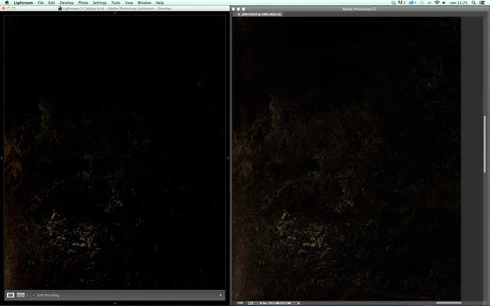
Hi, I've just found a really bad issue occurring in Lr 5 (but also in all other Lightroom versions) under Mac OSX 10.9 with a calibrated monitor: dark shadows (from a value of 20 to 0) are all clipped (pure black with no detail and no textures) while the histogram remains ok, indicating NO clipped shadows at all. This issue afflics also ACR.

Photoshop for now is the only software under MAC that reproduces dark shadows correctly: Library Module shows a bit darker and shifted shadows than Ps but acceptable, Develop Module is really bad showing brutally clipped shadows (but you work in the Develop Module right?!).

The same problem occurred also in OSX 10.8 but it was related only to LUT profiles, creating a Matrix based profile problems were solved.

Now the issue occurs with both Matrix and LUT profiles, v2 and v4. There's no apparent way to make Lr working right.

Under Windows no problems at all: Bridge, Photoshop, ACR, Lr (Library Module and Develop Module) show the same correct NOT clipped shadows.

I tested 8 different Mac running 10.9 with different GPU, different monitors, different profiling Softwares (Color Eyes Display Pro, Eizo Color Navigator, BasICC Color, i1 Profiler). Same results.
I tried to change the gamma value (2.2, sRGB, L*) problems remain. I tried to change ICC version (v2, v4) problems reamain. I tried to change profile type (LUT, MATRIX) problems remain.

How can a photographer work professionally on RAW images if shadows are bad reproduced?

Why Photoshop can reproduce shadows correctly while Lr isn't able to do that?

Why this happens only on a Mac enviroment?

Is Lr based on ColorSync (that can't handle profiles correctly) while Ps isn't (because it can handle and it has no problem)?

Please Adobe, FIX IT for all professional photographers, we can’t use Lr for serious works under Mac.

Max Ramuschi
Adobe Certified Expert

p.s.: Added a 100% Crop screenshots that shows the problem, some photos are even worse...
This topic has been closed for replies.

166 replies

Max_Ramuschi
Known Participant
October 19, 2014
Eric was saying another thing about PS. There's nothing we can do to solve Lr issue. We must wait.
Community Expert
October 19, 2014
I am getting my signals crossed here. Didn't see who was asking questions and what the thread was in the email notifications. I thought you wanted me to try to change the setting in Photoshop and see if it fixed Lightroom. That didn't make any sense. Will try what Eric is asking.
Max_Ramuschi
Known Participant
October 19, 2014
no no, it's a completely different thing. Maybe Eric asked us if we were using GPU in Ps, because he wanted to be sure that we were comparing the same image in Lightroom and in a non GPU-issue-affected Photoshop .
Community Expert
October 19, 2014
Well it cannot solve the Lightroom issue. That is completely impossible. There is no GPU setting in Lightroom and Photoshop preferences have no effect on Lightroom.
Max_Ramuschi
Known Participant
October 19, 2014
We are aware of that kind of problem, but in my experience setting GPU to basic in performace tab, will solve every issue.
MadManChan2000
Adobe Employee
Adobe Employee
October 19, 2014
To be clear, the issue being experienced here in Lr is unrelated to the GPU.

The reason I asked some of you (offline) GPU-related questions for Ps is that the color values you will see in Ps can (often does) depend on whether you have GPU support turned on in Ps's Preferences panel.

(If you want to see what I mean, take Jao's test image and convert it to a color space that has a linear gamma, e.g., create a customized version of Adobe RGB, sRGB, or ProPhoto RGB with gamma of 1.0 -- you can use Ps's Color Settings panel to do this -- and then view that in Ps with the GPU option enabled vs with the GPU option disabled.)
Inspiring
October 19, 2014
Jao - I know, but Lightroom has been trying to use the GPU to accelerate display, and I suspected that Eric might need a bit more info.
Max_Ramuschi
Known Participant
October 19, 2014
The Intel HD 4000 has some problems: magenta shift in dark tones and bad transitions (banding) in shadows. Some Geforce have same issue even on Pc and, in my experience, Ati Fire Pro are ok...
Community Expert
October 19, 2014
Chris, this is a problem in Lightroom. Photoshop is basically correct in all cases no matter how you set its preferences safe perhaps a small 1-bit error that you should only be able to spot in a smooth color ramp. The problem in Lightroom Develop is MUCH larger than a small precision error. There is no performance tab in Lightroom and Lightroom doesn't use the GPU in the same way as Photoshop anyway.
Inspiring
October 19, 2014
Yes, that's the GPU precision problem I was referring to. Some claim to be accurate to a certain number of bits, but aren't really. We're still trying to figure out which is which and disable them for tasks that really need the stated precision.