
Participating Frequently
June 18, 2020

P: Lightroom Classic: "Open as layers in Photoshop" function broken after update

  • June 18, 2020
  • 86 replies
  • 4733 views

I edit about 30 images per day by selecting the below command, within Lightroom Classic (recently updated):


PHOTO > EDIT IN > OPEN AS LAYERS IN PHOTOSHOP (also recently updated)


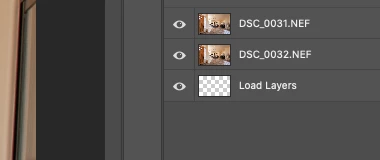
But after the most recent update of PS and LrC I have reliability lost this ability.  If I select 5 images in LrC and try to do the above, only about 1-2 images appear in my layered PS file as a layer, then a blank "LOAD LAYERS" layer appears (see attached) and one more image will open in a separate PS file and not a part of the layered file - then the import quits.


After I am done editing the layered file and when I save it - it will automatically save and load the modified layered file in LrC - which it does not do anymore. I was able to get it to work properly  couple times, but it always ends up giving me this problem about 80% of the time.


Obviously the only work around is for me to copy and past each layer individually and then manually save the file and import into my LrC catalog - which makes the process of editing images very inefficient when doing dozens of these edits per day.


I'm on a Macbook Pro, latest install of LrC and PS / most recent Catalina & have uninstalled/re-installed PS - again, I have edited hundreds of images like this prior to the recent updates and never had an issue so obviously it have something to do with the update, at least for me.


andrew
This topic has been closed for replies.

86 replies

arjunhaarith
Adobe Employee
Adobe Employee
December 17, 2020

Hi Phil,

Could you please mention the PS and LR versions that you are using along with the system info ? Does updating to new PS solve?

Thanks,
Arjun

arjunhaarith
Adobe Employee
Adobe Employee
December 17, 2020

Hi *jljordan ,

Did you try updating your PS and LR versions?

1) Also, how many images were you trying to open as Layers in PS (invoked from Lr). What are the nature of those images(like file types)? Were there any video present in the selection?

2) Were you seeing this problem even on the older PS2020 version?

3)What is the behavior when trying the same workflow using a new classic catalog

These information would help us to investigate more.

Thanks,

Arjun

Inspiring
December 15, 2020

Yes, Adobe employees post and respond here, all the time.

LR Classic Tips: NEVER use Auto-update, turn that feature off in Creative Cloud. Wait until you get the "all clear" from Jeff Harmon (Photo Taco Podcast) or Victoria Bampton (lightroomqueen.com) that it's OK to upgrade. Same with your MacOS, listen to "The Mac Geek Gab" podcast. I'm still on Catalina, I NEVER upgrade until the ".2" version, giving Apple time to squash the usual bugs. -25 year Mac IT Pro.

BTW, PS and LR (& Classic) have been the same price for years now, $9.99/month, which includes the killer feature, the cloud.

Inspiring
December 15, 2020

@PhilJAZ

Updating to 22.0.1. fixed the issue for me. I also updated to Big Sur (before updating PS & LR). 

22.1 is available now, and needless to say, I'm not messing with anything for a while. 


Participant
December 15, 2020

Also, does ADOBE reply and interact here or does it rely on it's customers to fix other customers issues? I'm new to exploring this page

Participant
December 15, 2020

I don't understand how this issue is not fixed yet. It's been ongoing for MONTHS. an update created the problem, an update needs to fix it ASAP. Beyond annoying. Photoshop & Lightroom become consistently slower and buggier, but yet more expensive than ever.

Inspiring
November 10, 2020

One more. Doing this command around 40 times a day for my living. With the new PS 21 it became really bad. Using the newest LRC and PS21, newest Mac OS, 64GB RAM, 3.8ghz, PS has assigned 52GB Ram or so. Still doing.

Tried with TIFF and PSD, issue remains.

Inspiring
November 9, 2020

Same problem here! This issue is debilitating for my work. I edit 100+ images per day with multiple layers for each image. I've had this problem in previous versions of PS, but usually only about 10% of the time. Now it is 100%. After every image I have to close PS and reopen, and even then sometimes it won't load as layers from LR. 

macOS Catalina 10.15.6

Photoshop 22.0.0 

Lightroom Classic 10.0

When is this going to be fixed? 

johnrellis
Legend
October 31, 2020

Jacob, please do Help > System Info -- which version of LR and which OS?

Black Diamond Photo
Known Participant
October 31, 2020

I'm having this issue as well. Super frustrating.