


Participating Frequently
June 18, 2020

P: Lightroom Classic: "Open as layers in Photoshop" function broken after update

  • June 18, 2020
  • 86 replies
  • 4733 views

I edit about 30 images per day by selecting the below command, within Lightroom Classic (recently updated):


PHOTO > EDIT IN > OPEN AS LAYERS IN PHOTOSHOP (also recently updated)


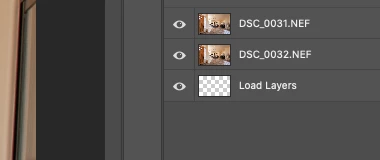
But after the most recent update of PS and LrC I have reliability lost this ability.  If I select 5 images in LrC and try to do the above, only about 1-2 images appear in my layered PS file as a layer, then a blank "LOAD LAYERS" layer appears (see attached) and one more image will open in a separate PS file and not a part of the layered file - then the import quits.


After I am done editing the layered file and when I save it - it will automatically save and load the modified layered file in LrC - which it does not do anymore. I was able to get it to work properly  couple times, but it always ends up giving me this problem about 80% of the time.


Obviously the only work around is for me to copy and past each layer individually and then manually save the file and import into my LrC catalog - which makes the process of editing images very inefficient when doing dozens of these edits per day.


I'm on a Macbook Pro, latest install of LrC and PS / most recent Catalina & have uninstalled/re-installed PS - again, I have edited hundreds of images like this prior to the recent updates and never had an issue so obviously it have something to do with the update, at least for me.


andrew
This topic has been closed for replies.

86 replies

Known Participant
April 11, 2021

@andre_erlich After further investigation I have discovered that Open As Layers from LR to PS works from Grid View but does not from Develop View. So it seems to be Lightroom Classic bug.

Known Participant
April 10, 2021

I am running LR Classic 10.2 ( Build [202103041821-226a1211) and Photoshop 22.3.0 on Windows 10-64 bits and whatever number of layers I choose in LR and Open as Layers in PS, only two layers and one empty layers are opened. If I just Edit In Photoshop, all images are opened (but of course not as layers!!!). When will annoying (not to say debilitating) bug will be fixed ??? Thanks and regards - Andre 

Known Participant
April 10, 2021

@Rikk Greetings. 

I am running LR Classic 10.2 ( Build [202103041821-226a1211) and Photoshop 22.3.0 on Windows 10-64 bits and whatever number of layers I choose in LR and Open as Layers in PS, only two layers and one empty layers are opened. If I just Edit In Photoshow, all images are aopened (but of course not as layers!!!) When will annoying (not to say debilitating) bug will be fixed ??? Thanks and regards - Andre

Rikk Flohr_Photography
Community Manager
Community Manager
March 16, 2021

Updates to Lightroom Classic and the Lightroom Ecosystem products for Desktop, Mobile and Web were released today and contain a fix for this issue.

Please refresh your Creative Cloud application and install your update when it becomes available. Thank you for your patience.

Rikk Flohr: Adobe Photography Org
Participant
March 4, 2021

@robert_somrak Doesn't work via Bridge either, does the same exact thing - loads up a bunch images, then just quits right back to the start screen after a while. I also tried loading the pictures into a stack with just Photoshop, same exact thing happens. Would it seem like the issue is with Photoshop?

Bob Somrak
Legend
March 4, 2021

Open as Layers from Lightroom has been an issue for years.  Sometimes even opening 20 images only 17 might open.  Did you try doing this using Bridge to see if it works.  

M4 Pro Mac Mini. 48GB
Participant
March 4, 2021

@TangCanada I did, actually! Same result...

Participating Frequently
March 4, 2021

Have you tried with less images.. ? Maybe 200.

Participant
March 4, 2021

Hi there!

I got a batch (679 to be exact) of photos I need to combine in Photoshop. Every time I try to do this via the "open as layers in Photoshop"-command in Lightroom Classic, Photoshop loads an x number of layers (usually 100-200) before just stopping the process and sending me back to Photoshop's starting page without any error messages. I've tried trashing the preferences on both applications, didn't work. I've also tried several (but not all of them) older versions, didn't work either. Needless to say, this is incredibly frustrating because I have other things to do than try to process the same batch of astro shots over and over again.

System info:

Windows 10 Pro 1909

i7-6850k 6 core 3,60GHz

64 Gigs of RAM

Photos are on a 7200RPM hard drive

Both applications are up to date