
Participating Frequently
June 18, 2020

P: Lightroom Classic: "Open as layers in Photoshop" function broken after update

  • June 18, 2020
  • 86 replies
  • 4733 views

I edit about 30 images per day by selecting the below command, within Lightroom Classic (recently updated):


PHOTO > EDIT IN > OPEN AS LAYERS IN PHOTOSHOP (also recently updated)


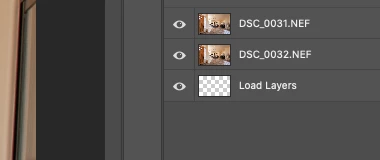
But after the most recent update of PS and LrC I have reliability lost this ability.  If I select 5 images in LrC and try to do the above, only about 1-2 images appear in my layered PS file as a layer, then a blank "LOAD LAYERS" layer appears (see attached) and one more image will open in a separate PS file and not a part of the layered file - then the import quits.


After I am done editing the layered file and when I save it - it will automatically save and load the modified layered file in LrC - which it does not do anymore. I was able to get it to work properly  couple times, but it always ends up giving me this problem about 80% of the time.


Obviously the only work around is for me to copy and past each layer individually and then manually save the file and import into my LrC catalog - which makes the process of editing images very inefficient when doing dozens of these edits per day.


I'm on a Macbook Pro, latest install of LrC and PS / most recent Catalina & have uninstalled/re-installed PS - again, I have edited hundreds of images like this prior to the recent updates and never had an issue so obviously it have something to do with the update, at least for me.


andrew
This topic has been closed for replies.

86 replies

johnrellis
Legend
October 22, 2020

"This is an ongoing issue"

And the issue has already been acknowledged by Adobe and assigned an internal bug report.

Inspiring
October 22, 2020

This is an ongoing issue, and happens regardless of images chosen. I can select 4 copies of an identical blank-black image, and it will still fail.

Known Participant
October 22, 2020

Just in case you haven't done this, make sure that all the images in the failed set exist and are not corrupt. 

  • Select a set of images in the Library module that fails.
  • Switch to the Develop module. 
  • Select the first one. 
  • If it is missing or corrupt, an error box will appear.
  • Tab through the images to ensure that they are there and not corrupt. 

I'm not sure whether the following are PS restrictions but the answer to these would, at a minimum, help isolate the problem. 

  • Are they all the same format: all raw, all JPEGs, etc?
  • Are they all the same resolution? 
  • Are they all from the same camera? 

An interesting and perhaps helpful test: 

  • Take a set that fails, a small set will do. 
  • Export them as DNG at a fixed resolution that is slightly lower than their current resolution into an empty folder. 
  • Import them into Lightroom. 
  • Now send the set to PS as layers. 
  • If this works then the problem is probably isolated to something in one of the images. 

Another test if you have a small set that fails: 

  • Remove one image at a time 
  • Send to PS 
  • If this eventually works then you've found the problem image and you can see if there's anything different about it. Of course more than one image in the set could be an issue. 

Note that this is problem isolation and not necessarily problem determination. But if you determine that the problem is not with one of your images, you can report it to PS Support and they will have a better starting point for researching the problem. 

Inspiring
October 22, 2020

Update on my previous post from a month ago.  Since upgrading to PS 22.0.0 and LR 10.0 two days ago, I have run 48 tests of opening multiple images from LR as layers in PS.  The number of images ranged from 19 to 91.  Of those 48 tests, four failed to fully load all layers (i.e., PS stopped midway as before).   Do I chalk this up to gremlins/stuff happens, or does the bug still persist?  For me, since the frequency of failure (~10%) is sufficiently low (relative to 33-50% previously??), this makes using Open as Layers in PS a viable option rather than the workaround I had been using. (I am using an iMac with MacOS 10.15.7.)

Inspiring
October 20, 2020

This is happening to me too!! 😞

TheDigitalDog
Inspiring
October 13, 2020

It's a known bug, on ”the list” to be fixed.

Author “Color Management for Photographers" & "Photoshop CC Color Management/pluralsight"
sydney_woehler
Participant
October 13, 2020

I am also having this issue. 

sydney_woehler
Participant
October 13, 2020

Ever since the last two updates, I have been unable to use the "Open as Layers" from Lightroom Classic to Photoshop. Sometimes it works and other times it does not. It will not open as layers and just opens them as separate files. This is really irritating and I can't get my work done in a timely manner. Please fix this before I lose my ever loving mind. Thank you. 

chad.rolfs
Community Manager
Community Manager
October 2, 2020

Fix coming very soon...

alex.furer
Known Participant
October 2, 2020

What OS are you on? Could it be that your drive is full? Temp file limitations? Dunno, just a hunch. Need more info.