Rodeus
Known Participant
August 24, 2020

P: Photo Merge to HDR, dramatic DNG color problem in Lightroom Classic

  • August 24, 2020
  • 16 replies
  • 808 views

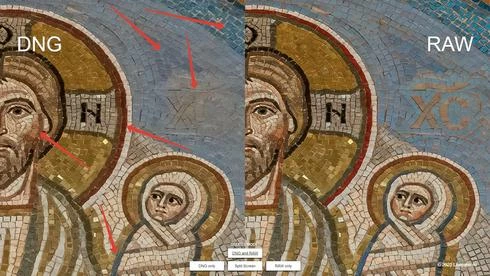
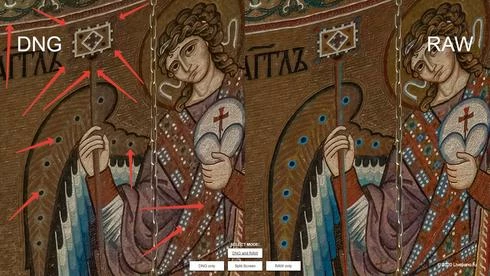
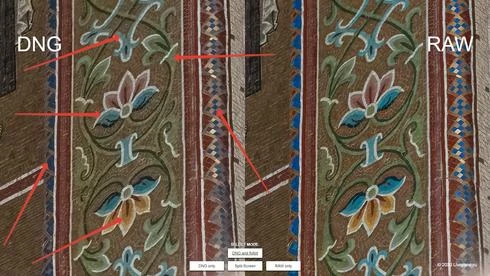
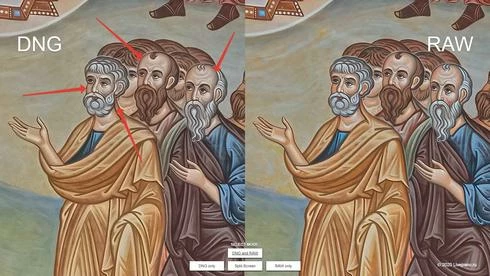
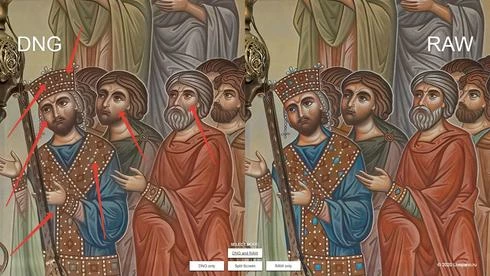
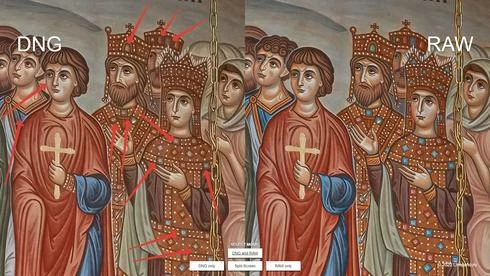
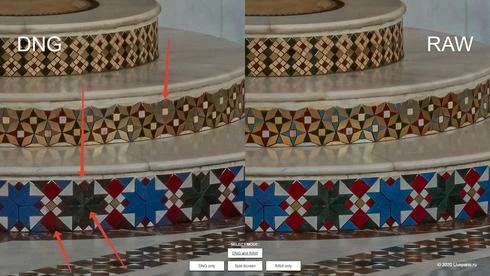
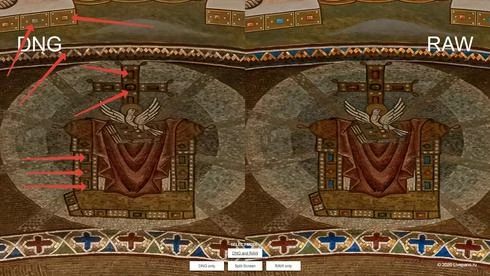
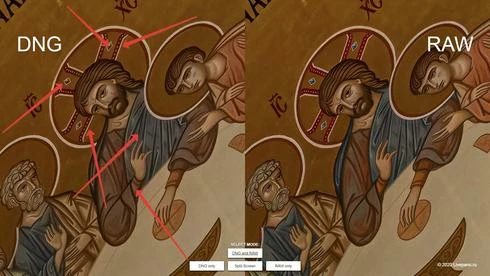
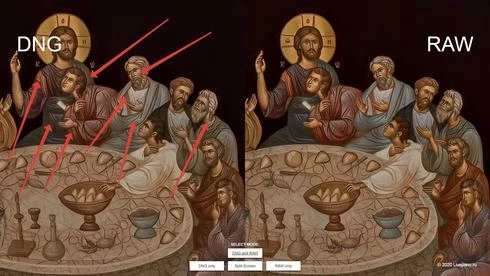
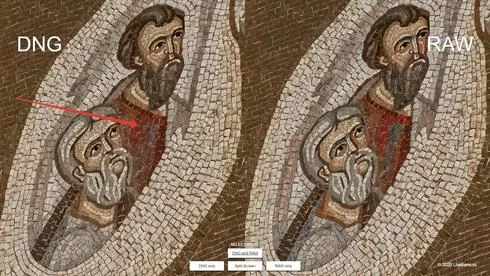
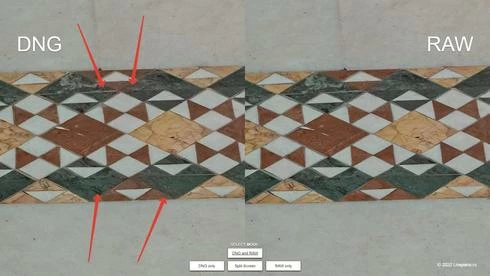
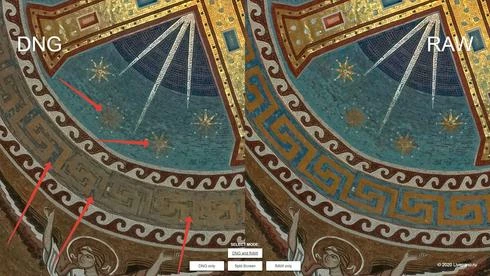
Accidentally faced with color degradation in DNG resulting from Photo Merge to HDR. It looks like a strong decrease in saturation in some tones, as well as the diffusion between different contrasting colors across the color boundary. The algorithm ACR of noise reduction in the color component behaves in a similar way at high values (over 40). But in Lightroom settings I didn't find a way to control the Photo Merge to HDR process. The problem was detected with RAW received from Canon EOS 90D camera in Ligtroom version 8.4 (ACR 11.4) and confirmed in Lightroom 9.3 (ACR 12.3). The DNGs were obtained from 5 exposures (5/3 stops per step). Making a DNG from 3 exposures (also in 5/3 stop, just discarded the most extreme frames), the problem is expressed less, but still there is. Checking on Canon EOS 5Ds and Canon EOS 70D cameras did not confirm the problem. There is nothing wrong with the DNG from RAW on these cameras. Color is deteriorating so badly that I have to look for a solution to save a big and complicated job (I stiched 3 gigapixel panoramas). And I'd already finished the job when I noticed the problem. I had to spend 2 days experimenting and 7 days redoing the whole work. I took the average frames from the exposure bracketing, adjusted them according to the white balance and exposure to DNG, converted to Tiff 8 bit, stiched a new panorama according to the ready stitching project from DNG Tiff's, then put a layer above and restore color degradation according to the Color overlay mode. But there was another problem - partial clipping in lights. I restored them by mask. The final result is here:
https://livepano.l-ark.com/pokrov/giga_final.html

As well as an archive of RAW sets from three cameras (Canon EOS 90D, 70D, 5Ds):
https://fex.net/s/pf2ea9a

DNG vs RAW: https://fex.net/s/vfnkpt9

I have also prepared 2 virtual panoramas that allow you to see the problem clearly, use mouse for navigate (drag to move and roll to zoom or drag and pinch from touch pad):
https://livepano.l-ark.com/pokrov/dng_vs_raw.html

And he recorded a screencast showing how to use these panoramas:
https://recordit.co/N9RS1Er0sC

If it's a bug, can you please tell me if it's enough to tell us about it here? I would like to solve this problem and not to face it anymore. It took too much effort to fix it.

I'm attaching screenshots of the problem:


16 replies

Rodeus
RodeusAuthor
Known Participant
August 25, 2020
If you deal with parallax-free shooting and the nodal point setting on the panorama head, shooting multi-row panoramas is not much different from shooting single-row panoramas. But to capture gigapixel panoramas, the process becomes a routine that can be transferred to robotic panoramic systems.
Backstage:


Rodeus
RodeusAuthor
Known Participant
August 25, 2020
Thank you for the assessment, Arjun! I have 17 years of panoramic stitching experience. And careful stitching does not require any long training. But working with HDR, contrast and natural color reproduction requires continuous skill enhancement. And the fact that LRc has learned how to do HDR DNG in batches has greatly simplified our work with HDR. If LRc had learned how to make auto stacking not only by the time of shooting, but also simply by the sequential analysis of a given number of frames of bracketing exposure, we would live even easier 🙂 But such hurtful misfires with color degradation on the contrary complicate the work.
arjunhaarith
Adobe Employee
Adobe Employee
August 25, 2020
Hi Rodion,

Before I start looking into this issue, I must say that you have done an amazing job. Wonderfully stitched images, and it was so pleasing to see the final result. Fantastic work!!  

For more details on this issue, I will contact you over mail.

Thanks,
Arjun
Colin Southern
Known Participant
August 24, 2020
You're doing so well! My "panoramas" are limited to single row, single exposure for art reproduction. You're producing amazing quality here.
Rodeus
RodeusAuthor
Known Participant
August 24, 2020
Thank you for your kind words, Colin! These gigapanoramas are part of a big job. I shot a few dozen more panoramas of normal resolution and recorded choral singing. The other day we will start programming the virtual tour. All panoramas (in reduced resolution for the draft) can be viewed here. Including the old version of the gigapanoramas, which were unsuccessfully filmed.
https://livepano.l-ark.com/pokrov_temp/

The rest of the panoramas I shot on a full-frame camera and on a fish eye lens.  And there was no problem with the DNG. And for these panoramas, to get more DOF and maximum resolution, I took a 35 Mp camera with a cropped factor of 1.6. And I faced such an unpleasant problem.

This temple is located in Moscow (Russia). And it is comparatively new.
Colin Southern
Known Participant
August 24, 2020
I can't help with the issue you're experiencing, but I did just want to say that that's some stunning architecture that you've photographed there ... and you've done a damn fine job capturing and processing it.