


iridios
Participating Frequently
January 6, 2020

P: Repair brush - creates a color fringe of about 1 pixel width in the target area

  • January 6, 2020
  • 19 replies
  • 1174 views

Unfortunately, the following problem occurs constantly:
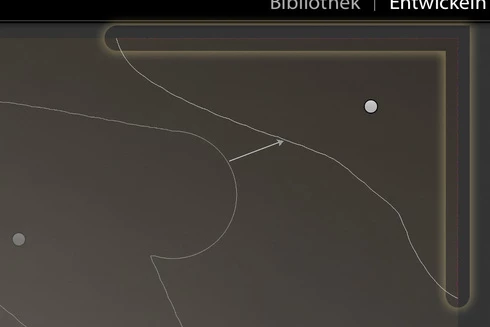
If the repair brush is used to paint over an area adjacent to the edge of the image, Lightroom creates a color fringe of about 1 pixel width in the target area.
The error is visible in the preview image and in the exported image, too.
I use Lightroom 9.1 on MacOS 10.14.6.

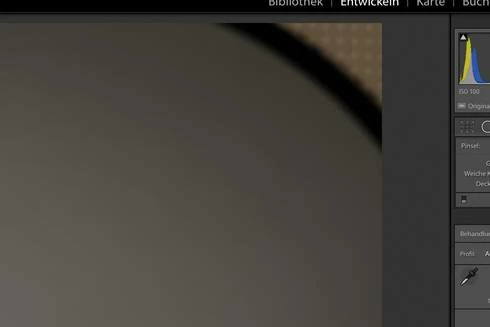
Add background with repair brush:

Color fringe appears:

Magnified 8 times:
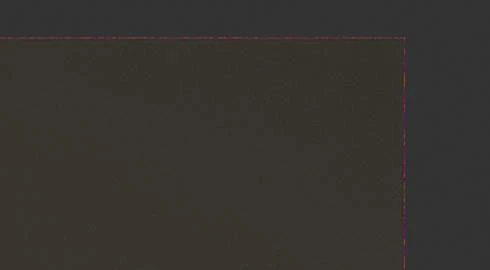

Edit: Changed second image to better show the issue.

This topic has been closed for replies.

19 replies

Legend
June 17, 2020
Hi Rikk,

I re-tested this with LrC 9.3 and for the test CR2 image, it appears to be fixed. However, whatever was done to fix this problem has made a new, and much worse problem for all spot healing near the frame edge. More on that here:

https://feedback.photoshop.com/photoshop_family/topics/9-3-update-apparent-bug-with-healing-tool?topic-reply-list%5Bsettings%5D%5Bfilter_by%5D=all&topic-reply-list%5Bsettings%5D%5Bpage%5D=1#reply_20563361


Rikk Flohr_Photography
Community Manager
Community Manager
June 16, 2020
Version 12.3, an update to Camera Raw, went live on June 15, 2020 and contains a fix for this issue. Please install the update and respond back if it does not cure the issue for you. Thank you for your patience!
Rikk Flohr: Adobe Photography Org
iridios
iridiosAuthor
Participating Frequently
January 16, 2020
Thank you Rikk!
Rikk Flohr_Photography
Community Manager
Community Manager
January 16, 2020
I've logged a bug with the Camera Raw team. I have downloaded your file and attached it to the bug.  This thread will be updated when the issue is fixed. 
Rikk Flohr: Adobe Photography Org
iridios
iridiosAuthor
Participating Frequently
January 16, 2020
Thanks for answering and looking into the issue.

I have just tested in CameraRAW and the color fringe appears as well.

Step by step instruction:
  1. open raw file in LR or in CameraRAW
  2. paint over an area at the edge of the picture with the repair brush
  3. if the error does not occur, move the target or source area a little. The color border is always different.
RAW file:
For privacy reasons, I cannot send the portrait image in question. However, I can send you a scrap capture from the same session, which also shows the problem: https://we.tl/t-lXw7ucgPQB (file available for one week)
Rikk Flohr_Photography
Community Manager
Community Manager
January 16, 2020
Greetings,

We've been monitoring the discussion on this thread. Important to resolution would be to test the same file in Camera Raw and see if it exhibits the same issue as Lightroom Classic.  Have you done this? If you see it in Camera Raw it is likely an issue to report to all Photography clients. If it only happens in Lightroom Classic then we can file it with the Classic team. In any case, we would need a copy of the raw file along with detailed step-by-step instructions of how to reproduce. 
Rikk Flohr: Adobe Photography Org
Inspiring
January 16, 2020
It is the right forum, but from what I've seen, I'm guessing there are several degrees of response. If there's a quick workaround/fix, then someone (who may or may not be from Adobe, e.g. a fellow user) will chime in. Especially if the issue is likely to impact a significant proportion of users: that's why if any users are experiencing it, they should click on the Me Too button above so Adobe would know.

If it's a bug (as this seems to be), then someone from Adobe (or one of the forum admins) will need to confirm it as repeatable before change the status (e.g. from Problem to Acknowledged) and passage upwards to the supposrt pipeline. Timelines for fixes will then be anyone's guess as it would depend on competing priorities. In this case, as the impact is only one pixel wide at the edge, I probably won't hold my breath for any quick response for a fix and just proceed to implement my own workaround, e,g, either ignore because the impact is so small that the vast majority of viewers won't notice the fringe (especially in multi-coloured images), or crop in slightly where it is noticeable (such as the monochrome test cases you provided)...
iridios
iridiosAuthor
Participating Frequently
January 16, 2020
This is the right forum to get Adobe's attention, right?
So far they haven't reacted and I would be happy if the issue would be looked at.
Or is there another way to submit a bug report?
iridios
iridiosAuthor
Participating Frequently
January 9, 2020
I ran some more tests and found that the fringe appears only at the outermost border of the cr2 image. If I crop the image just a tiny bit before applying the repair brush, no fringe appears.

And I can reliably reproduce the issue on 5D4 and 5DSR raw files. With raw files from the 5D3 and the 6D2 no fringes appeared so far.
Legend
January 9, 2020
I was also able to repeat the issue with cloning dark edge areas with files from Canon 5Dmkiv, 5DS R  (cr2) & EOS R (cr3) (using with LR9.1/win10)
I also tried some other sample files from other Nikon and Canon cameras but so far those were the 3 models that I found that had the same problem. (I was using files with no other LR edits applied)